Confluence におけるロールとは
この記事では、Confluence の新しいロールベースのアクセス モデルについて説明します。ロールベースのアクセスの一般提供 (GA) が開始されました。
ロールを管理するには、[Confluence 設定] に移動し、[権限]、[スペース ロール] の順に選択するか、[スペース設定] を開いて [ユーザー] を選択します。
これらのオプションが表示されない場合は、対象のインスタンスがロールに対してまだ有効化されていません。
ロールにより、スペースへのユーザー アクセスの管理の一貫性、予測可能、拡張が可能になります。各ロールにはそれぞれ異なる権限が割り当てられるため、各ユーザーが確実に実行できる操作を確認できます。
さらに、グループ メンバーシップに関係なく、すべての Confluence ユーザーやすべての Confluence 管理者など、さまざまなクラスのユーザーに対してロールを幅広く割り当てられます。

Confluence におけるロール
Confluence には既定のロールが 4 つあり、カスタム ロールを定義することもできます。
管理スペース内のすべてを管理します。 推奨される対象者: IT チーム、スペース所有者 | マネージャーユーザーとコンテンツを管理しますが、設定は管理しません。 推奨される対象者: プロジェクト リード、チーム リード |
協力者スペース内のコンテンツを追加および編集します。 | Viewerスペース内のコンテンツを閲覧し、コメントを追加します。 |
従来の権限と Confluence のロールの対応
新しい Confluence ロールの画面では、従来のスペース権限テーブルが刷新されています。これらの対応関係を次に示します。

![Confluence の [アクセス管理] 画面のビュー](http://images.ctfassets.net/zsv3d0ugroxu/1dnw8EXN1wt106nuqy29Rd/b6b220d9280f8c907429c9fbdcaa58f5/image-20260601-182928.png)
古い名前 | 新しい名前 | 権限で許可される内容 |
|---|---|---|
すべて | コンテンツを表示する | スペース内のすべてのコンテンツアイテムを表示します。 自分に閲覧が制限されているコンテンツは誰も表示できません。 |
すべて | 自身のコンテンツを削除 | 自分のコンテンツ アイテムとフォルダーを削除する |
ページ、ホワイトボード、データベース、スマート リンク | コンテンツを作成する | 新しいコンテンツ アイテムとフォルダーを作成する |
ページ、ホワイトボード、データベース、スマート リンク | スペース内の任意のコンテンツをアーカイブ | 自分で作成していないものを含む、任意のコンテンツをアーカイブする |
ページ、ホワイトボード、データベース、スマート リンク | 任意のユーザーのコンテンツを削除 | 自分で作成していないものを含む、任意のコンテンツを削除する |
ブログ | ブログを作成 | ブログ投稿を作成する |
ブログ | ブログを削除 | 自分で作成していないものを含む、任意のブログ投稿を削除する |
コメント | コンテンツへのコメント | 表示可能な任意のコンテンツにコメントを追加する |
コメント | 任意のユーザーのコメントを削除 | 表示可能な任意のコンテンツに対する、任意のユーザーのコメントを削除する |
添付ファイル | 添付ファイルの追加 | コンテンツ アイテムとコメントに添付ファイルを追加する |
添付ファイル | 添付ファイルを削除する | 編集可能なすべてのコンテンツの添付ファイルを削除 |
制限 | コンテンツに対するユーザー アクセスを管理 | コンテンツレベルの権限を管理する。コンテンツを制限したり、コンテンツを開放したり、コンテンツに対する特定のアクセス権をユーザーに付与したりできます。 |
スペース | スペースをエクスポート | スペース内のすべてのコンテンツをエクスポートする |
スペース | スペースの機能、自動化を管理する | スペースの機能、自動化、レガシーおよび関連コンテンツ、インテグレーションを管理します。
|
新しい権限
従来の権限設定からロール設定に移行すると、カスタム ロールの作成やアクセスの割り当て時に、より多くの権限を利用できることにお気づきになるでしょう。こうした新しい権限は、元の管理者、ブログの作成、コンテンツの作成、コンテンツへのコメント、および表示の各権限から分離され、既定のマネージャー ロールの作成を可能にし、ロール システム内でより詳細な制御を提供します。
ロールが最初に有効化されると、元の権限を持っていたユーザーには、新しい権限が自動的に付与されます。元の権限を持っていなかったユーザーには、新しい権限が既定で付与されません。
新
| スペースへのアクセスを管理 | ユーザー、グループ、ユーザー クラス、アプリのアクセスを追加、アップデート、削除する アプリのカスタム コンテンツ権限を管理する 注意: この権限を持っている場合でも、自分が持っていない権限を含むロールを割り当てたり削除したりすることはできません。 |
新
| スペース内のすべてのコンテンツを管理 | スペース内のすべてのコンテンツ (自分が作成していないコンテンツを含む) を管理します。 コンテンツの所有権を変更できます。 以前の権限エクスペリエンスからロールに移行する場合、この権限を持つユーザーは、 サイトでロールベースのアクセスを使用している場合、スペース内のすべてのコンテンツの制限を管理するには、ユーザーに 他のスペース権限 (コンテンツのアーカイブ、削除、編集など) と組み合わせることで、この権限によりコンテンツ マネージャー ツールでの一括操作も利用できるようになります。 |
新
| コンテンツ テンプレートを作成 | スペース レベルのコンテンツ テンプレートをページとリアルタイム文書用に作成する |
新
| スペースのルック & フィールを管理 | スペースでテーマ、レイアウト、PDF エクスポートの書式設定を管理する |
新
| 公開リンクを許可および管理 | スペースでの公開リンクの使用を許可またはブロックする (サイトで公開リンクが許可されている場合) |
新
| スペースへのゲスト アクセスを管理 | スペース内のゲストユーザーのアクセス権限を追加、変更、削除する |
新
| 匿名アクセスを許可および管理 | 匿名ユーザーによるスペースへのアクセスを許可またはブロックする |
新
| スペースを削除 | スペースとそのすべてのコンテンツを削除します。 スペースは削除されるとゴミ箱に移動し、60 日間保持された後完全に削除される |
新
| スペースをアーカイブする | スペースとそのすべてのコンテンツをアーカイブします。 |
新
| コンテンツを編集 | ページとリアルタイム文書のタイトル、本文、ステータス、ラベルを編集します。 データベースのタイトル、列、セルのコンテンツを編集します。 ホワイトボードのタイトルとコンテンツを編集します。 |
新
| ブログを編集 | ブログコンテンツ (ブログ投稿のタイトルと本文を含む) を編集します。 |
新
| 自分のコメントの削除 | 作成したコメントを削除する |
新
| 個々のコンテンツをエクスポート | 表示可能なページ、リアルタイム文書、ブログ、ホワイトボード、データベースをエクスポートします。 |
各ロールに含まれる特定の権限

管理者ロールに含まれる権限

マネージャー ロールに含まれる権限
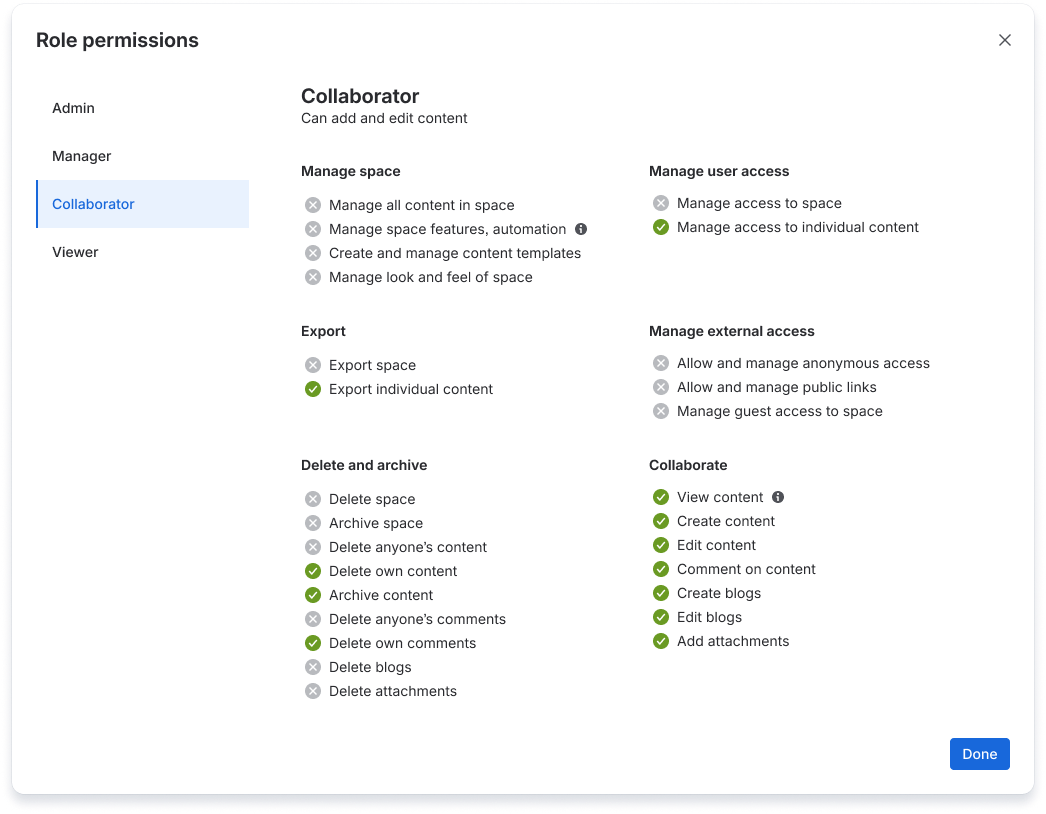
コラボレーター ロールに含まれる権限

ビューアー ロールに含まれる権限
この内容はお役に立ちましたか?