What are Confluence's roles?
This article describes Confluence's new role-based access model. Role-based access is now generally available (GA).
To manage roles, go to Confluence settings, then select Permissions, then Space roles, or open Space settings and select Users.
If you don't see these options, your instance hasn’t been enabled for roles yet.
Roles make managing user access to spaces consistent, predictable, and scalable. Each role has a different set of individual permissions associated with it, giving you confidence in what each user can do.
You can also assign roles broadly to different classes of users such as All Confluence users or All Confluence admins, regardless of group membership.

Confluence’s roles
Confluence has four default roles, as well as the ability to define custom roles.
View the specific permissions included in each default role
AdminManages everything in the space. Best for: IT teams, Space owners | ManagerManages people and content but not settings. Best for: Project leads, Team leads |
CollaboratorAdds and edits content in the space. | ViewerViews and comments on content in the space. |
How the legacy permissions map to Confluence’s roles
The legacy space permissions table has a new look in the new world of Confluence roles. Here’s how it all fits together.


Old name | New name | What the permission allows |
|---|---|---|
All | View content | View all content items in a space. No one can view content they’re restricted from viewing. |
All | Delete own content | Delete own content items and folders |
Pages, whiteboards, databases, and Smart Links | Create content | Create new content items and folders |
Pages, whiteboards, databases, and Smart Links | Archive any content in the space | Archive any content, including content you didn’t create |
Pages, whiteboards, databases, and Smart Links | Delete anyone’s content | Delete any content, including content you didn’t create |
Blogs | Create blogs | Create blog posts |
Blogs | Delete blogs | Delete any blog posts, including those you didn’t create |
Comments | Comment on content | Add comments on any content you can view |
Comments | Delete anyone’s comments | Delete anyone’s comments on any content you can view |
Attachments | Add attachments | Add attachments to content items and comments |
Attachments | Delete attachments | Delete any attachments on any content you can edit |
Restrictions | Manage user access to content | Manage content-level permissions — restrict content, open content up, and grant people specific access to content. |
Space | Export space | Export all content in a space |
Space | Manage space features, automation | Manage space features, automation, legacy and related content, and integrations.
|
New permissions
If you transition to roles from the old permissions experience, you’ll notice more permissions available when creating custom roles and assigning access. These new permissions were split from the original Admin, Create blogs, Create content, Comment on content, and View permissions, enabling the creation of the default Manager role and providing more granular control within the role system.
Anyone who had the original permissions will automatically have the new ones when roles is initially enabled. Anyone who didn’t have the original permissions won’t get the new ones by default.
NEW Split from the | Manage access to space | Add, update, or remove access for users, groups, user classes, and apps Manage custom content permissions for apps Note: Even if you have this permission, you can't assign or remove roles that include permissions you don’t have. |
NEW Split from the | Manage all content in space | Manage all content in the space, including content you didn’t create. Can change content ownership. If you’re transitioning to roles from the old permissions experience, users with this permission can manage restrictions for all content in the space, even if they don't have the If you site has role-based access, users must have the When combined with other space permissions (such as archive, delete, or edit content), this permission also unlocks bulk actions in the Content manager tool. |
NEW Split from the | Create content templates | Create space-level content templates for pages and live docs |
NEW Split from the | Manage look and feel of space | Manage themes, layout, and PDF export formatting in space |
NEW Split from the | Allow and manage public links | Allow or block public link usage in space (assuming public links are allowed on your site) |
NEW Split from the | Manage guest access to space | Add, change, and remove access for guest users in the space |
NEW Split from the | Allow and manage anonymous access | Allow or block anonymous users from access the space |
NEW Split from the | Delete space | Delete a space and all of its content. Once deleted, a space will go to the trash where it’ll remain for 60 days before being permanently deleted |
NEW Split from the | Archive space | Archive a space and all of its content. |
NEW Split from the | Edit content | Edit title, body text, status, and labels for pages and live docs. Edit title, columns, and cell content for databases. Edit title and content for whiteboards. |
NEW Split from the | Edit blogs | Edit blog content, including blog post title and body text. |
NEW Split from the | Delete own comments | Delete comments that you create |
NEW Split from the | Export individual content | Export pages, live docs, blogs, whiteboards, and databases that you can view. |
Specific permissions in each role

Permissions included with the Admin role

Permissions included with the Manager role
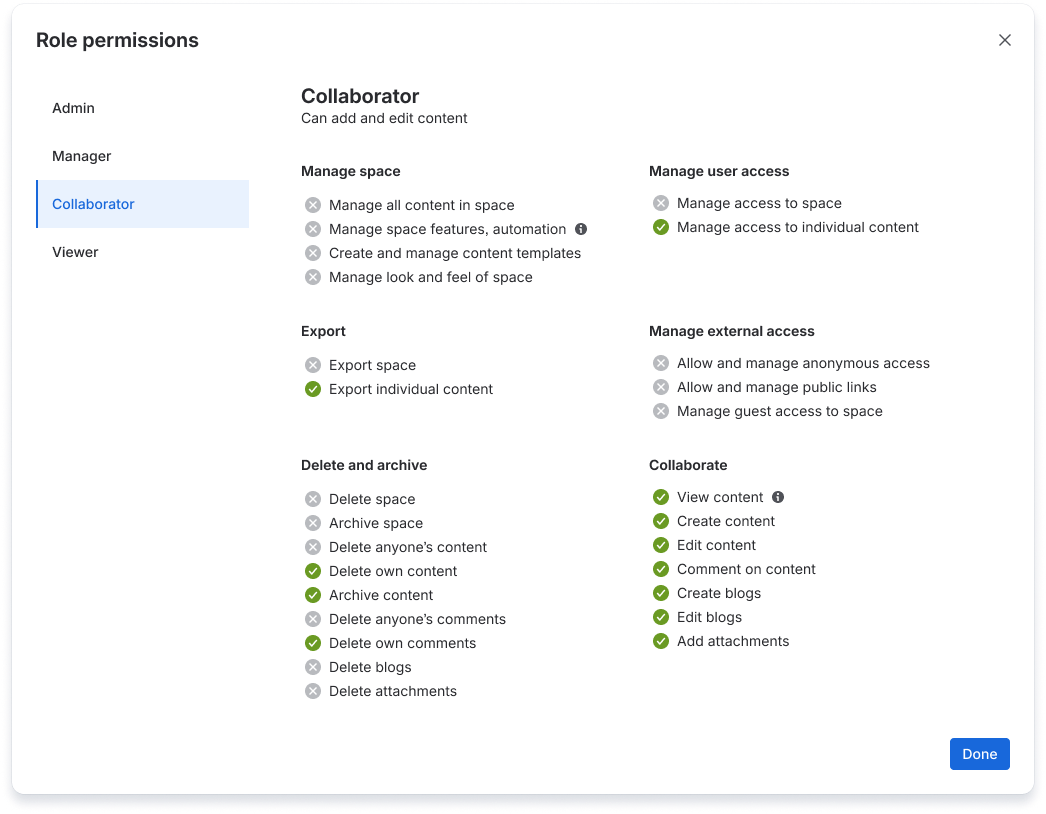
Permissions included with the Collaborator role

Permissions included with the Viewer role
Was this helpful?