How data egress works in Atlassian Isolated Cloud
This page explains how data egress works in Atlassian Isolated Cloud (IC), the security controls that govern it, and the specific types of data that may leave the isolated environment.
Overview of data egress
Data egress is the movement of specific, authorized data across the Isolated Cloud boundary to external environments (which include Atlassian Commercial Cloud or even non-Atlassian, third-party services that your organization chooses to connect). This is necessary to allow IC users to interact with global Atlassian services (such as the portal) or to enable certain apps to function.
All data egress is governed by rules enforced through our internal change-management procedure.
Architecture and data flow
The following diagram illustrates the relationship between the Isolated Cloud VPC and the Atlassian Commercial AWS Organization.
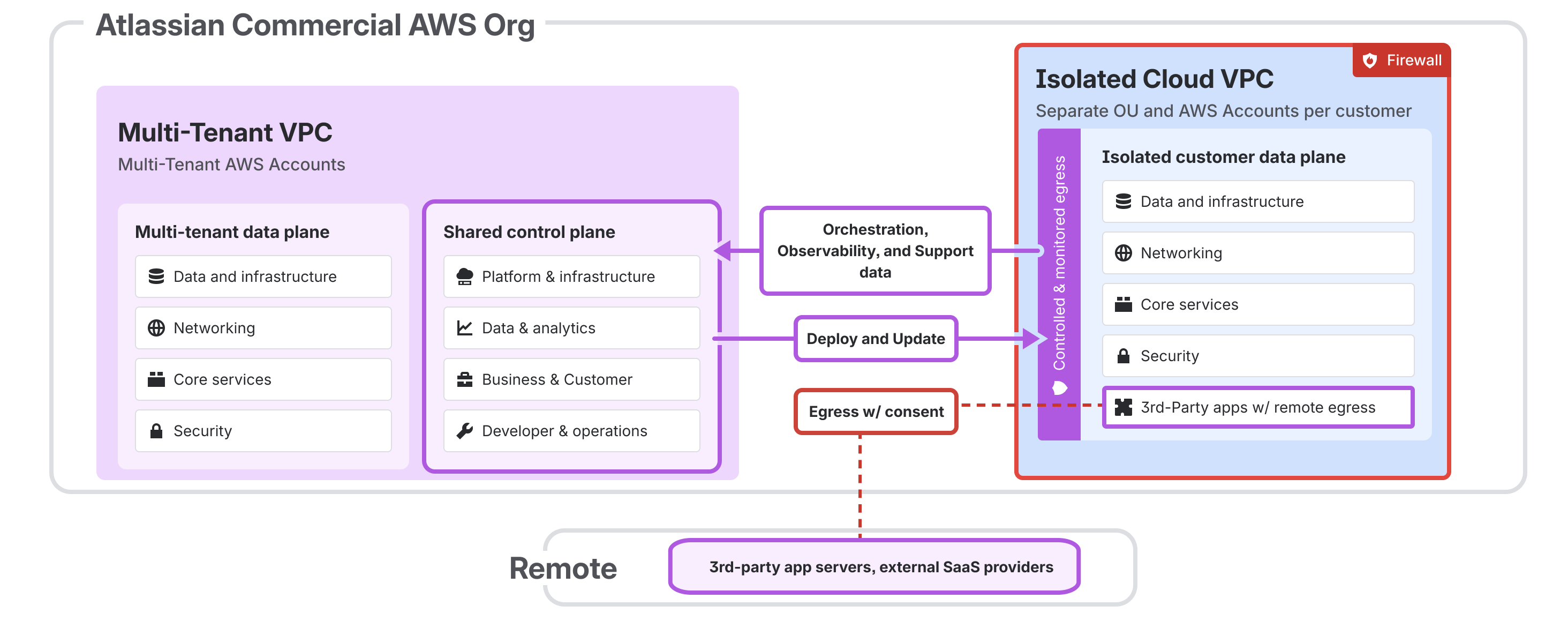
Controlled and monitored egress
As shown in the diagram, the Isolated Cloud is protected by a strict firewall. Any data leaving the Isolated customer data plane must pass through a Controlled & Monitored Egress point. This boundary ensures that:
Non-UGC & Non-personal data: Only data that has been classified and approved (such as system metadata or non-sensitive configuration) is allowed to flow to the Shared control plane in the commercial environment.
Deploy and Update: A dedicated channel exists for secure deployment and updates from the Commercial Cloud into the Isolated Cloud.
Isolation: Each customer resides in a separate Organizational Unit (OU) and AWS account to maintain strict multi-tenant isolation.
Key components and controls
The Isolated Cloud uses several layers of protection to manage data in transit:
Isolated Context Gateway (ICG): The proxy gateway that enforces data policies at the boundary. It handles data obfuscation for fields that are not explicitly allowed to be egressed in plaintext.
Data classification: Every data field is classified using Atlassian’s data taxonomy. These labels determine if data must be obfuscated.
Customer consent: Data egress is not enabled by default. Egress occurs only when a customer takes a specific action (e.g., enabling an integration or uploading a support attachment)or otherwise provides consent.
Obfuscation by default:The majority of personal data and user generated content originated in the IC is obfuscated during transit unless a verified business need exists.
Data egress handling
When data leaves the Isolated Cloud, it is handled in one of three ways:
Transit-only data
Most egressed data is "transit only." This means the data is used momentarily to complete a request (such as displaying a user’s nickname or locale on a support page) and is not stored in the Commercial Cloud. Once the session or request is complete, the data is deleted.
Persisted data
In limited cases, specific identifiers must be stored (persisted) in the Commercial Cloud to maintain service functionality. For example, email addresses are required by the Atlassian Support portal to create and manage support tickets, link communication, and identify the support seeker.
Temporary storage (with TTL)
To facilitate secure login and a better user experience, some data (like email) may be stored in a transient commercial database with a very short time-to-live (TTL).
For example, the Support Portal may store your email for 5 minutes (before automatically deleting it) when you log in through your Isolated Cloud’s identity provider.
Data egress for Atlassian Support
To provide technical support, specific Identity data is egressed from the Isolated Cloud to the Commercial Cloud support environment.
Data type | Handling | Purpose |
|---|---|---|
Persisted | Primary identifier for ticket creation and communication. | |
Display name | Transit only | Used in the support UI to identify the user. |
Account ID | Transit only | Used to link support data with other Atlassian systems. |
Locale/Nickname | Transit only | Used to personalize the support portal interface. |
For more details about this type of egress, see Access and shared services in Atlassian Isolated Cloud.
Data egress for third-party apps
Some third-party apps integrate with external services to deliver their core functionality (for example, an app that integrates with a third-party service like Slack, GitHub, or Jenkins). These apps use remotes, which are connections from the Isolated Cloud environment to specific external endpoints.
In Isolated Cloud, app egress is disabled by default. When a third-party app requires access to an external service, it must explicitly request your consent before any data can leave the isolated environment. During installation (or when the app later enables a feature that requires a new remote), your organization's administrator is presented with a consent prompt that clearly identifies:
The name of the app requesting egress
The specific external domain(s) the app wants to communicate with
No data is sent to external services until your administrator explicitly approves the request. If the app does not meet your organization's requirements, the request can simply be denied.
After consent is granted, administrators retain full control. Approved egress rules and remote endpoints can be reviewed, modified, or revoked at any time through Admin Hub. All changes to egress and remote configurations are recorded in the audit log for compliance and oversight purposes.
Security and auditing
For auditors and administrators, the data egress process provides a clear trail of what data is leaving the environment and why.
Policy-driven: Egress is controlled by code-based policies in Atlassian’s internal Transit Policy Manager, ensuring consistent enforcement.
Least privilege approach: Atlassian follows a principle of least privilege, egressing only the minimum data required for a service to function.
Encryption: All data in transit between the Isolated Cloud and Commercial Cloud is encrypted.
Was this helpful?