自動化を使用し、繰り返し実行する作業項目のスケジュールを設定する
Scheduling a work item to recur via automation can save you the effort of creating the same work item multiple times. The automation creates a copy of a work item, copying over most of the information.
作業項目を自動的に繰り返すように設定する
Jira プロジェクトで繰り返し作業項目を設定する方法は次のとおりです。
自動的に繰り返す作業項目を開きます。
稲妻アイコンから [自動化] を選択するか、[期限] フィールドを選択します。
[繰り返しを設定] を選択します。
Fill in the recurring details: when the work item will recur, the trigger, and when the flow will expire. The work item can recur based on a schedule or incorporate whether the work item has been completed.
Executions of these automations count towards edition usage limits. How is my usage calculated?
作業項目が繰り返し発生するとどうなりますか?
When the work item recurs, it inherits the automation flow which will be turned on automatically.
作業項目のスケジューリングは以下を継承します。
同じフィールド (開始日と期限以外)
子の作業項目
以下は含まれません。
添付ファイル
Web リンク
リンクされた作業項目、Confluence ページ、Confluence ホワイトボード、または Loom ビデオ
繰り返し作業項目の期限は、予定された頻度に基づいて自動的に設定されます。たとえば、週単位のスケジュールでは、作業項目の作成日から 7 日後に期限が設定されます。
"繰り返し" アイコンは、作業項目ビューの期限付き日付フィールド横に表示されます。また、カレンダー ビューにも表示されます。
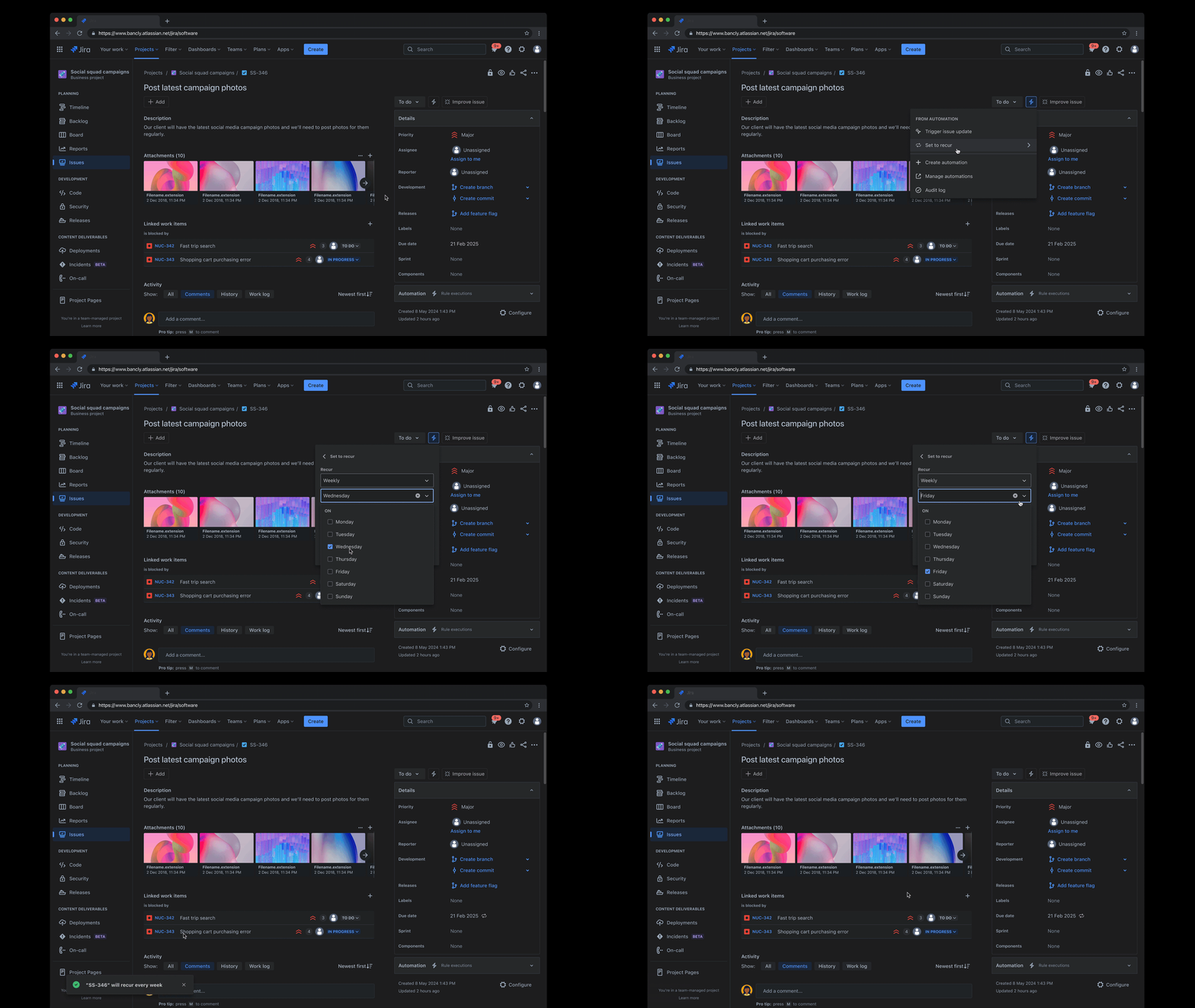
Steps for this automation flow
Find out more on about relevant automation steps for this flow:
作業項目が自動で繰り返されないようにする
作業項目の繰り返しを停止するには、次の手順に従います。
自動的に繰り返し発生する作業項目を開きます。
稲妻アイコンで [自動化 ] を選択するか、[ 期限 ] フィールドを選択します。
[繰り返し] メニュー アイテムを探して、繰り返し作業フォームを開きます。
[削除] を選択します。
あるいは、管理者は次の方法でも実行できます。
プロジェクト内から、[ プロジェクト設定] > [自動化] の順に選択します。
Select Flows to view a list of all your created automation flows.
You can filter the list of flows using the flow name and labels. The flow name is “Clone on a schedule” and the label is “Recurring”.
Depending on your permissions, you will be able to Delete and/or Disable the flow.
More about enabling and disabling flows
There is a global automation configuration available to stop non-admins from creating and managing recurring work automation flows. What permissions are required to manage automation flows?
この内容はお役に立ちましたか?