
Use worktree mode in Rovo Dev CLI
Worktree mode allows you to run Rovo Dev CLI in an isolated Git worktree instead of directly in your main checkout.
This is useful when you want to keep changes isolated, experiment safely, or return to the same workspace later without disturbing your primary working directory.
Start Rovo Dev in worktree mode
Command line flag
Start Rovo Dev CLI in a Git worktree:
# Generate a timestamp-based worktree name automatically
acli rovodev run --worktree

# Use a named worktree that you can reuse later
acli rovodev run --worktree feature-branch-cleanup
If you pass --worktree without a value, Rovo Dev generates a name in the format worktree-YYYYMMDD-HHMMSS.
If you pass a name such as feature-branch-cleanup, Rovo Dev creates or reconnects to that specific worktree under <repo>/.rovodev/worktrees/<name>.
How worktree mode behaves
Creates or reuses a Git worktree inside .rovodev/worktrees/ at the root of your repository. When you run the worktree mode, Rovo Dev creates a branch derived from the worktree name and starts from the repository's default remote branch.
You can open an existing worktree when it is still valid, so you can return to the same isolated workspace later. If you have any uncommitted changes from your current workspace, Rovo Dev will carry them forward by applying them as a patch to the new worktree.
Additionally, worktree mode creates a lock while the session is active so another Rovo Dev CLI process can’t reuse the same worktree at the same time.
Exit and cleanup behaviour
If there are no user changes when the session ends, Rovo Dev removes the worktree automatically.
If there are changes in an interactive session, Rovo Dev lets you choose whether to remove the worktree or keep it for later reuse, and when there are changes in a non-interactive session, Rovo Dev keeps the worktree and reports its location.
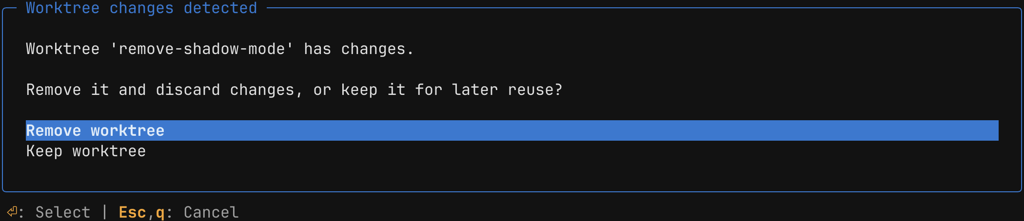
Keeping the worktree is useful when you want to inspect changes manually, continue the same task later, or compare the isolated work to your main checkout.
Additional information
Worktree mode only works inside a Git repository.
You cannot start a new worktree session from inside another Rovo Dev worktree session.
Worktree names may only contain alphanumeric characters, hyphens, and underscores.
If a worktree is already locked by another live process, you will not be able to open that worktree in Rovo Dev CLI using the
--worktreeoption.
Was this helpful?