Request Participant is not receiving notifications in JSM Cloud
Platform Notice: Cloud Only - This article only applies to Atlassian apps on the cloud platform.
Summary
Learn how to resolve notification issues for request participants in Jira Cloud projects.
Solution
Why a Request Participant may not receive notifications
The participant was added, but customer notifications are disabled for that event.
The participant is an agent expecting internal notifications.
The notification scheme/customer-notification setting for the relevant event is off.
Types of notifications in JSM
JSM has customer notifications and internal notifications. Whether a request participant is notified depends on their role and how they were added (Reporter/Approver/Request participant).
Customer notifications
Regardless of whether someone is a customer, agent, or admin, they will receive customer notifications if they:
Raise a request.
Are added to the Reporter, Approver, or Request participant field on a request.
Belong to an organization that has allowed customers to share requests with each other, and has a request shared with them.
Are a customer (not an agent or admin) and they post a public comment on a request.
Internal notifications
Internal notifications are only sent to agents and admins, and never to customers. Internal notifications are sent to agents or admins if they:
Are added as watchers on a request (this happens when they post an internal note or a public comment on a request, transition a request’s status, or add themselves as a watcher).
Are added to the Assignee field on a request.
Customer role vs Watcher/Assignee role
In the above scenario, please check whether the user in question is added as both a Request Participant and a Watcher/Assignee.
If the answer to the above question is 'Yes', ensure that only internal notifications are triggered for the users. In this situation, if the user is not supposed to receive Internal Notifications, even Customer Notifications will not be created for the user, leaving the user without receiving any notification for the case.
Using Automation to remove Participants from the Watchers list
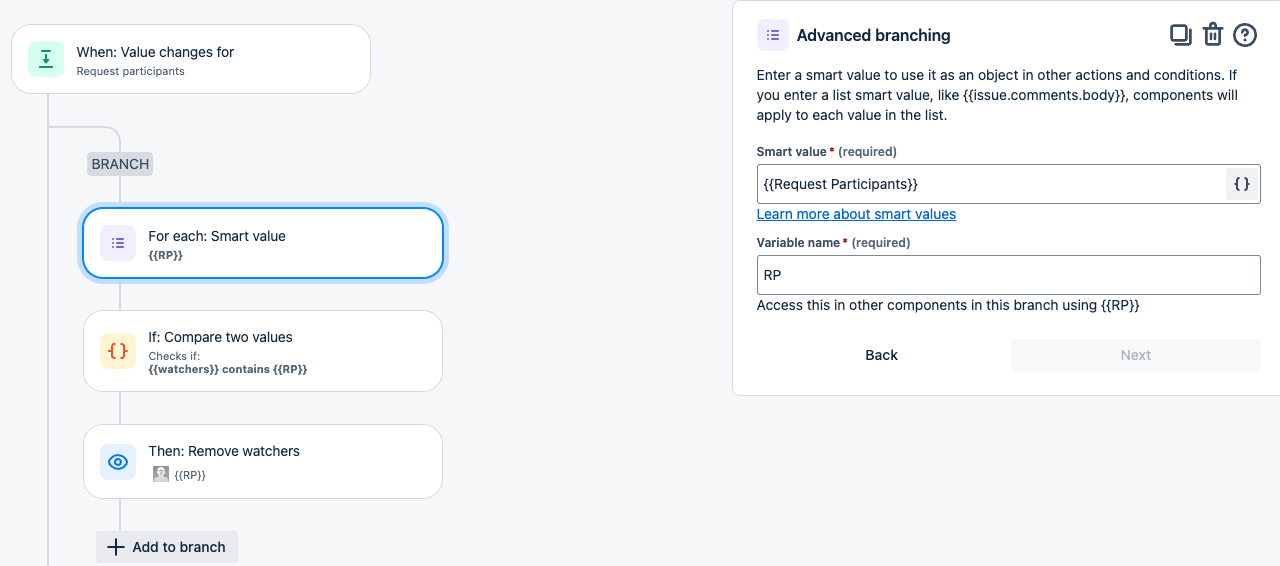
Make sure the user does not add themselves as Watcher on the tickets if Watcher Notification (Internal) is Turned Off and they want to receive notifications as Customers. The following automation rule may be configured on the project to ensure that whenever a new Request Participant is added, they are also removed from Watchers:
The customer unsubscribed from notifications
A customer may also stop receiving notifications for a request because they disabled notifications in the portal view of the request, so the admin can ask the user to double-check that.
Currently, only the user can enable/disable customer notifications via the bell icon in the request portal view.
After adjusting the customer-notification setting, add a test participant and trigger the relevant event (for example, a public comment) to confirm the participant receives the email.
Was this helpful?