Opsgenie not available under the product switcher button
Platform Notice: Cloud Only - This article only applies to Atlassian apps on the cloud platform.
Summary
Jira Administrators are used to accessing their Opsgenie product via the Jira navigation bar. However, they sometimes discover that they can no longer find that option.
Solution
Bundled with JSM and Standalone
As Opsgenie can be purchased as a Standalone subscription or provided with a Jira Service Management product subscription by default, it can be confusing to know which subscription your Opsgenie site is associated with.
Following are some indicators in identifying which subscription type your Opsgenie site is using:
Check the billing page in the Admin Hub. If you can't see a separate billing line item for your Opsgenie URL, then your Opsgenie site URL is likely billed as part of your Jira Service Management subscription plan. For example:
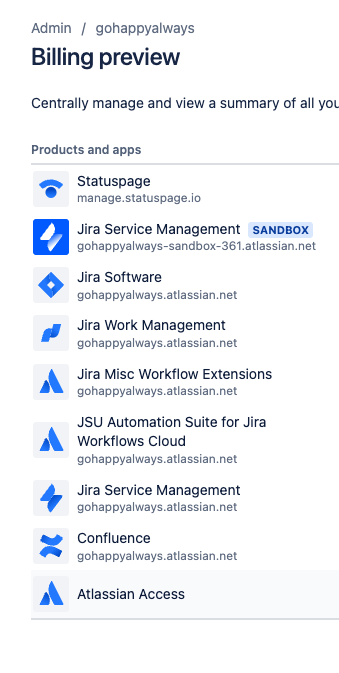
You manage the edition plan, billing frequency, and payment details in your single Jira Service Management subscription.
For Opsgenie Standalone, it will looks as below:
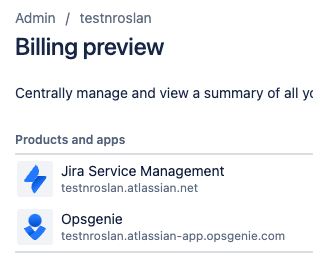
If you are using Opsgenie with a Jira Service Management product but cannot see your Opsgenie site URL when using the "Switch To" button/feature in your Jira, then your Opsgenie site URL is billed as part of your Jira Service Management subscription.
If your Opsgenie site/subscription IS merged with your Jira Service Management subscription, you may also be aware of the functionality differences and similarities between the merged Opsgenie plan and its equivalent Standalone Opsgenie plan:
JSM merged Opsgenie plan | Equivalent Opsgenie Standalone Plan |
|---|---|
Free | Free |
Standard | Essentials |
Premium | Standard |
Enterprise | Enterprise |
Other general facts and items to note
Currently, the JSM-subordinated type of Opsgenie doesn't support the following features as the standalone Opsgenie:
Voice Notification for JSM-Standard.
Incoming call routing for JSM-Standard.
Advanced Integration Settings for JSM-Standard.
Live chat support.
Free Stakeholder roles.
More information and detail on the differences in feature availability between the JSM merged (or "JSM-Subordinate") Opsgenie and the Opsgenie Standalone plans can be viewed here:
User Management in Opsgenie when merged with Jira Service Management subscription.
When Opsgenie is merged with JSM (as JSM-subordinate Opsgenie), the users added into the default product access group for Jira Service Management (to be recognised as agents) are automatically granted access to the merged Opsgenie site. Also, user management between the two are bi-directional: if you add/remove a user in Opsgenie, it will perform the same in JSM, and vice-versa.
You can check the users assigned to your Opsgenie by viewing the Users page: [https://<site-name>.app.opsgenie.com/settings/users/] (Opsgenie > Settings > Users).
Once you’ve merged Opsgenie with Jira Service Management, deleting users will revoke their license to both products. So, if you remove users from Opsgenie, they’ll be removed from Jira Service Management and vice versa.
However, JSM integrated OG plans have extras including:
Major incident management in Free (vs. none in Opsgenie standalone).
Services in Free (vs. none in standalone).
Unlimited SMS alerts in JSM standard (vs. extra charge in Opsgenie standalone).
Was this helpful?