How to append list of objects to a reference Assets object attribute using Automation
Platform Notice: Cloud Only - This article only applies to Atlassian apps on the cloud platform.
Summary
Customers can create an Assets Object and set its attributes via automation. However, currently, we can't append an Assets object attribute of reference type via automation.
This documentation covers the scenario when you need to append an Assets object attribute of reference type via automation. The method in this article requires less technical knowledge to utilize: How to Append Objects to an Assets Object Attribute using Automation
For more examples, see the article Update Asset object attribute values using automation.
Environment
Automation for Jira and JSM Assets
Cause
We have this behavior described on the feature request JSDCLOUD-9964 - Assets Automation: Add support for copying multiple values of Asset data using Automation to see the possibility of providing the functionality to be able to copy a list of objects to a reference Assets object attribute that is created via automation.
Solution
Before you start — is there a simpler way?
This method uses a Send-web-request action and the Assets REST API because the standard "Edit object" action overwrites (rather than appends) a reference attribute. If you only need to append a small, fixed set of values and want a simpler setup, first try the simpler approach described in Automate Appending Objects to Asset Attributes in Jira Cloud.
Known limitation
Why this workaround is necessary: Native automation can't append multiple values to a reference Assets attribute — the "Edit object" action and the Update-object REST API both perform a strict overwrite. This is tracked in JSDCLOUD-10089. The branch + Send-web-request pattern below is the current workaround.
Access request to new applications (Append new values to a referenced Assets object attribute)
Let's say you have an Assets object field "Application List" that stores the list of Applications the new employee needs access to. The "Application List" Assets object field is fetching objects from the Applications object type. Also, you have an Employee object type that has an attribute "Application access" which references the object type Applications with unlimited cardinality.

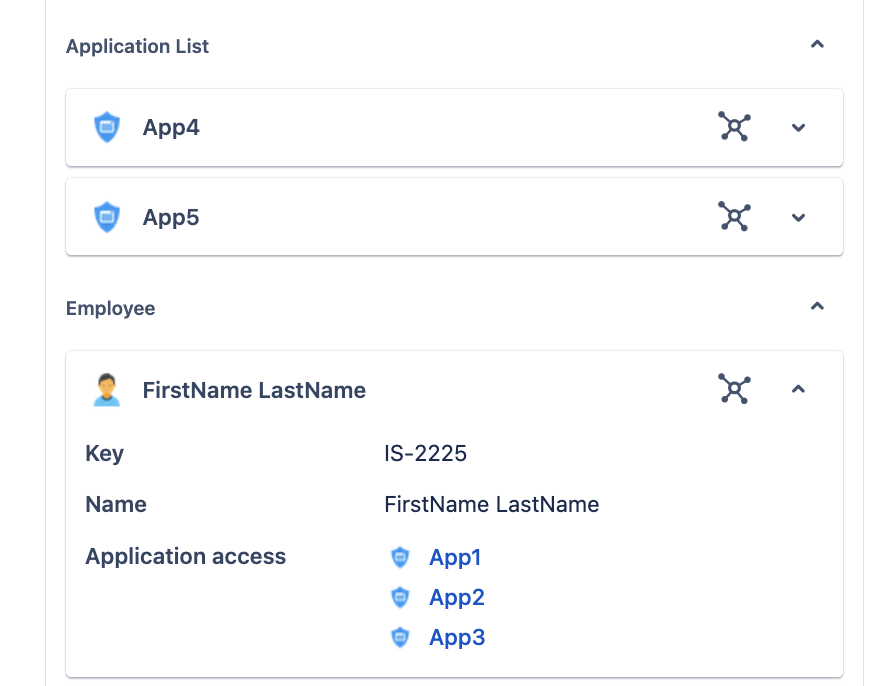
Whenever an Employee requests access to a new set of applications listed in the "Application List" Assets object field, once the agent provides the access, the list of new applications should be updated in the "Application access" attribute for the Employee object. Here is an employee who currently has access to 3 applications: App1, App2, App3. The employee raises a new Access request to get access to the applications App4 and App5. The Employee Assets object field is set to the Employee "FirstName LastName," with the "Application access" attribute set to App1, App2, and App3. And the Application List Assets object field is set to application objects App4 and App5.
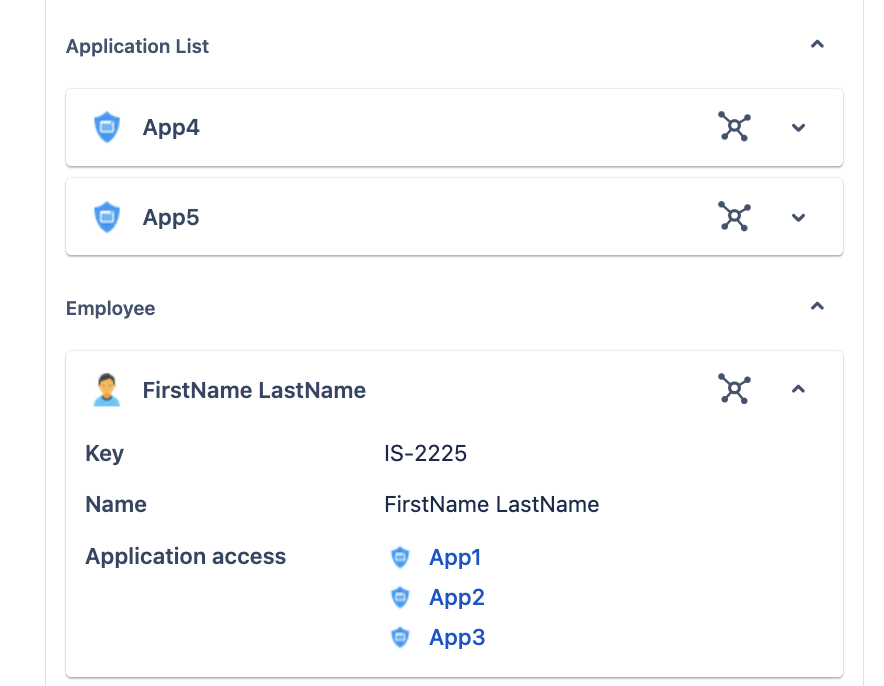
Here are the steps to append the list of applications in use by the Employee object:
Create an automation rule that triggers when the agent has provided access to new applications and the access request is closed
Note that at the moment, it is not possible to update attribute values using the REST API, as it performs a strict update that overwrites the value rather than appending multiple values. So here is what we do to append the values:
Use the below smart value to get the new list of applications mentioned in the Application List Assets object field, and need to be updated in the object Employee.
{{"Application List".Key.asJsonObject("value")}}We can't use the same format to retrieve the current list of applications mentioned in the Employee object, because they are actually stored in the object's reference-type attribute. So this doesn't work:
{{Employee."Application access".Key.asJsonObject("value")}} (DOESN'T WORK)We are going to use the below smart value to get the current list of applications within a Branch AQL action:
{{object."Application access".Key.asJsonObject("value")}}
Add an AQL branch to find the Employee object to be edited so that we can fetch the current list of applications for the Employee (To Add Branch AQL make sure the automation rule context is global and not limited to a project).
objecttype = Employee and Name = "{{Employee.Name}}"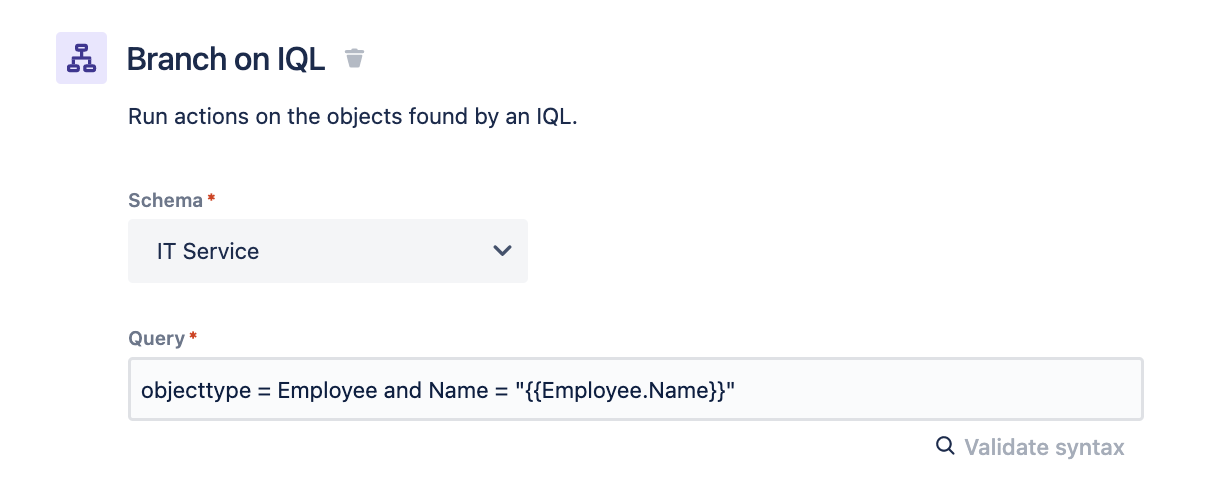
Add a log action within the branch to make sure we get the desired results:
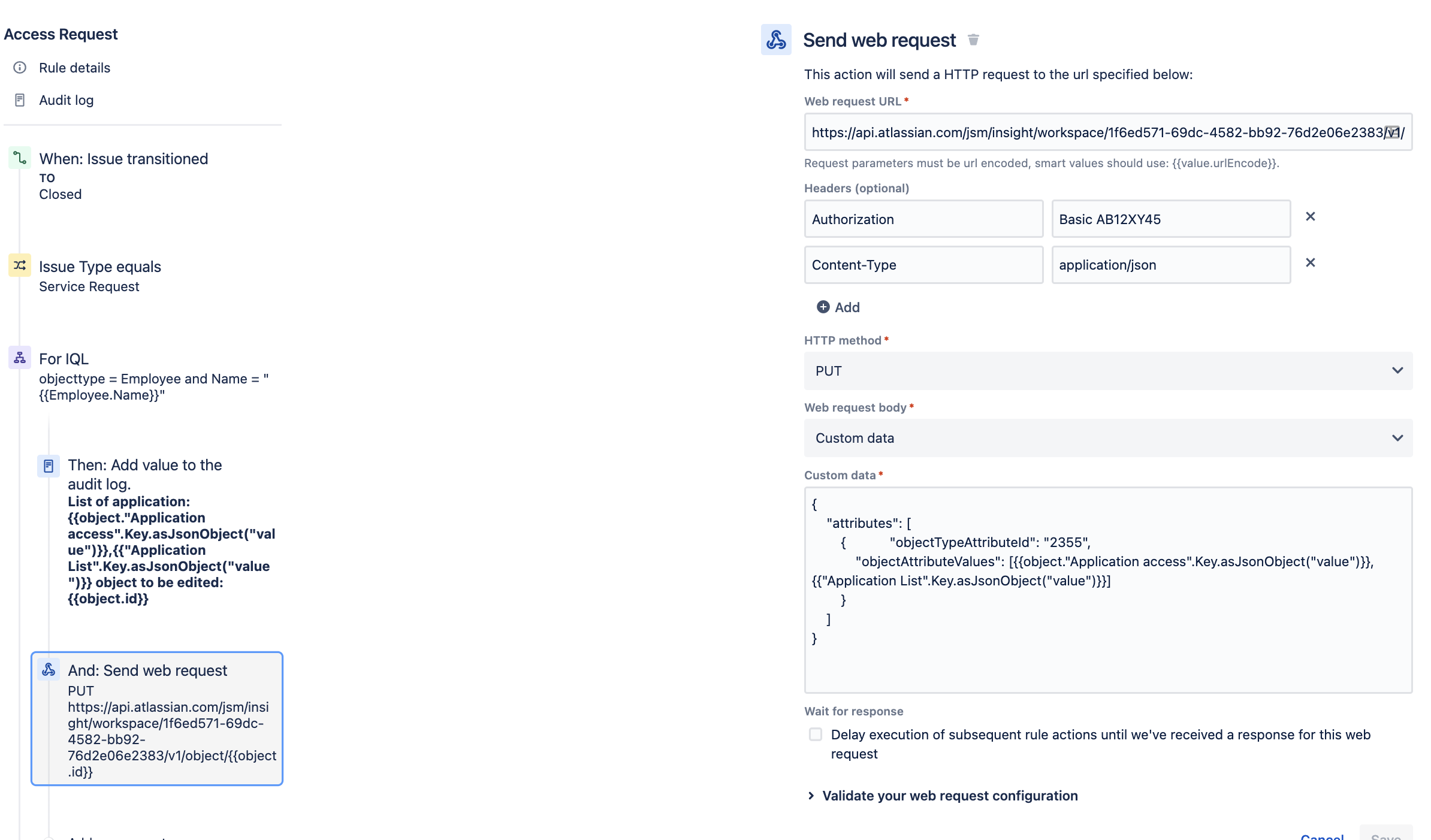
List of application: {{object."Application access".Key.asJsonObject("value")}},{{"Application List".Key.asJsonObject("value")}} object to be edited: {{object.id}}In the Branch, add a Send web request action to send the Update object REST API to the object to be edited:
The API token in the Authorization header is the one generated under your Atlassian Account → Sec urity → API tokens. Don't use the Assets import-configuration token — they are different tokens, and the import token will fail authentication here.
In the Authorization header make sure that you add the keyword Basic followed by the base64 of your emailaddress:APItoken.So if the base64 of the emailaddress:APItoken is AB12XY45, then to the Authorization header add the value Basic AB12XY45
Note: The API Token referenced here is generated under an Atlassian Account's Profile Page. It is not the Import Configuration Token generated for Assets Imports.
Note: When using Powershell to encode the string to base64, the source encode matters. In this case, UTF8 should be used. This is mentioned in our Basic Auth for REST APIs page.
Add the following Web request URL:
https://api.atlassian.com/jsm/assets/workspace/<YOUR WORKSPACE ID>/v1/object/{{object.id}}If you are not aware of the workspace ID: Find your workspace ID
Add the following to the Custom data field:
{
    "attributes": [
        {            "objectTypeAttributeId": "2355",
            "objectAttributeValues": [{{object."Application access".Key.asJsonObject("value")}},{{"Application List".Key.asJsonObject("value")}}]
        }
    ]
}
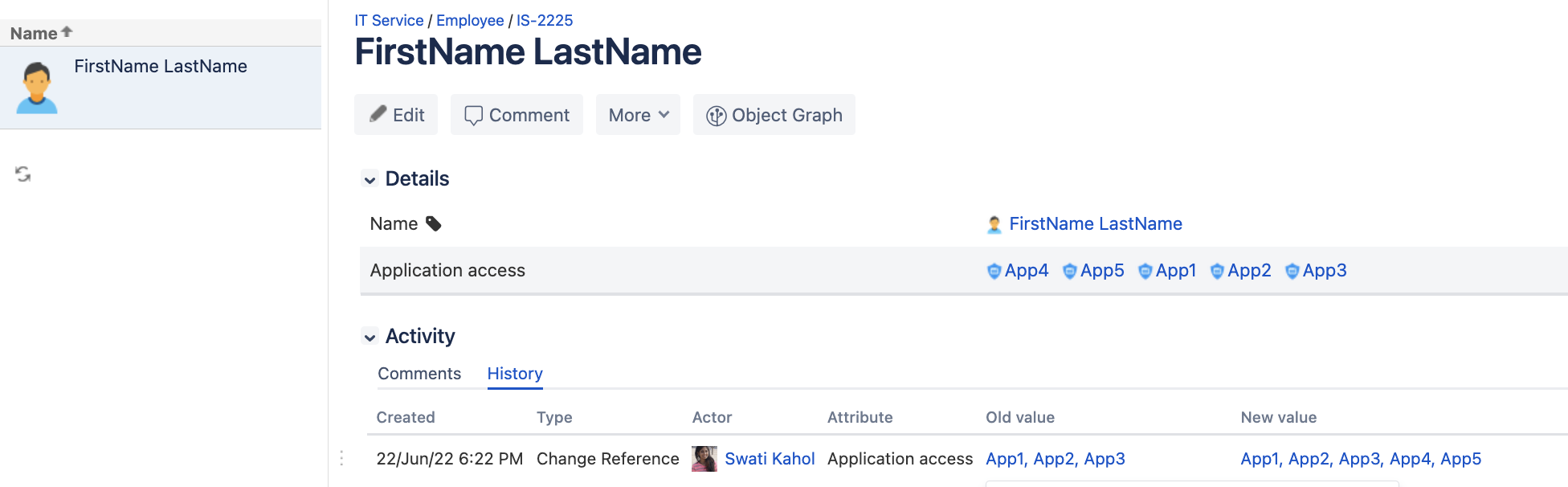
Here is how the rule execution looks:
Before execution:
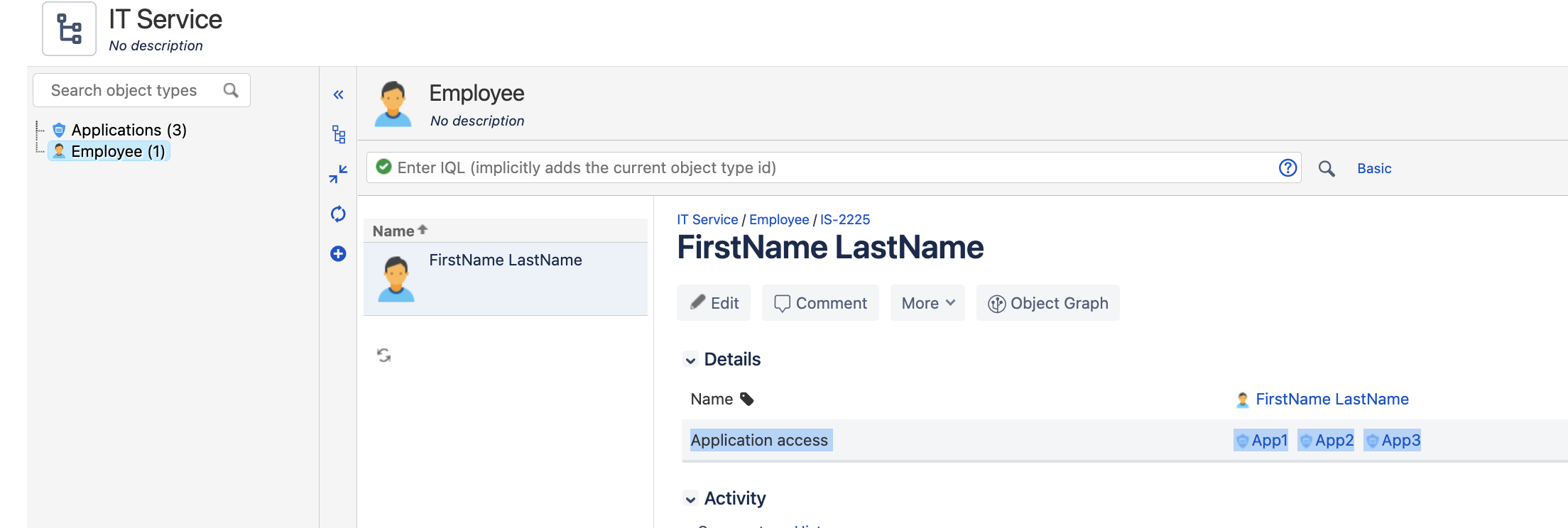
Execution Audit log:

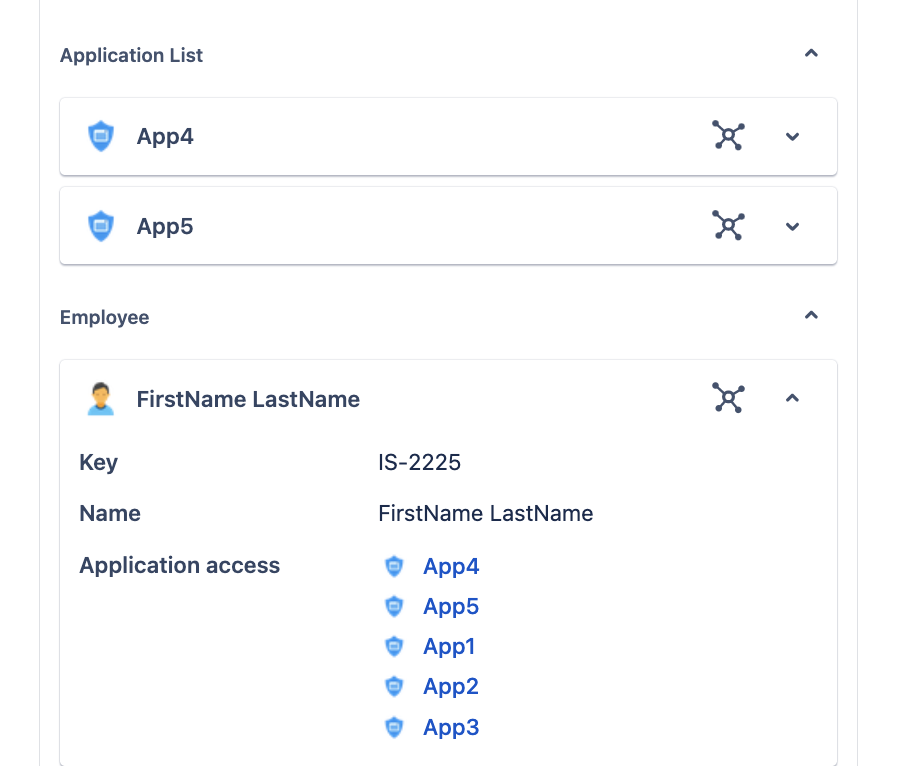
After execution:
Verification steps
Run the rule against a test Employee object that already has a known set of referenced objects (for example, App1–App3) and an access request adding App4–App5.
Check the rule's audit log entry for the Log action (step 4) — it should print both the current list and the new list.
Confirm the Send-web-request action returned HTTP 200, then open the Employee object and verify the reference attribute now contains the combined list (App1–App5), not just the new values.
Please reach out to support if you have any questions.
Was this helpful?