Jira users aren't receiving notifications in Jira Cloud projects
Platform Notice: Cloud Only - This article only applies to Atlassian apps on the cloud platform.
Summary
Jira users are not receiving notifications they expect to receive after changes to work items in a company-managed Jira Business, Software, or Service Management space.
Jira Notifications (configured in Jira spaces in Space Settings > Notifications), differ from than the Jira Service Management (JSM) Customer Notifications (configured in Space Settings > Customer Notifications).
To troubleshoot JSM Customer notifications, please refer to: How to troubleshoot customer notifications in Jira Service Management Cloud.
Solution
Note: Missing notifications in a company-managed space usually trace back to one of these causes. Work through the checks in order - each is independent, so any one of them can be the cause:
The person turned off notifications in their own profile, or an external email filter is blocking delivery
The person can't view the work item because of a space permission or work item security level
The person isn't a recipient in the space notification scheme
A workflow transition fires the wrong event
On service spaces, the person is being treated as a customer
Check if notifications are disabled in the user profile
Occasionally, the affected user might have unsubscribed from notifications themselves. Additionally, ensure there are no external factors, such as email filtering rules or spam/junk mail settings in external email clients like Outlook, that could block Jira notifications from being delivered to the inbox.
Affected users can verify this setting for their own profiles:
From any page in Jira, select your profile picture, then select Personal settings
Select Spaces and issues in the navigation sidebar
If it's turned off, use the Send me emails for issue activity toggle to turn notifications on
To also get notifications about your own changes, select the You make changes to issues checkbox
Confirm that affected users can view work items
In order to receive notifications from Jira work items, users must be able to view these items in Jira.
Two configurations control whether users can view work items. They are the Browse space permission from the space's permission scheme, and whether work item security is set on the individual work items.
Check for Browse Space permission
Visit the affected space
Navigate to Space settings > Permissions
Find the Browse Space permission in the list
Check whether the affected user belongs to one of the groups or space roles listed. If not, refer to Manage space permissions to grant permission for the user
Check for work item security
Visit a work item where notifications were not sent as expected
Check the security lock icon on the work item
If the lock is closed and a security level has been set, the user may not be part of the proper security level to view the issue. Refer to Configure work item security schemes to determine the best way to resolve the problem.
Add user to Space Notification Scheme
If the affected user is not set as a recipient of the notification for the given event, you will need to edit the Notification Scheme used by the space. Notification events can be set to deliver to:
Individual users
Groups
Space Roles
Jira roles (current assignee, reporter, watchers, etc.)
To check the Notification scheme in use:
Navigate to the affected Space
Select Space Settings > Notifications > Settings
Confirm workflow transitions fire the correct events
A common scenario where this applies:
An issue was closed using the "Close issue" transition
A user is a watcher, reporter, or assignee of that issue
According to the Notification scheme configuration in the space, this user should receive notifications on the event Issue Closed
This user does not receive a notification when the issue is closed
Using the scenario above, if the Close Issue transition fires a Generic Event (instead of the Issue Closed event) then the user won't receive a notification. See the below screenshot as an example of this configuration:
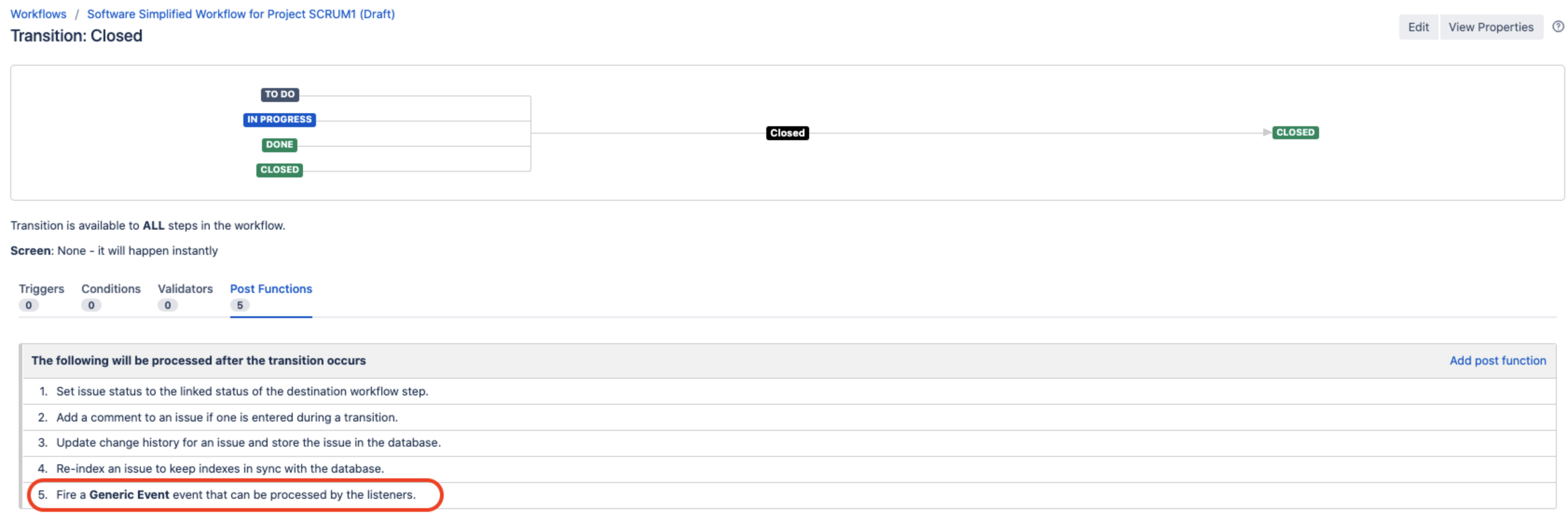
To fix this issue, you can either:
Change the event fired by the transition to Issue Closed
Please refer to Advanced workflow configuration for instructions
Edit the notification scheme associated with the space, so that the impacted user can receive notifications on the event Generic Event
Please refer to Configure notification schemes for instructions
Service Spaces only: Affected users may be considered "customers" by JSM
When users aren't receiving notifications specifically from Service Space work items, the problem may be caused by accidentally belonging to a JSM customer organization. When this happens, the user will be treated as a customer within the work item and Jira notifications are not triggered for them.
To remove the user from the customer organization:
Go to the space
Navigate to Organizations
Remove the user from the Organization
Was this helpful?