Missing SLAs in Jira Service Management
Platform Notice: Data Center Only - This article only applies to Atlassian apps on the Data Center platform.
Note that this KB was created for the Data Center version of the product. Data Center KBs for non-Data-Center-specific features may also work for Server versions of the product, however they have not been tested. Support for Server* products ended on February 15th 2024. If you are running a Server product, you can visit the Atlassian Server end of support announcement to review your migration options.
*Except Fisheye and Crucible
Summary
This article is about Jira Service Management Data Center. For the Cloud equivalent, see SLAs in Jira Service Management are missing or disappeared.
In Jira Service Management, you may encounter instances where the SLA for an issue is either missing or fails to update (start/stop) when expected. While this Knowledge Base does not offer a definitive solution due to potential variations in root causes such as apps, database corruption, or other unknown factors, it does present a viable workaround for addressing the issue of missing SLAs.
Environment
Jira Service Management version 3.0.3 or above.
Diagnosis
An example case is the missing 'Initial Reaction Time' SLA in the issue:
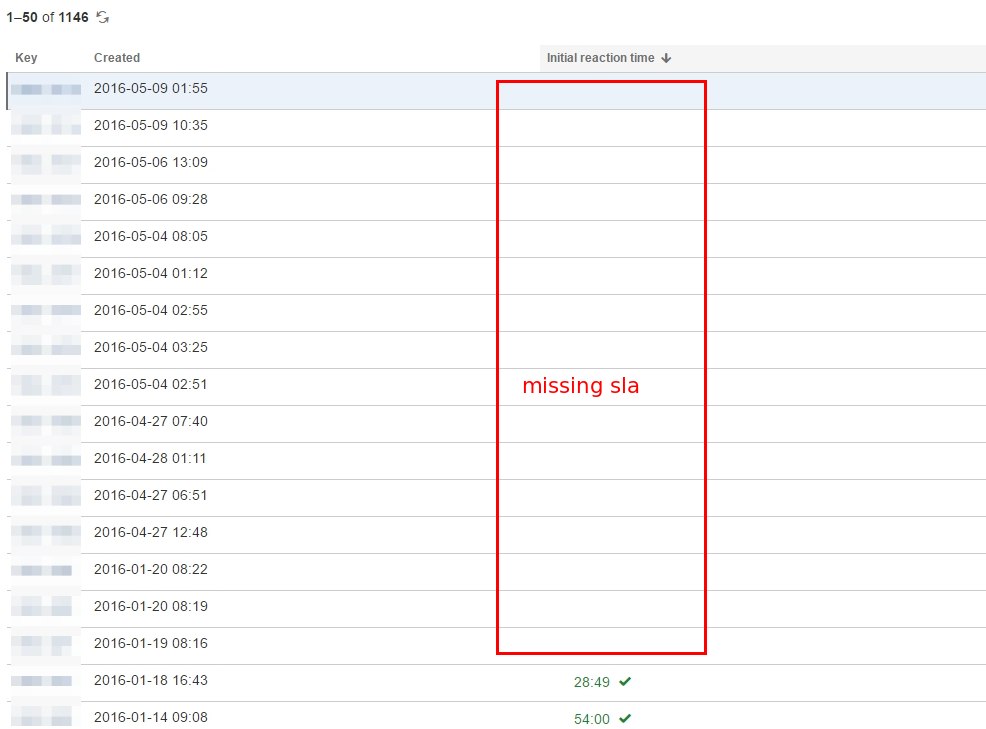

SLA is not showing on both ticket and issue navigator searches.
There are SLA entries in the database for the affected issues but the SLA is either missing or incorrectly displayed on the UI e.g. still running when they should already be stopped.
Refer to this documentation to verify from the database the SLA data is indeed missing.
Cause
There can be multiple causes, such as:
Corrupted database.
Plugin problems.
Errors when calculating the SLA update.
Bugs such as JSDSERVER-16647.
Solution
Resolution
For the following root causes:
Corrupted database: The above workaround is expected to resolve the issue of missing data.
Plugin Issue: Enable Safe Mode on the test instance to see if the SLA is still missing.
For any other unidentified root causes, please reach out to Atlassian Support for further investigation.
Workaround
Before initiating the reconstruction of SLAs for all issues using the REST API, keep in mind you have the option to recalculate SLAs from the UI for specific issues only.
As detailed in the Jira Service Management 5.0.x release notes, you can recalculate SLAs from the UI for JSM version >= 5.0.x. We recommend trying this method before resorting to REST calls if the problem is for a few specific issues or you want to see if recalculation helps.
To recalculate SLAs for one issue using the UI
Navigate to the issue.
In the SLAs section, select More actions (…) > Recalculate all SLAs.
Select Recalculate.
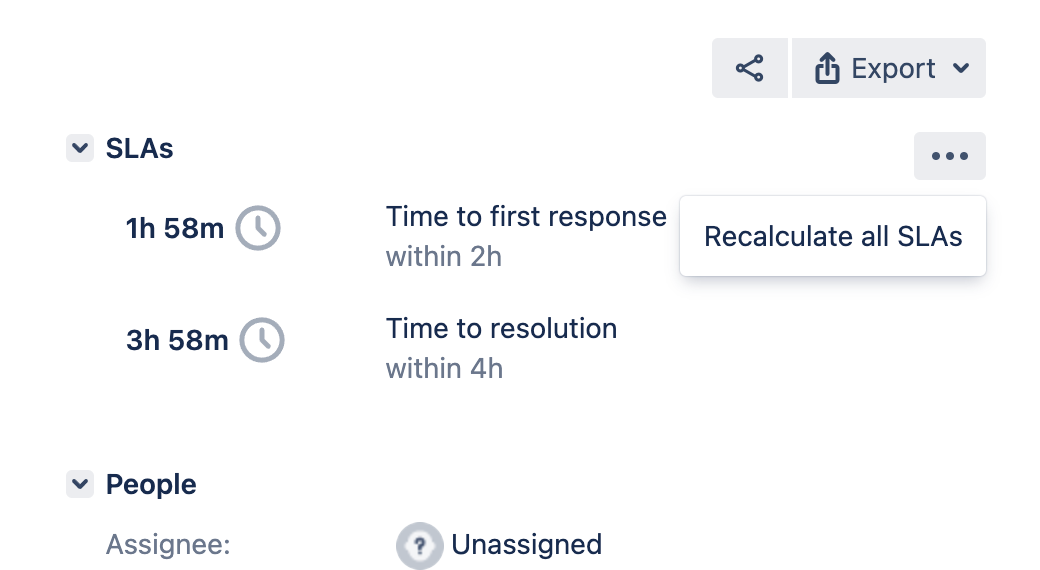
To recalculate SLAs for a list of issues using the REST API
If you are running JSD 4.3.0 and above, you will need to first enable the dark feature sd.sla.fix.timeline.enabled per the instructions in Enable Dark Feature in Jira:
Navigate to the following page to access the Dark Features page:
<baseUrl>/secure/admin/SiteDarkFeatures!Default.jspaEnter sd.sla.fix.timeline.enabled in the field “Enable dark feature” and clicking on the “Add” button, and verify that the dark feature sd.sla.fix.timeline.enabled is showing:
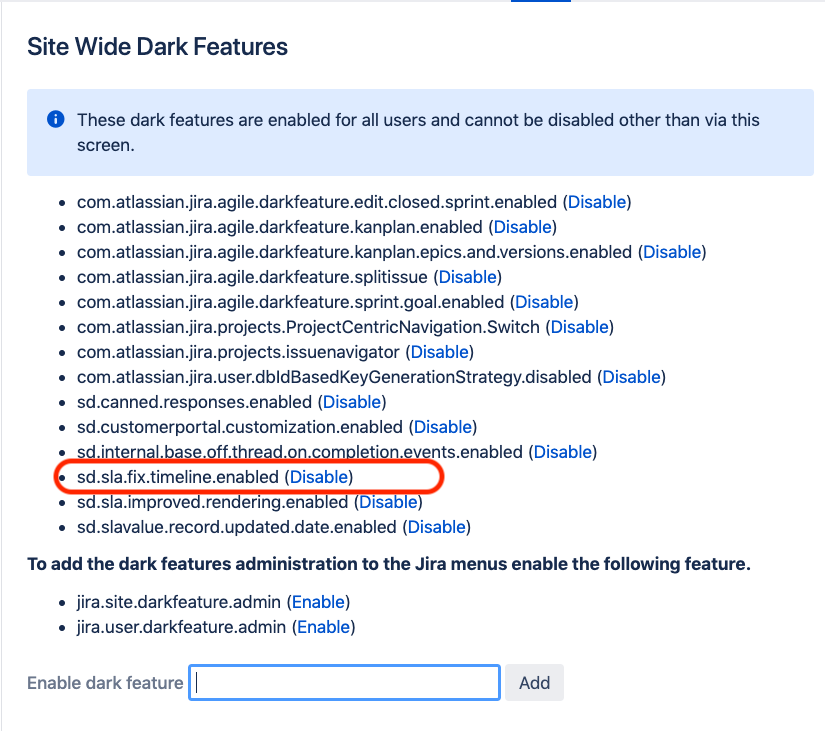
Perform a POST-REST call to the Jira instance through the following URL:
<baseUrl>/rest/servicedesk/1/servicedesk/sla/admin/task/destructive/reconstructIn the Authorization tab, select 'Basic Auth' type and supply your Jira credentials accordingly.
Along with the header: "Content-Type: application/json" and raw JSON data below within the Body section.
["ISSUEKEY-XXX", "ISSUEKEY-XXXX"]Key in the issue key for the issue which has the missing SLA.
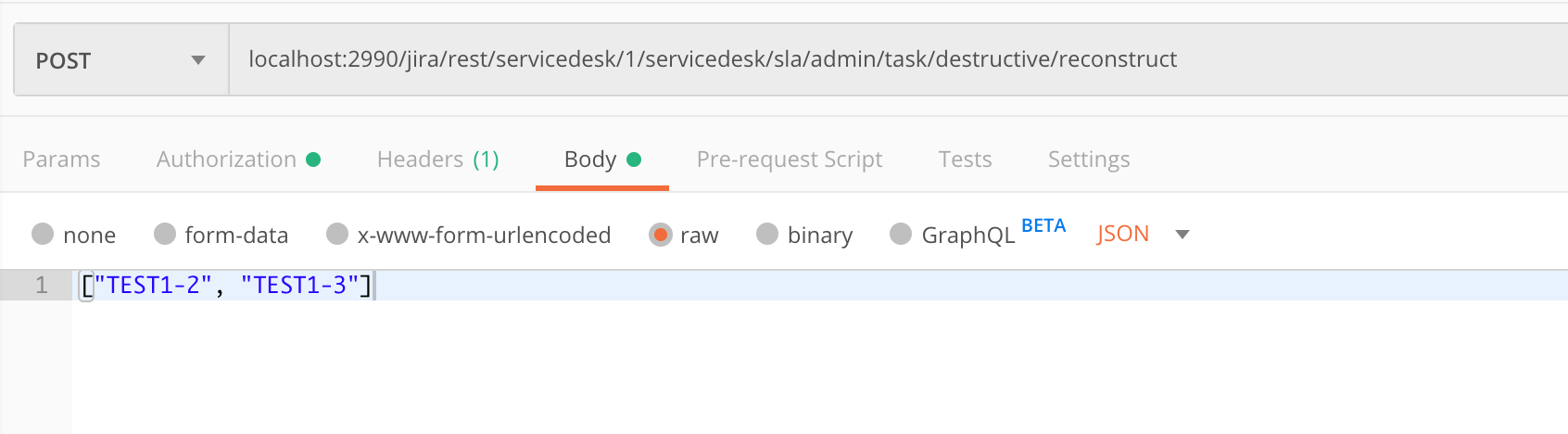
You may install Postman offered by Chrome Web Store to achieve this. Please make sure you're sending a POST request with rawdata with JSON application.
Alternatively, you can use the CURL command-line tool to do this:
$ curl -X POST -u $USERNAME:$PASSWORD -H "Content-Type: application/json" "http://localhost:2990/jira/rest/servicedesk/1/servicedesk/sla/admin/task/destructive/reconstruct" -d "[\"TEST1-2\", \"TEST1-3\"]"
Performing the above REST API call will trigger a manual reconstruction of the SLA.
Navigate to the Service Management Project Administration and click on the "Update" icon under the SLAs section.
To recalculate SLAs for JQL using the REST API (JSM 4.9.1+)
/rest/servicedesk/1/servicedesk/sla/admin/task/destructive/reconstruct/jql
Similar to
/rest/servicedesk/1/servicedesk/sla/admin/task/destructive/reconstructbut it takes a valid JQL expression instead of the list of issues to get the issues to be reconstructed.Not providing any JQL will cause an empty JQL to be executed which will return all issues on the instance , and will run reconstruction on all of them, with the risk of causing a performance issue. Use with caution.
$ curl -X POST -u $USERNAME:$PASSWORD -H "Content-Type: application/json" "http://localhost:2990/jira/rest/servicedesk/1/servicedesk/sla/admin/task/destructive/reconstruct/jql" -d "Project=TST"
/rest/servicedesk/1/servicedesk/sla/admin/task/destructive/reconstruct/force
Similar to
<baseUrl>/rest/servicedesk/1/servicedesk/sla/admin/task/destructive/reconstruct, but it will not take into account whether any events are missing or out of order. It will recalculate the SLA based on current SLA settings (which might have changed since the time the issue SLAs were calculated) and force overwrite the values in the DB for each issue provided to the API in the request body.⚠️ Be EXTREMELY careful when running this one. The changes are irreversible, and the new calculated values will take into account only the current SLA settings that may not be the same as when the SLAs were originally calculated for the ticket.
/rest/servicedesk/1/servicedesk/sla/admin/task/destructive/reconstruct/jql/force
Similar to
<baseUrl>/rest/servicedesk/1/servicedesk/sla/admin/task/destructive/reconstruct/jql, but it will not take into account whether any events are missing or out of order. It will recalculate the SLA based on current SLA settings (which might have changed since the time the issue SLAs were calculated) and force overwrite the values in the DB for each issue returned by the provided JQL.⚠️ Be EXTREMELY careful when running this one. The changes are irreversible, and the new calculated values will take into account only the current SLA settings that may not be the same as when the SLAs were originally calculated for the ticket.
⚠️ Not providing any JQL will cause an empty JQL to be executed which will return all issues on the instance, and will run reconstruction on all of them. Use with EXTREME caution.
Recalculating SLAs using a script (versions below 4.9.1)
This script was build to help running the /rest/servicedesk/1/servicedesk/sla/admin/task/destructive/reconstruct endpoint using a JQL on versions earlier than 4.9.1.
Service Desk SLA Regen.py
'''
Script for regenerating SLAs in JSD. Set search_jql and run!
'''

import requests
import json
import getpass
import sys

# Username and password terminal input
username = input('Jira Username: ')
password = getpass.getpass()

search_url = 'https://<base-url>/rest/api/2/search'
sla_url = 'https://<base-url>/rest/servicedesk/1/servicedesk/sla/admin/task/destructive/reconstruct?force=false'

search_jql = ''

data = {"jql": search_jql,
        "fields": ["key"],
        "startAt": 0,
        "maxResults": 1000}

# python dictionary to json
data = json.dumps(data)

# Session Start
s = requests.Session()

# Initial Search request
r = s.post(
    url= search_url,
    data=data,
    auth=(username, password),
    headers={'Content-Type': 'application/json'}
)

status_code = r.status_code

if status_code == 401:
    sys.exit("Invalid credentials provided, please check username/password")

total = r.json()["total"]
print("Total is " + str(total))
startValue = 0
all_issues = []

while startValue < total:

    data = {"jql": search_jql,
        "fields": ["key"],
        "startAt": startValue,
        "maxResults": 1000}

    data = json.dumps(data)
    print("Starting search at startvalue=" + str(startValue))
    r = s.post(
            url=search_url,
            data=data,
            headers={'Content-Type': 'application/json'}
        )

    for issues in r.json().get("issues"):
            all_issues.append(issues["key"])
    startValue += 1000

for issue in all_issues:
    data = [issue]
    data = json.dumps(data)
    print("Updating " + issue)

    r = s.post(
            url=sla_url,
            data=data,
            headers={'Content-Type': 'application/json'}
        )
Python3 and
requestsmodule are needed to run it.
Using the Automation for Jira to schedule automatic reconstruction:
Is is not recommended to keep an automation to perform such workaround job on a schedule.
If this is a critical business need, keep the JQL as restrictive as possible and make sure to remove the automation as soon as the root cause is resolved.
Create a Global Automation Rule.
Select a "Scheduled event" trigger for every 1h or another period that best fits your case.
Mark the "simply run" checkbox option on the scheduled trigger.
For the action, select the: "Send web request" block:
{{baseURL}}/rest/servicedesk/1/servicedesk/sla/admin/task/destructive/reconstruct/jqlNote: You'll still need to enable the dark feature before applying this workaround.
Header for the Auth credentials:
Authorization = Bearer <personal-token>Note: We recommend using secret keys in Automation for Jira to avoid exposing your key to other automation users.
Header for the json content (JQL)
Content-Type > application/jsonExample JQL to get the latest missing SLAs
"SLA-NAME" = outdated() AND created > -2hNote: To avoid unnecessary recalculation be sure to use a JQL that gets only the affected issues as every time this rule run, Jira will recalculate all the SLAs even if they aren't missing or broken.
5. Create a new name, save and publish the new rule.
6. You can click the button "Run rule" button to run the rule and check the Audit log to make sure it works.
Was this helpful?