How to get the AccountID for Customer Accounts in JSM
Platform Notice: Cloud Only - This article only applies to Atlassian apps on the cloud platform.
Summary
Sometimes, we need to perform ticket actions using the user's accountID, still, this information is not displayed in the User Management pages when it's related to a portal-only customer account.
Solution
Choose the existing method
What you have | Use this existing method | Where to find the accountID |
|---|---|---|
You can access the JSM Space customer list | Customers Page JQL Search Results | Open a link in the `Open requests` or `Closed requests` column and read the accountID from the JQL syntax. |
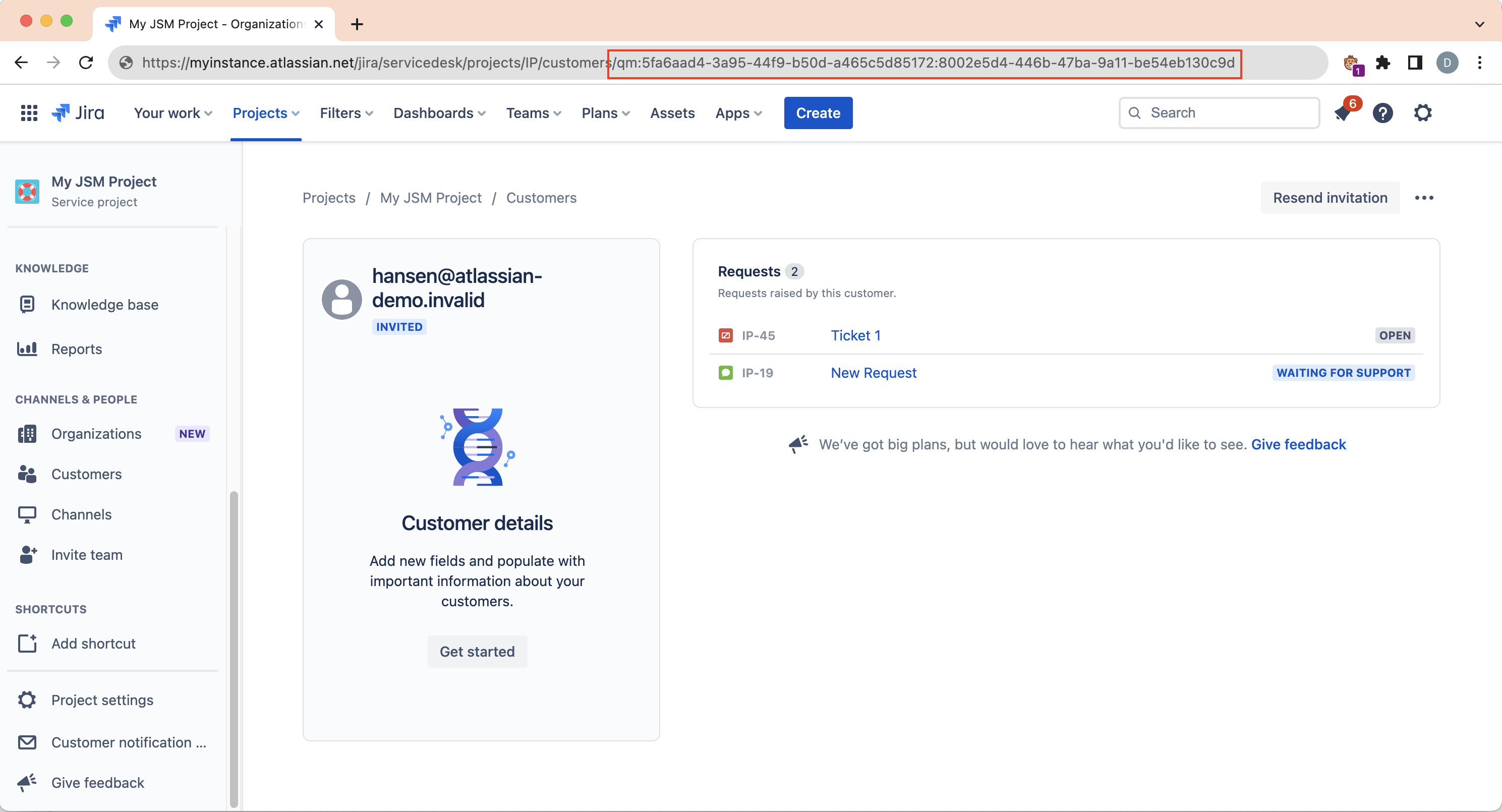
You can open the customer account profile | Customer Service Management feature | Read the accountID from the URL address bar. |
You need to retrieve accountIDs in a list | Administration - User Management | Export the customer list in a CSV file. |
The customer account appears in a work item as a Reporter, Request Participant, or a custom User Picker field | Jira Work Item API | Search the associated field in the JSON and use its `accountId` value. |
You do not know which work item is associated with the customer | Jira User Search API | Search using the customer's email address and use the returned `accountId`. |
Customers Page JQL Search Results
Since the changes in JQL search, Jira now uses the accountID instead of the email when searching for fields with the User Picker type. You can take advantage of this by clicking on one of the links in the "Open requests" or "Closed requests" columns, on the JSM Space Customer tab, which will redirect to the issue navigator, where you can get the accountID from the JQL syntax.


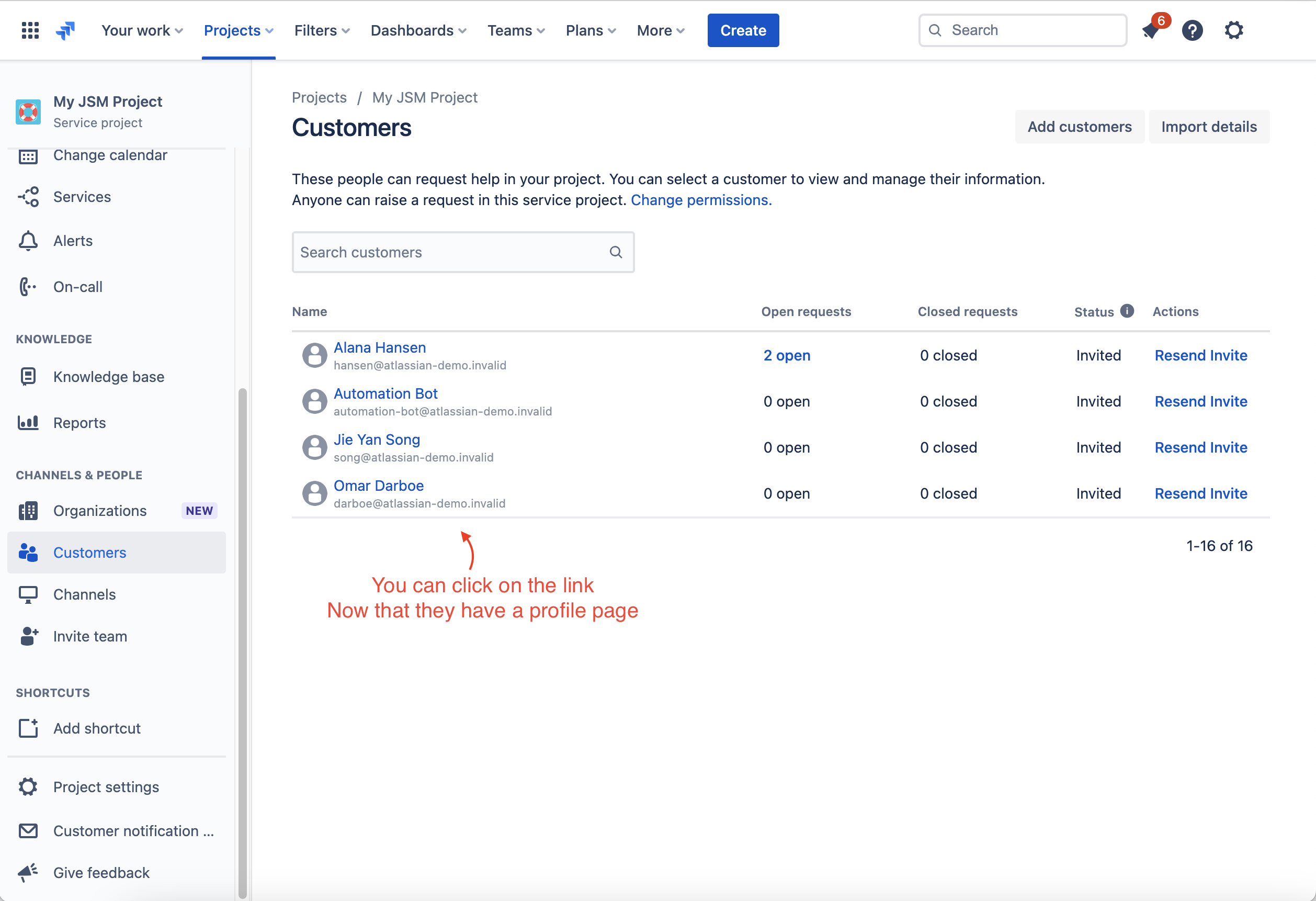
Customer Service Management feature
Using the new customer service management feature, you can see a "profile" of your customer account; there, you can get the accountID in the URL address bar.
Reference: Introducing rich customer context in Jira Service Management
Administration - User Management
You can also get the accountID of an internal user/portal-only customer account when exporting the customer list in a CSV file. Find the instructions in the articles below:
Here are a couple of articles that you can use the accountID:
How to update the Approver via an Approval field using Jira Automation in team-managed projects
How to add/update/remove Request Participants using Automation for Jira
Using the JIRA Work Item API Endpoint
You can rely on the Jira work item API to get the accountID for a portal-only customer account if they're added to the ticket as a Reporter, Request Participant, or any custom field that has a User Picker field type and this user is associated with it.
1. Find an issue ticket the desired user is associated with.
2. Open the issue using the URL format below:
https://<site-name>.atlassian.net/rest/api/2/issue/<issue-key>?expand=names

e.g. https://mysite.atlassian.net/rest/api/2/issue/SD-123?expand=names
3. Search for the field this user is associated with. (e.g., Reporter, Request Participants, etc.)
4. Its struct will be similar to the JSON below:
		"reporter": {
			"self": "https://sitename.atlassian.net/rest/api/2/user?accountId=qm:5fa6aad4-3a95-44f9-b50d-a465c5d85172:225adc9a-ce45-45a4-92de-3c2d8b6b687f",
			"accountId": "qm:5fa6aad4-3a95-44f9-b50d-a465c5d85172:225adc9a-ce45-45a4-92de-3c2d8b6b687f",
			"avatarUrls": {
				"48x48": "...",
				"24x24": "...",
				"16x16": "...",
				"32x32": "..."
			},
			"displayName": "Customer Name",
			"active": true,
			"timeZone": "...",
			"accountType": "customer"
		},
Using the JIRA User Search API Endpoint
You can search for users using this endpoint if unsure about an issue ticket related to the desired user.
1. Open the endpoint below in a new tab and change the information accordingly:
https://<site-name>.atlassian.net/rest/api/3/user/search?query=<emailAddress>

e.g. https://sitename.atlassian.net/rest/api/3/user/search?query=customer@company.net
2. Its struct will be similar to the JSON below:
[
	{
		"self": "https://sitename.atlassian.net/rest/api/3/user?accountId=qm:5fa6aad4-3a95-44f9-b50d-a465c5d85172:225adc9a-ce45-45a4-92de-3c2d8b6b687f",
		"accountId": "qm:5fa6aad4-3a95-44f9-b50d-a465c5d85172:225adc9a-ce45-45a4-92de-3c2d8b6b687f",
		"accountType": "customer",
		"emailAddress": "customer@company.net",
		"avatarUrls": {...},
		"displayName": "Customer Name",
		"active": true,
		"timeZone": "...",
		"locale": "en_US"
	}
]Was this helpful?