Comments fail to update status in Jira Service Management Cloud
Platform Notice: Cloud Only - This article only applies to Atlassian apps on the cloud platform.
Summary
A default automation rule in JSM is the one that transitions tickets: When a comment is added → update the status. This article focuses on the most common causes why the rule may not run as expected.
Solution
This article covers the most common cause of this rule failing: the assignee or agent who added the comment is also assigned a customer-side role on the same request. If the commenter does not hold any of the roles listed below, this specific cause does not apply to your scenario.
The user who added a comment has multiple roles in the request
A default automation rule in Jira Service Management transitions tickets when a comment is added. The rule may fail when the person who added the comment has more than one role in the request.
The most common cause is that the assignee or agent who added the comment is also listed as the reporter, a request participant, or a member of an organization the ticket was shared with. When a licensed Jira Service Management user is assigned to a customer role, the automation may fail to verify permissions correctly and may not run as expected.
The rule fails whenever the same person who added the comment is both the assignee or agent and any one of the roles listed above on the same request. When this overlap exists, the automation may fail to verify permissions correctly and the transition condition may not match as expected.
This also causes issues with SLA, as you can see in Time to first response SLA not stopping when an agent adds a comment to the ticket.
Use the automation audit log to track which condition failed
Open the rule execution Audit log to identify which condition failed. Use the condition results to distinguish the following cases:
Comment visibility: confirm whether the comment was internal.
Initiator and status: check whether the initiator was treated as a customer and whether the ticket was in Waiting For Support or Waiting For Customer.
Transition result: confirm whether the ticket transitioned to the expected status.
If the initiator was considered a customer due to another role in the request, the condition requiring that the initiator not be a customer may fail. The same issue can occur when the assignee is also a request participant.
To confirm this is your cause, open the rule execution Audit log and check whether the condition failed on "Initiator is not a customer" while the status was "Waiting For Support" or the mirror check: "Initiator is a customer" while the status was "Waiting For Customer". A failure on either of those conditions, while the comment itself was not internal, indicates the commenter is being treated as a customer because of an overlapping role. The examples below illustrate this pattern.
Example 1
In the following example, the ticket was shared with an Organization, and the Assignee was a member of the organization as well. As you'll see, no actions were performed by the automation since it didn’t match the condition.
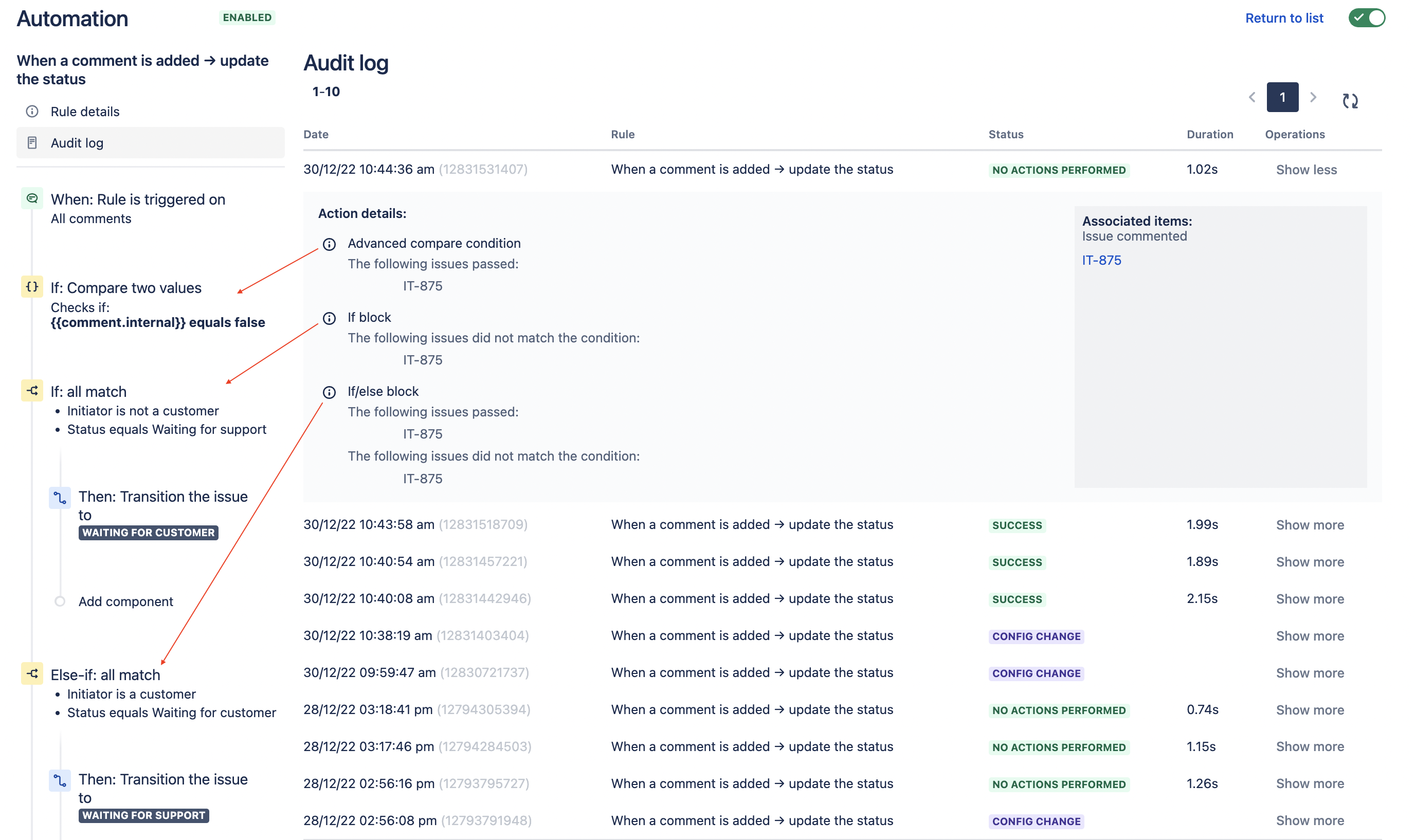
As seen in the screenshot:
✔️ The first condition passed since the comment was not internal.
❌ The second condition didn’t match. When accessing the ticket and confirming that it was on Waiting For Support, but it was failing because the Initiator is not a customer.
❌ On the third condition, the first IF passed since the initiator was considered a customer, but it then failed because the status wasn’t Waiting For Customer.
ℹ️ The same issue will happen if the Assignee is also listed as a Request participant on the ticket.
Example 2
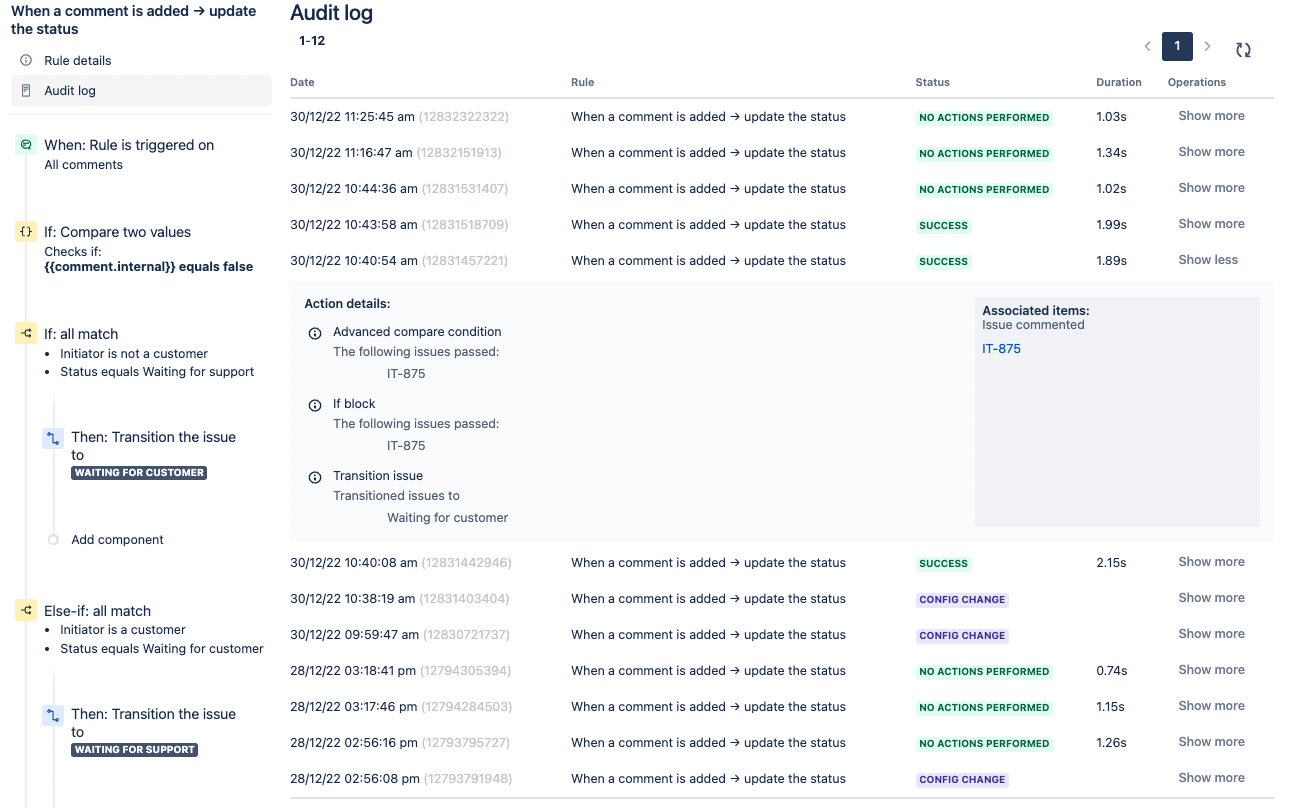
A successful transition from Waiting For Support to Waiting For Customer:
✔️Comment is not internal.
✔️ Initiator is not a Customer, and the status is Waiting For Support.
✔️ Ticket transitioned to Waiting For Customer.
Example 3
A successful transition from Waiting For Customer to Waiting For Support:

✔️Comment is not internal.
❌ Initiator is not a customer, and the status is Waiting For Support.
✔️ Initiator is a customer, and the status is Waiting For Customer.
✔️ Ticket transitioned to Waiting For Support.
How to avoid this issue?
As a general best practice in Jira Service Management, differentiate between agents and customers in a request. An agent working on the request should not be a request participant or part of an organization in the ticket.
For collaboration between Jira teams: use the Watcher option when another agent needs to collaborate on a ticket, rather than adding that agent as a request participant or as part of an organization.
Organizations and request participants should include portal-only customers and internal customers who have Atlassian accounts but no product access.
A licensed user can be added with caution only if they are not an agent for that specific project and have no internal access to the project; in that case, they can access the request via the portal.
More details about each type of account are in the documentation below:
Was this helpful?