Can't create issues because of required fields in Jira Cloud
Platform Notice: Cloud Only - This article only applies to Atlassian apps on the cloud platform.
Summary
In Jira Cloud company-managed spaces, there are two ways to make a field required:
By specifying field behavior in the field configuration
In a workflow with a Field Required validator
These implementations appear differently during work item creation. If a field is required by either of these methods, but is not on the create screen, users will be blocked from creating work items.
Solution
Error message you see | Cause | Go to |
|---|---|---|
| Field is required by field configuration | Section "Field is required by field configuration" |
| Field is required by field configuration (subtask) | Section "Sub-task error messages" |
| Field is required by a workflow validator | Section "Fields required by workflow validators" |
A field can be required in two ways, and they fail differently:
Type | How it's enforced | What you'll see |
|---|---|---|
Field configuration | Field marked required in the field configuration | Asterisk ( * ) shown on the Create screen |
Workflow validator | "Field Required" validator on a transition | Error only at that transition, field may not appear on the Create screen at all |
- Field is required by field configuration
When a field has been marked Required in your field configuration and that field appears on the create screen, you will see the field marked by an asterisk.
If the field is not assigned a value, or required fields have not been put on the create screen, work item creation results in the error "<field name>: <field name> is required."
Users will not be able to create work items until you proceed with one of these options:
You add the field to the create screen and the field is given a value
You remove the field requirement from the field configuration
You give a default value to the field (if possible for the field type)
Remove the required condition from the field configuration
Note that all changes made to a field configuration will affect all projects that use that field configuration.
To remove a field requirement from a field configuration:
Go to the affected project
Select Space Settings
Select Work items > Fields
Select the Pencil icon next to the field configuration
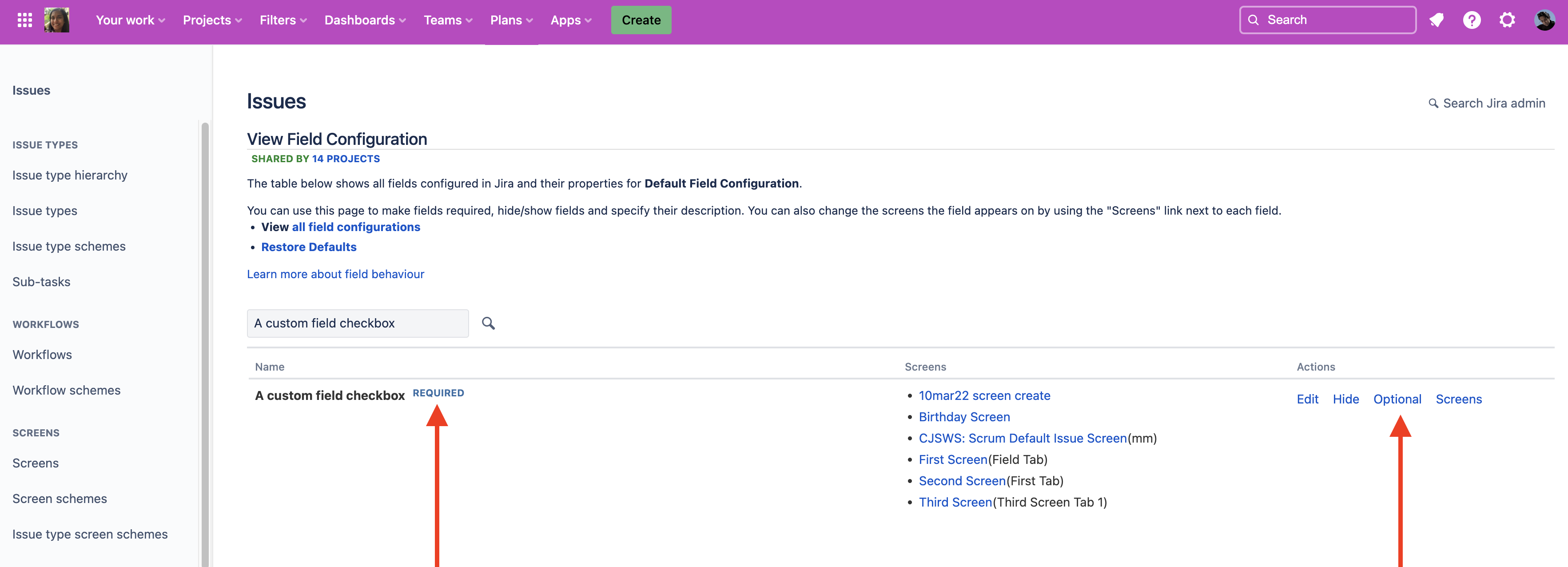
Search for the field identified in the error message
The field will have a "Required" badge which will disappear when you select the Optional link in the Actions column
Sub-task error messages
The error messages look a bit different when creating subtasks. If you try to create a subtask and the required field is on the create screen, a larger modal will pop-up prompting you to enter the required value.
If the required field is not on the create screen you will see a pop-up error with the text "We couldn't create the subtask. <Field name>: <Field name> is required."
- Fields required by workflow validators
When a field is required by a workflow validator that has no custom error message configured, work item creation results in the error "Field <field name> is required."
We recommend using a custom error message in your workflow validator, which allows you to make it more descriptive for the actions your users should take.
Remove the field required validator from the workflow
Note that all changes made to a workflow will affect all projects that use that workflow.
Navigate to your project
Select Space settings
Select Workflows
Select Edit workflow for the affected work item types/workflow
Select the Pencil icon next to the workflow name
Select the Diagram editor and select the arrow representing the Create transition
Select Validators as seen here:
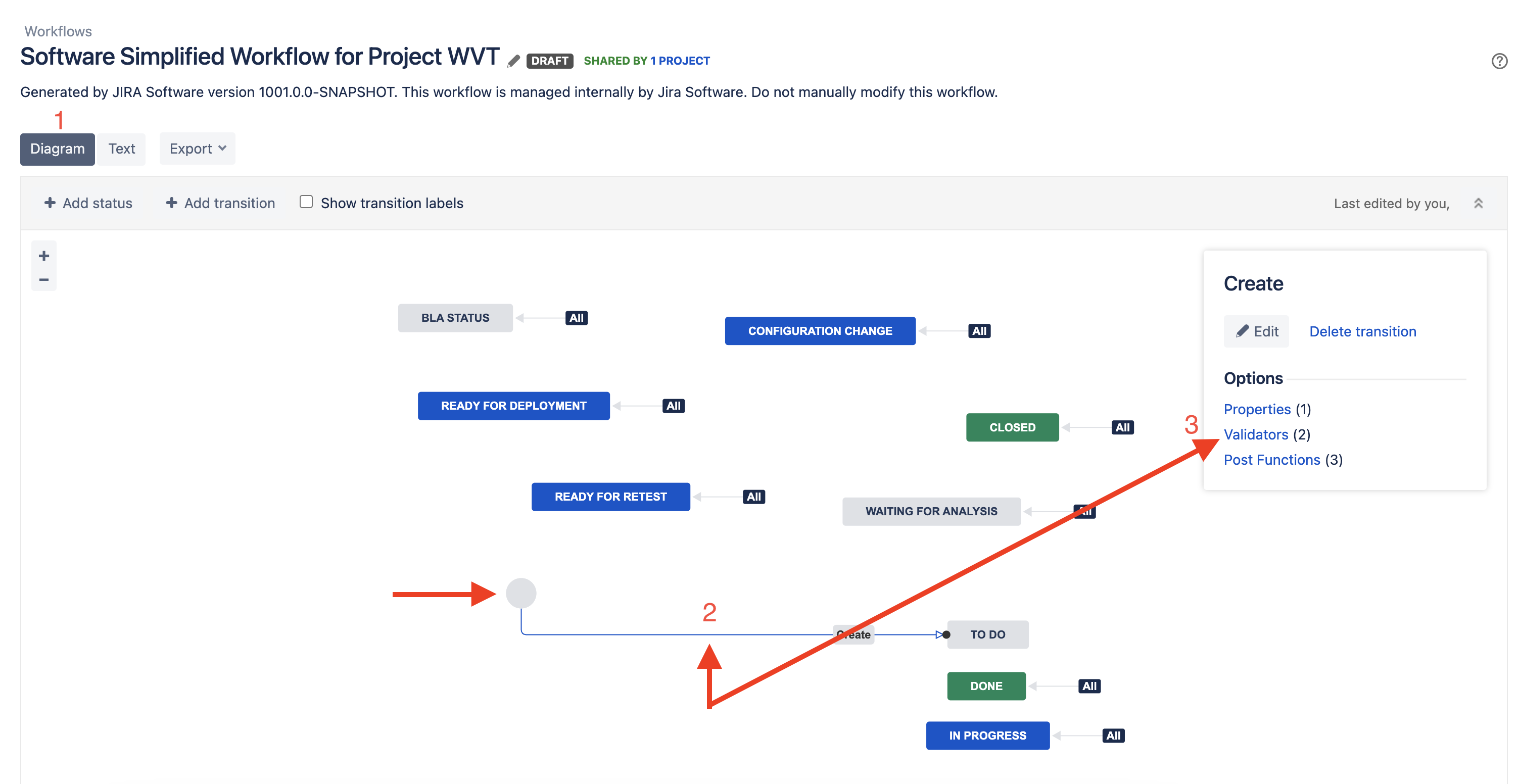
For the field required validator, select the cross icon to delete it as displayed below:
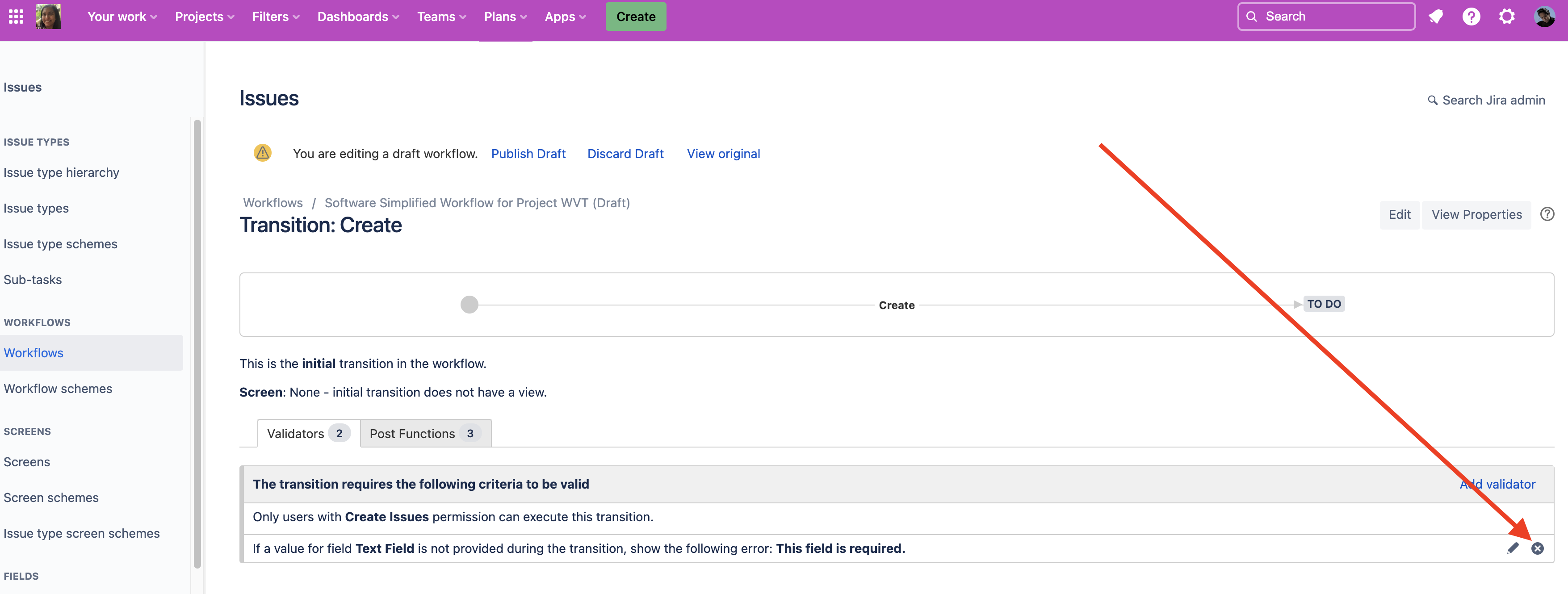
Select Publish draft
- How do I know it worked?
After making the fix, return to the work item creation screen. The required field should now appear with an asterisk ( * ). Fill it in, the work item will create successfully.
Related article
Was this helpful?