Bulk archive work items in Jira Cloud with Automation
Platform Notice: Cloud Only - This article only applies to Atlassian apps on the cloud platform.
Summary
Archiving work items is available on Premium and Enterprise plans. On Jira Cloud you can archive individual work items natively, but bulk archiving is not currently available in the UI, see the feature request JRACLOUD-85101. This automation workflow provides a supported workaround through current Jira Cloud releases.
Note: Two different limits apply:
The Archive work item(s) by ID/key API endpoint accepts up to 1,000 work items per request.
The Lookup work items automation action only returns up to 100 work items at a time.
If you use Lookup work items to build your list, each rule execution archives at most 100 items. To archive larger batches, schedule repeated rule runs or page through your JQL results.
Solution
Automation execution limits
For Premium plans, there is a limit of 1000 automation executions per licensed user.
Before proceeding with this workaround, make sure the automation won't exceed the monthly execution limit. Please refer to How is my usage calculated for more details.
Bulk archive issues using Automation
It's possible to archive up to 1000 work items at a time by sending a PUT request to the Archive issue(s) by issue ID/key API endpoint. This requires a user token to authorize the request. However, if we want to use the Lookup work items automation action, we will be limited to 100 work items at a time.
Navigate to Global automation in Jira and create a new rule
Use a trigger that matches your requirements
The Manual or Scheduled triggers are likely the best choices
Use the Lookup work items action to fetch a list of work items via JQL
Please note: This action will only fetch 100 issues at a time
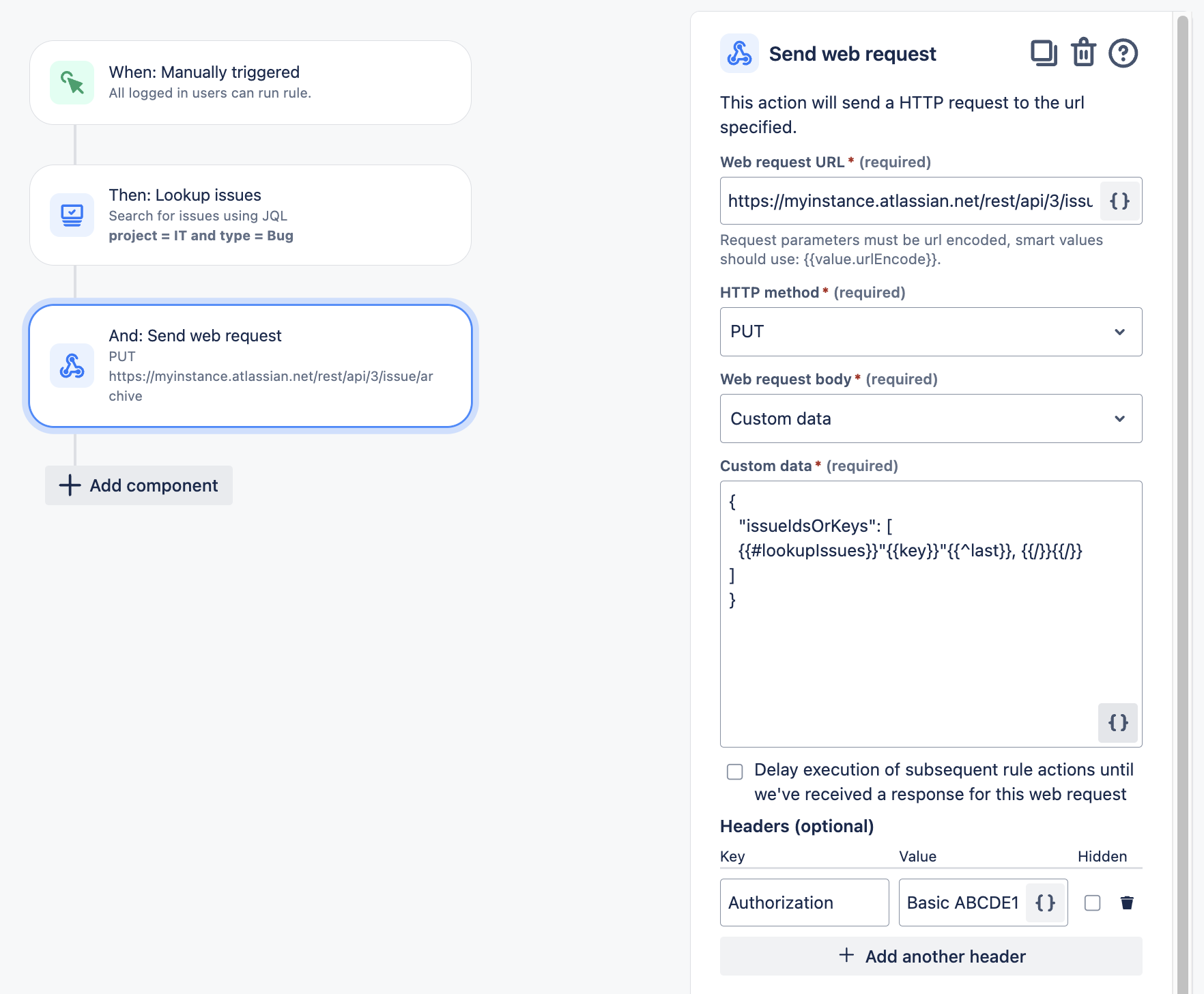
Configure the Send web request action with the following parameters:
Web request URL:
https://<YOUR-URL>.atlassian.net/rest/api/3/issue/archiveHTTP method: PUT
Web request body: Custom data
Custom data:
{
  "issueIdsOrKeys": [
    {{#lookupIssues}}"{{key}}"{{^last}}, {{/}}{{/}}
  ]
}
Headers & Authentication: Ensure keys are double-quoted and comma-separated as shown above, and authorize the request using your Base64-encoded user API token. See the instructions here.
Please refer to the screenshot below for an example automation rule:
Was this helpful?