Confluence Cloud でユーザー ライセンスの上限を超えるとどうなりますか?
プラットフォームの注記: Cloud のみ - This article only applies to Atlassian apps on the クラウド プラットフォーム上のアトラシアン製品にのみ適用されます。
要約
For customers who are on annual subscriptions, when you exceed your user-tier license limit, users will experience reduced functionality for Confluence (I.E. edit the description of spaces or create personal spaces), but it does not mean that the site will become read-only, as it happens in Confluence Data Center/Server.
When it happens in Cloud, you would need to either contact us to upgrade the product license tier or remove licenses from existing users.
ℹ️ ユーザーは引き続きスペースやページを作成できるため、既存のページを編集できます。
診断
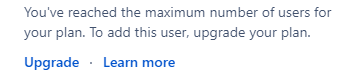
Confluence の新しいユーザーを追加しようとすると、次のメッセージが表示されます。
ユーザー数がお使いのプランの最大数に達しています。このユーザーを追加するには、プランをアップグレードしてください。
When trying to edit the space details in Confluence or create a new personal space, another message is displayed (notice that this does not impact other types of spaces or editing/creating pages):

原因
When using Atlassian Guard for user management so new users are added via user provisioning, and new users will be added to the site and consume product licenses. This behavior is explained in the following closed bug:
ソリューション
この問題を解決するには、次の 2 つの方法があります。
現在の年間ライセンス サブスクリプションを、より高いユーザー階層にアップグレードする。
You would need to contact our licensing team in Pricing, billing & licensing inquiries | Atlassian
2. Reduce the number of users consuming a Jira or Confluence Cloud license.
1 人以上の既存のユーザーからライセンス割り当てを削除するには、次の手順を実行します。
admin.atlassian.com にログインします。
ユーザーを削除するサイトを選択します。
For the Users, you want to remove product access, click on the (…) button and select Show Product Access.
製品の横にあるチェックボックスをオフにすると、そのユーザーからライセンスの割り当てとアクセス権の両方が削除されます。
Click Save to confirm the changes.
この内容はお役に立ちましたか?