Use cover images for work items and board cards in Jira Cloud
Platform Notice: Cloud Only - This article only applies to Atlassian apps on the cloud platform.
Summary
Covers can be used to make work items stand out on the board view in both company- and team-managed Software and Business projects in Jira.
Solution
Cover images in Jira spaces
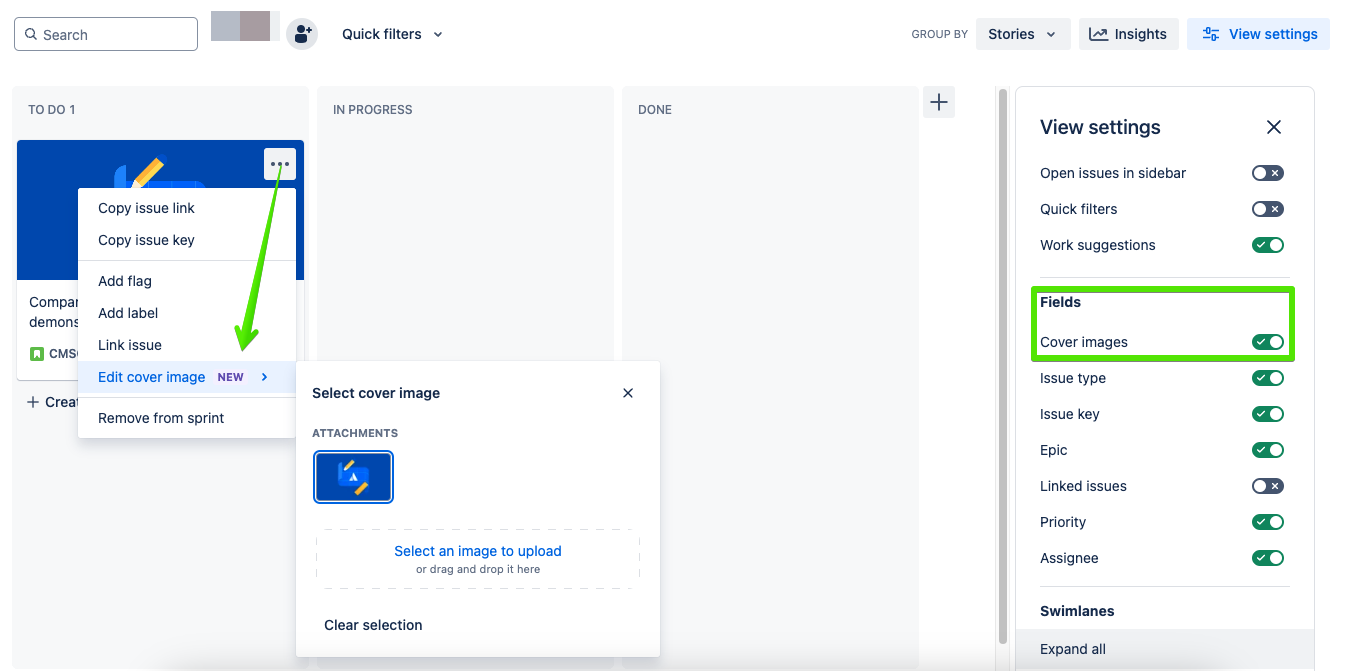
First, ensure that your board view settings will display cover images once they've been added:
Visit your Active sprints view (for Scrum boards) or the Kanban board view (for Kanban boards)
Select View settings and toggle ‘Card cover’ on
Next, add a cover image to your work item:
From the board view click More options (...) on one of your work items
In the Select cover popup, select any color, gradient, photo by Unsplash, or image attachment
Updated on July 23, 2026
Was this helpful?
Still need help?
The Atlassian Community is here for you.