Update Run-As User for JSM Cloud Legacy Automation
Platform Notice: Cloud Only - This article only applies to Atlassian apps on the cloud platform.
Summary
In Automation for Jira, you can set a rule's Owner and Actor. However, in Legacy Automation, you can only configure who runs the automation.
Solution
Change the Legacy Automation configuration
When you select an individual automation rule, the current user can be identified by using the cogwheel within the rule. By default, this will be the user who is set as the Project Administrator.
Alternatively, within individual rules, the default user can be overwritten to be the user who triggered the automation rule.
To update the default user that Legacy Automation uses:
Navigate to Project Settings > Automation > Legacy Automation.
Select the "

" icon next to 'Add rule' as shown in the screenshot below:
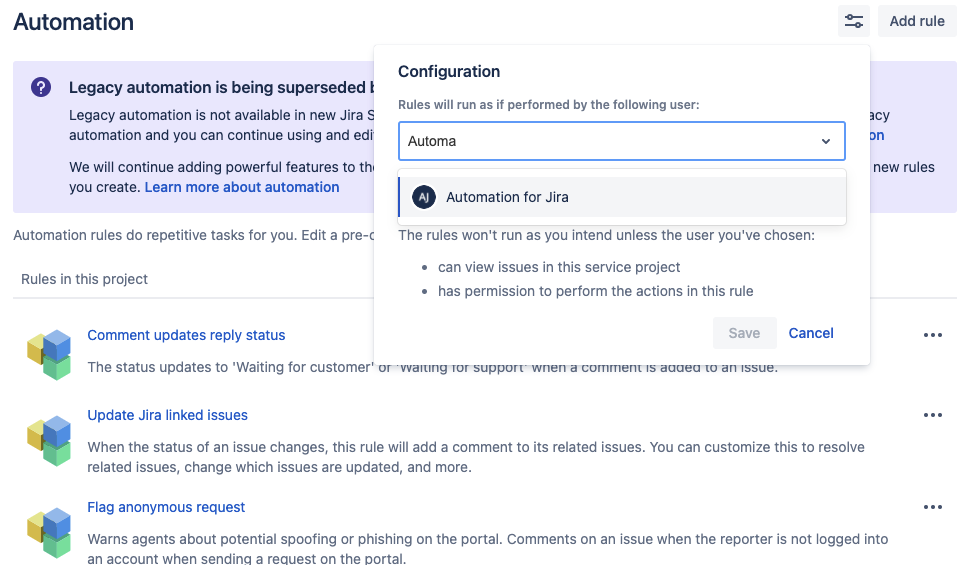
Type in the desired user in the user picker field and hit Save.
Was this helpful?