Unable to create work item in Jira Cloud
Platform Notice: Cloud Only - This article only applies to Atlassian apps on the cloud platform.
Summary
While creating a work item user gets the error:
Couldn't create the work item
We're having some trouble creating the work item. Refresh the page and try again.
This guide will explain how to troubleshoot this error when there is no indication from the error message what went wrong.
Diagnosis
Analyze error code in browser DevTools
Check the browser dev tools and you will see the below call in Network tab with 500 response code:
issue?updateHistory=true&applyDefaultValues=false
Status Code - 500 Internal Server Error
Below is the response:
"errorMessages": ["We can't create this issue for you right now, it could be due to unsupported content you've entered into one or more of the issue fields. If this situation persists, contact your administrator as they'll be able to access more specific information in the log file."],Note: The on-screen message and the 500 response do not identify the failing field or function. Your Jira admin can review the network response for more specific details before you adjust the workflow.
Check the create issue transition for the workflow
Since the work item is not being created without proper indication, we should review the Create Issue transition from the workflow post function.
As per the document: Use post functions with the initial transition
Jira includes the following essential post functions that are specific to a workflow's initial transition and that are performed in this order:
Create the work item.
Fire an event that can be processed by the listeners.
Cause
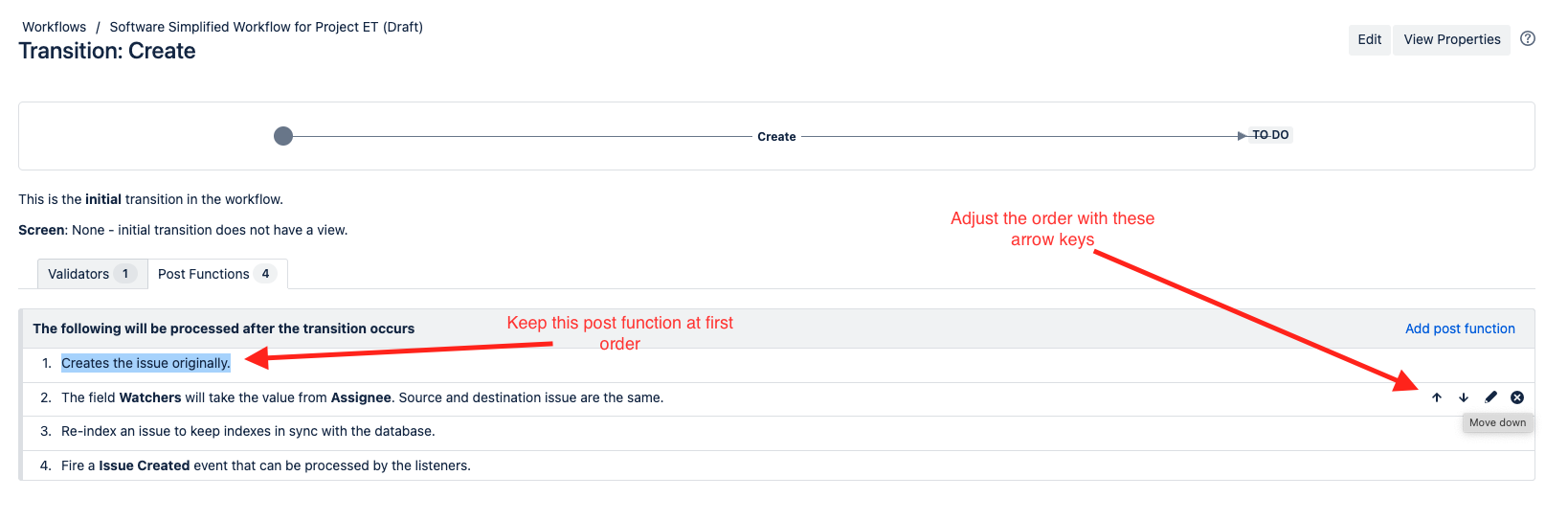
The "Creates the issue originally" is not the first post function on the list.
Solution
To resolve this issue, reorder the post functions on the initial transition:
Open the workflow used by the space and work item type where the error occurs (Settings → Work item → Workflows, then edit the affected workflow).
Select the Create transition (the initial transition leading into the first status).
Review the post functions listed on that transition.
Move Creates the issue originally to the top - if it is not in the first position, use the arrow icons to move it to position 1.
Publish the workflow draft.
Try creating the work item again to confirm issue creation succeeds.
Track the feature request to improve the error message for a create work item problem caused by a workflow post function:
Was this helpful?