Unable to assign or mention users for a certain projects only.
Platform Notice: Data Center Only - This article only applies to Atlassian apps on the Data Center platform.
Note that this KB was created for the Data Center version of the product. Data Center KBs for non-Data-Center-specific features may also work for Server versions of the product, however they have not been tested. Support for Server* products ended on February 15th 2024. If you are running a Server product, you can visit the Atlassian Server end of support announcement to review your migration options.
*Except Fisheye and Crucible
Summary
Symptoms
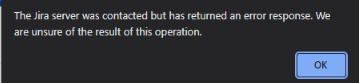
A small number of projects have issues both in setting the assignee and mentioning users.
Projects in question share Permission Schemes with unaffected projects.
Setting the Reporter does not experience the same issue.
Environment
Jia Data Center.
Diagnosis
The following log appears in atlassian-jira.log when the user hits the above error when trying to set an assignee.
 /rest/internal/2/user/mention/search [c.a.p.r.c.error.jersey.ThrowableExceptionMapper] Uncaught exception thrown by REST service: Failed to getPermissionSchemeIdFor; projectId=10374
java.lang.RuntimeException: Failed to getPermissionSchemeIdFor; projectId=10374
	at com.atlassian.jira.mention.stats.SchemePermissionsDAOWithStats.getPermissionSchemeIdFor(SchemePermissionsDAOWithStats.java:55)
	at com.atlassian.jira.permission.DefaultIssueUserSearchManager.getPermissionSchemeLogic(DefaultIssueUserSearchManager.java:133)
	at com.atlassian.jira.permission.DefaultIssueUserSearchManager.findTopMentionableUsers(DefaultIssueUserSearchManager.java:94)
	at com.atlassian.jira.bc.user.search.DefaultUserPickerSearchService.findTopMentionableUsers(DefaultUserPickerSearchService.java:294)
	at com.atlassian.jira.mention.SortedMentionableUserSearcher.searchForUsers(SortedMentionableUserSearcher.java:216)
	at com.atlassian.jira.mention.SortedMentionableUserSearcher.findRelatedUsersToMention(SortedMentionableUserSearcher.java:113)
	at jdk.internal.reflect.GeneratedMethodAccessor2420.invoke(Unknown Source)
Caused by: com.querydsl.core.NonUniqueResultException: Only one result is allowed for fetchOne calls
	at com.querydsl.core.support.FetchableQueryBase.uniqueResult(FetchableQueryBase.java:64)
	at com.querydsl.sql.ProjectableSQLQuery.fetchOne(ProjectableSQLQuery.java:398)
	at com.atlassian.jira.permission.QueryDSLSchemePermissionsDAO.lambda$getPermissionSchemeIdFor$0(QueryDSLSchemePermissionsDAO.java:57)
	at com.atlassian.jira.database.DefaultQueryDslAccessor.lambda$executeQuery$0(DefaultQueryDslAccessor.java:68)
	at com.atlassian.jira.database.DatabaseAccessorImpl.lambda$runInTransaction$0(DatabaseAccessorImpl.java:105)
	at com.atlassian.jira.database.DatabaseAccessorImpl.runInTransaction(DatabaseAccessorImpl.java:100)
	at com.atlassian.jira.database.DefaultQueryDslAccessor.executeQuery(DefaultQueryDslAccessor.java:67)
	at com.atlassian.jira.database.QueryDslAccessorHandlingCollationProblems.executeQuery(QueryDslAccessorHandlingCollationProblems.java:81)
	at com.atlassian.jira.permission.QueryDSLSchemePermissionsDAO.getPermissionSchemeIdFor(QueryDSLSchemePermissionsDAO.java:49)
	at com.atlassian.jira.mention.stats.SchemePermissionsDAOWithStats.getPermissionSchemeIdFor(SchemePermissionsDAOWithStats.java:43)
Cause
There are multiple permission schemes associated to the JIRA project that might have caused by corrupted XML migration or by third party application.
Solution
Start by identifying duplicate permission schemes associated with projects. Run the following SQL query(this had been tested on Microsoft SQL server):
SELECT na.*, p.pkey AS 'Project Key', p.ID AS 'Project ID', p.pname AS 'Project Name', ps.ID AS 'Permission Scheme ID', ps.NAME AS 'Permission Scheme Name'
FROM jiraschema.nodeassociation na
JOIN jiraschema.project p ON na.SOURCE_NODE_ID = p.ID
LEFT JOIN jiraschema.permissionscheme ps ON na.SINK_NODE_ID = ps.ID
WHERE na.SOURCE_NODE_ENTITY = 'Project'
AND na.SINK_NODE_ENTITY = 'PermissionScheme'
AND na.SOURCE_NODE_ID IN (SELECT SOURCE_NODE_ID--, COUNT
FROM jiraschema.nodeassociation
WHERE SOURCE_NODE_ENTITY = 'Project'
AND SINK_NODE_ENTITY = 'PermissionScheme'
GROUP BY SOURCE_NODE_ID
HAVING COUNT(SOURCE_NODE_ID) > 1)
The SQL above will identify the duplicate Permissionscheme ID
--GET NODE ASSOCIATIONS linking to Permission schemes which don't exist anymore.
--THESE NEED TO BE DELETED
SELECT *
FROM jiraschema.nodeassociation na
WHERE na.SOURCE_NODE_ENTITY = 'Project'
AND na.SINK_NODE_ENTITY = 'PermissionScheme'
AND na.SINK_NODE_ID NOT IN (SELECT ID FROM jiraschema.permissionscheme)
Was this helpful?