Select Default Product Access while Inviting User
Platform Notice: Cloud Only - This article only applies to Atlassian apps on the cloud platform.
Summary
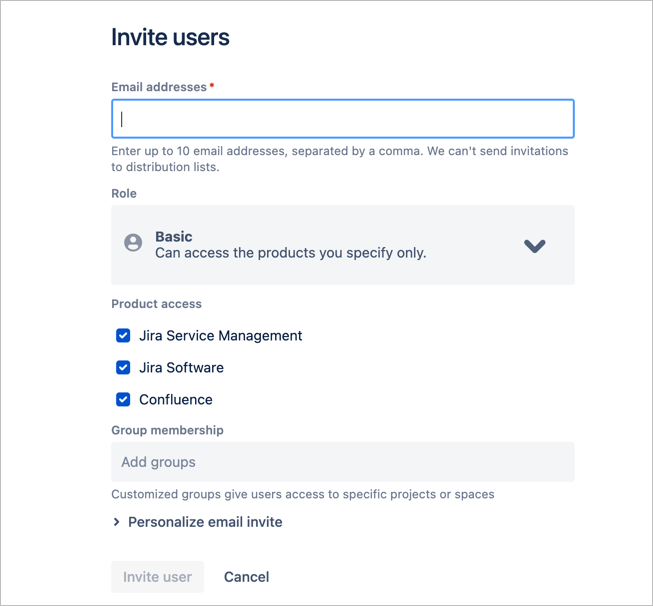
In the new user access settings experience, when extending user invitations, the system auto-selects all products for access, potentially causing administrators to miss the manual deselection of products they intend to restrict. This article investigates the underlying causes and associated consequences of this behavior.
Cause
Due to a larger project of migration to refine the user-management experience, which moved the user base from the site level to the org level, the concept of ‘site access’ no longer exists. This means that users are now in a shared user base with multiple products. How users get access to that user base was redesigned with multiple products in mind.
We have an ongoing Feature Request to address this default behavior:
Until this change ships, the invite experience selects all products by default. Follow ID-8059 for updates.
Solution
Currently there is no way to change the default selected products. Administrators must manually uncheck the products on the invite modal shown above.
Jira Invite using the Cloud API
The new user who is created via the Jira Cloud REST API Create Users endpoint will automatically have access to the default product access settings.
When creating users via the Jira Cloud REST API, configure the products field based on your access requirements:
Omit or leave the
productsfield empty — the user receives default product access.Set
productsto an empty array ([ ]) — the user is created with no product access.List specific products in
products— the user receives only the specified products (e.g.,jira-software).
Supported product values from the source: jira-core, jira-servicedesk, jira-product-discovery, jira-software.
In the example below, the user is being granted jira-software product access:
Example
Example :

{
  "userId": "<string>",
  "email": "<string>",
  "extraGroups": [
    "<string>"
  ],
  "products": [
    "jira-software"
  ],
  "suppressInviteEmail": true,
  "inviteEmailText": "<string>",
  "inviteContinueUrl": "<string>",
  "createdDate": "<string>"
}
Note: If you invited someone before deselecting a product, you can adjust their product access afterward, you do not need to delete and re-invite them. Manage their access from your organization's user management settings.
Was this helpful?