JSON Queries in Jira Automation
Platform Notice: Cloud Only - This article only applies to Atlassian apps on the cloud platform.
Summary
Currently, it is not possible to query JSON data using conditional operators in the Jira automation smart values. We can only perform simple traversing of this data using JSON object notation.
This limitation is being tracked as a feature request, identified as More ways to use code in Automation, e.g. ability to use JSON path expressions to query JSON data in web request responses
Solution
Despite the current limitations, Jira Automation allows for the traversal of JSON data based on given attributes through the use of Advanced Compare Conditions. The following example illustrates how this can be achieved:
JSON data
{
"details": [
{
"attribute": "AccountExist",
"newValue": "TRUE",
"oldValue": "FALSE"
},
{
"attribute": "userID",
"newValue": "57EDF17A1697F4393EC78A01",
"oldValue": "null"
},
{
"attribute": "userName",
"newValue": "user001",
"oldValue": "null"
},
{
"attribute": "emailAddress",
"newValue": "newaddress@domain.com",
"oldValue": "null"
},
{
"attribute": "fullName",
"newValue": "Test User",
"oldValue": "null"
}
]
}
Use case: Find the value given against the parameter "newValue" where the attribute is 'fullname'. Usually, it can be done using the following expression for the JSON data; however, the conditional operator can't be used in automation smart values:
expression
$.details[?(@.attribute=='fullName')].newValueTo solve this, an automation rule can be created using the 'Advanced branching' action as follows:
Step 1: Branch against the smart value {{webhookData.details}}. The result will comprise the arrays from the JSON data.
Step 2: Perform a conditional compare to check if any of the `attribute` properties consist of 'fullName'.
Step 3: If the condition is met, log the 'newValue'.
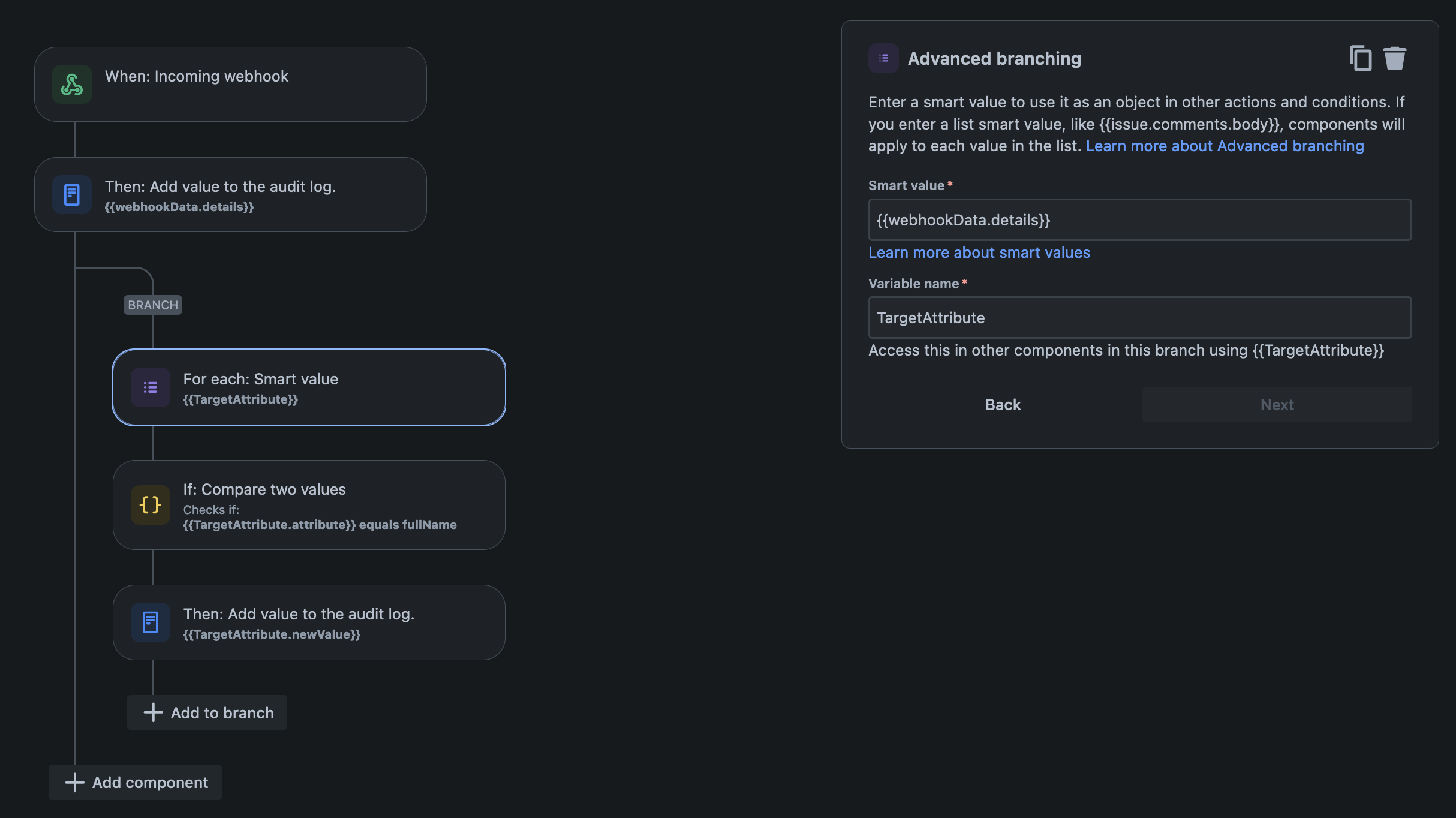
After building the Advanced Branching rule, test it against JSON payloads where the target attribute appears in different array positions (not just the first element) to confirm the branch-and-compare approach reliably finds the right entry regardless of position.
For JSON payloads with more than a handful of possible array positions, the branch-and-compare approach can get unwieldy — consider whether a 'Send web request' round-trip to a small external function (if your team already uses one) that returns the specific value would be more maintainable than nesting additional branches.
References:
If you encounter issues or require further clarification on the topic, please consider reaching out to Atlassian Support for further assistance.
Was this helpful?