JIRA Service Stops Working after Upgrading from 6.x to 7.x in Windows
Platform Notice: Data Center Only - This article only applies to Atlassian apps on the Data Center platform.
Note that this KB was created for the Data Center version of the product. Data Center KBs for non-Data-Center-specific features may also work for Server versions of the product, however they have not been tested. Support for Server* products ended on February 15th 2024. If you are running a Server product, you can visit the Atlassian Server end of support announcement to review your migration options.
*Except Fisheye and Crucible
Summary
Symptoms
After upgrading JIRA from 6.x to 7.x (e.g. 6.4.12 to 7.2) in Windows using Rapid method, JIRA service stops working.
Diagnosis
Manually starting the service throws an error that the service's Executable Path is not found.
Cause
JIRA 7.x is bundled with Tomcat 8 while JIRA 6.x doesn't support Tomcat 8. During the upgrade, Tomcat 7 which is used by JIRA 6.x. is removed and replaced by Tomcat 8, causing the service to be unable to find the path to Tomcat 7.
Solution
Resolution
Open cmd as Admin and run this command to delete the service
sc delete ServiceNameServiceName can be found from Service Manager (right click the Service -> Properties):
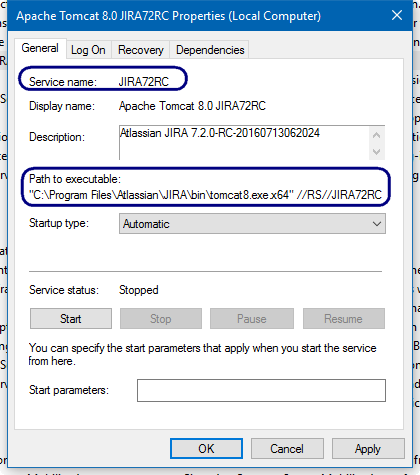
Still in cmd, cd to
JIRA_Install/binand run this command to register a new service:service.bat install AnyUniqueServiceNameThis will register a new JIRA service pointing to the executable Tomcat 8 (as in the above image)
Was this helpful?