Notify pending approvers using Automation for JSM Cloud
Platform Notice: Cloud Only - This article only applies to Atlassian apps on the cloud platform.
Summary
Automate reminders for approvers to review pending requests in service projects. Learn how to setup notifications effectively.
Solution
Before you start
You'll need the smart value notation of your Approval custom field before building this rule. Every example below uses customfield_ID as a placeholder — replace it with your field's actual smart value.
Follow Find the smart value for a field to retrieve it.
Pick your approver-field type
The correct rule depends on how approvers are configured:
User Picker approver field — use Case 1 below (indexes approvers with
.approvers.get(0)).Other approver configurations — adapt the JQL and smart values accordingly.
The rule pattern: run a scheduled JQL search for issues with pending approvals, re-fetch the data, then comment @-mentioning the approver whose decision is still pending.
Use an automation rule to notify the pending approvers
The suggested automation rule logic is to search for tickets with the final approval decision set to "pending" because one or more approvers have not yet made their decision, then comment on the ticket to "@" notify the user pending approval.
Please keep in mind that you must find the appropriate smart value of the custom field Approval. You must replace customfield_ID with the smart value of your field in the rule.
Please follow the instructions in our article to retrieve a custom field's smart value notation.
Case 1: Using a User Picker field
The example rule below is in a scenario where two approvers are in the selected approver field.
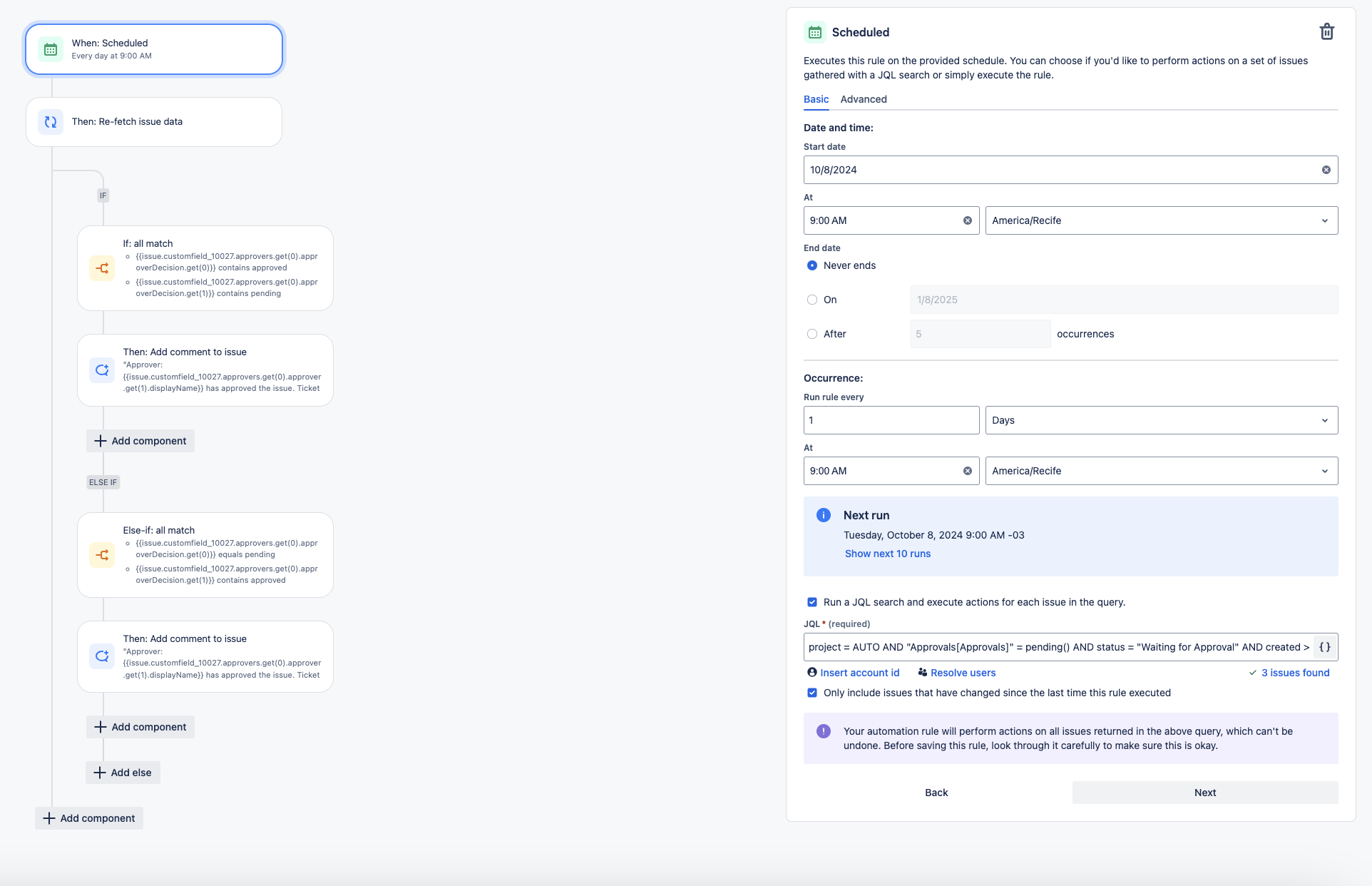
When: Scheduled
Mark the "Run a JQL search and execute actions for each work item in the query" checkbox and filter for the work items with pending approvals:
"Approvals[Approvals]" = pending() AND --complete your JQL filter here (I.E. project = PROJECTKEY AND status = "Waiting for Approval")
Then: Re-fetch work item data
Add a condition: IF or ELSE block
If: All matches
First value:
{{issue.customfield_ID.approvers.get(0).approverDecision.get(0)}}Condition: contains
Second value: approved
AND
First value:
{{issue.customfield_ID.approvers.get(0).approverDecision.get(1)}}Condition: contains
Second value: pending
Then: Add comment to work item
Comment: "Approver: {{issue.customfield_ID.approvers.get(0).approver.get(0).displayName}} has approved the work item. Ticket is now waiting for the Approver: [~accountid:{{issue.customfield_ID.approvers.get(0).approver.get(1).accountId}}] decision."
Else If: All matches
First value:
{{issue.customfield_ID.approvers.get(0).approverDecision.get(0)}}Condition: contains
Second value: pending
AND
First value:
{{issue.customfield_ID.approvers.get(0).approverDecision.get(1)}}Condition: contains
Second value: approved
Then: Add comment to work item
Comment: "Approver: {{issue.customfield_ID.approvers.get(0).approver.get(1).displayName}} has approved the work item. Ticket is now waiting for the Approver: [~accountid:{{issue.customfield_ID.approvers.get(0).approver.get(0).accountId}}] decision."
Name the automation rule and turn it ON
Below is an example of what the rule will look like in the automation editor:
Case 2: Using a Group Picker field
The example rule below is for a scenario in which an approver group field is selected as the approver source.
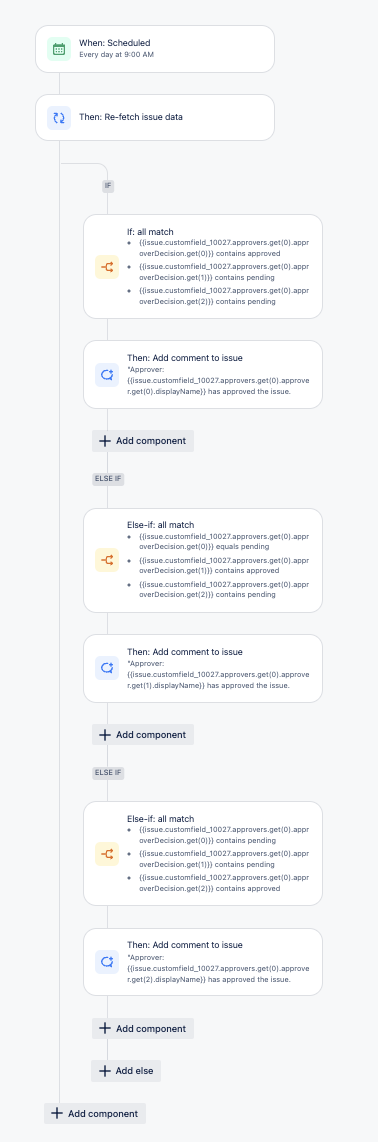
When: Scheduled
Mark the "Run a JQL search and execute actions for each work item in the query" checkbox and filter for the work items with pending approvals:
"Approvals[Approvals]" = pending() AND --complete your JQL filter here (I.E. project = PROJECTKEY AND status = "Waiting for Approval")
Then: Re-fetch work item data
Add a condition: IF or ELSE block
If: All matches
First value:
{{issue.customfield_ID.approvers.get(0).approverDecision.get(0)}}Condition: contains
Second value: approved
AND
First value:
{{issue.customfield_ID.approvers.get(0).approverDecision.get(1)}}Condition: contains
Second value: pending
AND
First value:
{{issue.customfield_ID.approvers.get(0).approverDecision.get(2)}}Condition: contains
Second value: pending
Then: Add comment to work item
Comment: "Approver: {{issue.customfield_ID.approvers.get(0).approver.get(0).displayName}} has approved the work item. Ticket is now waiting for the Approvers: [~accountid:{{issue.customfield_ID.approvers.get(0).approver.get(1).accountId}}] and [~accountid:{{issue.customfield_ID.approvers.get(0).approver.get(2).accountId}}] decision."
Else If: All matches
First value:
{{issue.customfield_ID.approvers.get(0).approverDecision.get(0)}}Condition: contains
Second value: pending
AND
First value:
{{issue.customfield_ID.approvers.get(0).approverDecision.get(1)}}Condition: contains
Second value: approved
AND
First value:
{{issue.customfield_ID.approvers.get(0).approverDecision.get(2)}}Condition: contains
Second value: pending
Then: Add comment to work item
Comment: "Approver: {{issue.customfield_ID.approvers.get(0).approver.get(1).displayName}} has approved the work item. Ticket is now waiting for the Approver: [~accountid:{{issue.customfield_ID.approvers.get(0).approver.get(0).accountId}}] and [~accountid:{{issue.customfield_ID.approvers.get(0).approver.get(2).accountId}}] decision."
Else If: All matches
First value:
{{issue.customfield_ID.approvers.get(0).approverDecision.get(0)}}Condition: contains
Second value: pending
AND
First value:
{{issue.customfield_ID.approvers.get(0).approverDecision.get(1)}}Condition: contains
Second value: pending
AND
First value:
{{issue.customfield_ID.approvers.get(0).approverDecision.get(2)}}Condition: contains
Second value: approved
Then: Add comment to work item
Comment: "Approver: {{issue.customfield_ID.approvers.get(0).approver.get(2).displayName}} has approved the work item. Ticket is now waiting for the Approver: [~accountid:{{issue.customfield_ID.approvers.get(0).approver.get(0).accountId}}] and [~accountid:{{issue.customfield_ID.approvers.get(0).approver.get(1).accountId}}] decision."
Name the automation rule and turn it ON
Here's a screenshot of the finished rule in the automation editor:
Confirm if it worked
Create a test request that requires two approvers: have one approve and leave the other pending.
Trigger the rule and confirm the pending approver is @-mentioned in a comment and receives the notification.
Feature request ticket
The following feature suggestion has been raised for the implementation and improvement of the "Approval required" automation rule action in JSM:
References
Was this helpful?