How to send emails Approvers of Jira release using Automation for Jira
Platform Notice: Cloud Only - This article only applies to Atlassian apps on the cloud platform.
Summary
When a user is added as an approver to a Release, they won't be notified about it. This can cause problems as their attention is required. This article provides a solution using automation to send the user a notification when they are added as an approver.
Solution
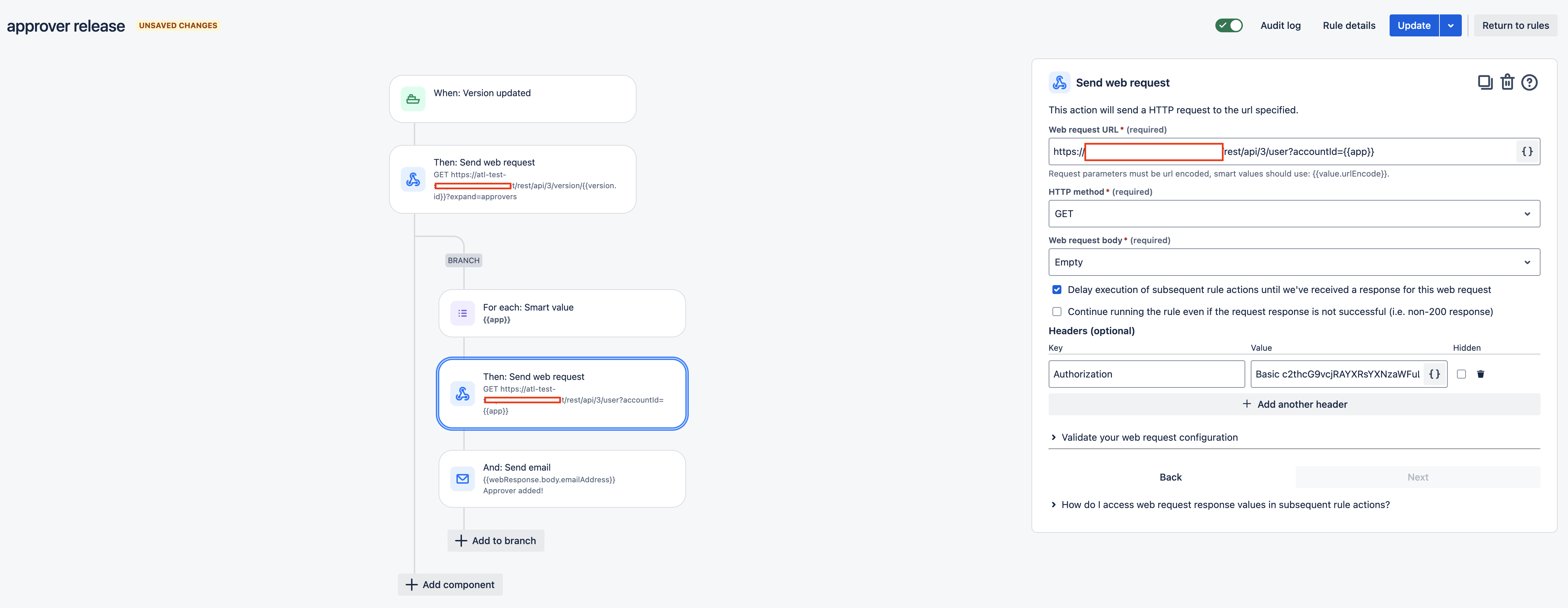
The automation rule will be configured like this:
Add the Version updated trigger.
Add a Send Web Request action with the following settings:
Web request URL: https://sitename/rest/api/3/version/{{version.id}}?expand=approvers
HTTP method: GET
Web request body: Empty
Mark the checkbox of the setting: Delay execution of subsequent rule actions until we've received a response for this web request
In the Headers (optional) section, add the header key Authorization, and the value will be the API token encoded in Base64. For more details on this, check Automation for Jira - Send web request using Jira REST API.
Add an Advanced branching condition (a smart values branch) with the following settings:
Smart value:
{{webResponse.body.approvers.accountID}}Variable name: app
Add another Send Web Request action with the following settings:
Web request URL: https://sitename/rest/api/3/user?accountId={{app}}
HTTP method: GET
Web request body: Empty
Mark the checkbox of the setting: Delay execution of subsequent rule actions until we've received a response for this web request
In the Headers (optional) section, please add the header key Authorization and the value will be the API token encoded to Base64. For more details on this, check .
Add the action of Send email with the following settings:
To:
{{webResponse.body.emailAddress}}Subject: Any subject of your choice.
Content: Any content of your choice.
The automation rule will look like this:
Was this helpful?