How to retrieve the association between users, teams and the Advanced Roadmaps plans in Jira Data Center
Platform Notice: Data Center Only - This article only applies to Atlassian apps on the Data Center platform.
Note that this KB was created for the Data Center version of the product. Data Center KBs for non-Data-Center-specific features may also work for Server versions of the product, however they have not been tested. Support for Server* products ended on February 15th 2024. If you are running a Server product, you can visit the Atlassian Server end of support announcement to review your migration options.
*Except Fisheye and Crucible
Summary
At times, you may need to identify the connection between an Advanced Roadmaps plan and its associated teams, as well as the members of those teams. This article aims to retrieve that information from the Jira database.
Environment
Jira Data Center 8.20.0 and any higher version.
Solution
You can use the following SQL Query to retrieve the association between plans, teams and the team members:
select PL."TITLE" AS "Plan_Title",T."TITLE" AS "Team_TITLE",P."JIRA_USER_ID" from "AO_82B313_RESOURCE" R
join "AO_82B313_PERSON" P on R."PERSON_ID" = P."ID"
join "AO_82B313_TEAM" T on R."TEAM_ID" = T."ID"
join "AO_D9132D_PLANTEAM" PT on PT."TEAM_ID" = T."ID"
join "AO_D9132D_PLAN" PL on PL."ID" = PT."PLAN_ID";
Please note the following information is provided as-is. Atlassian Support cannot provide further assistance with the SQL queries described below.
This query was written for Postgres and might require adjustments to work on different database servers:
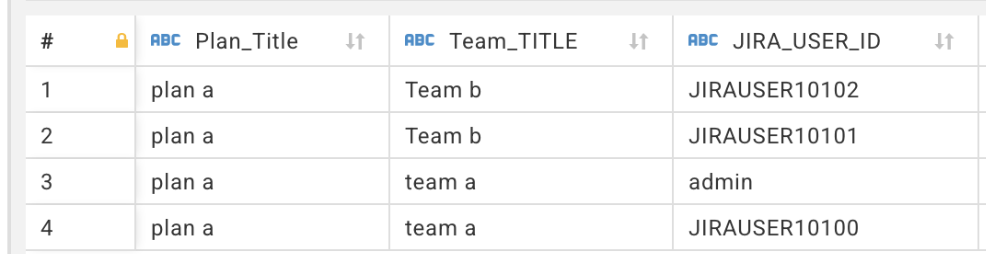
Here is a sample output:
Was this helpful?