How to increase the Request Participant field size in Jira Service Management
Platform Notice: Data Center Only - This article only applies to Atlassian apps on the Data Center platform.
Note that this KB was created for the Data Center version of the product. Data Center KBs for non-Data-Center-specific features may also work for Server versions of the product, however they have not been tested. Support for Server* products ended on February 15th 2024. If you are running a Server product, you can visit the Atlassian Server end of support announcement to review your migration options.
*Except Fisheye and Crucible
Summary
In the issue view of Jira Service Management projects, the user picker fields for Request Participants, Reporter, and Assignee are too narrow to display full user names, increasing the risk of selecting the wrong user.
When user names are long, it becomes difficult to distinguish them in the list, as illustrated below:
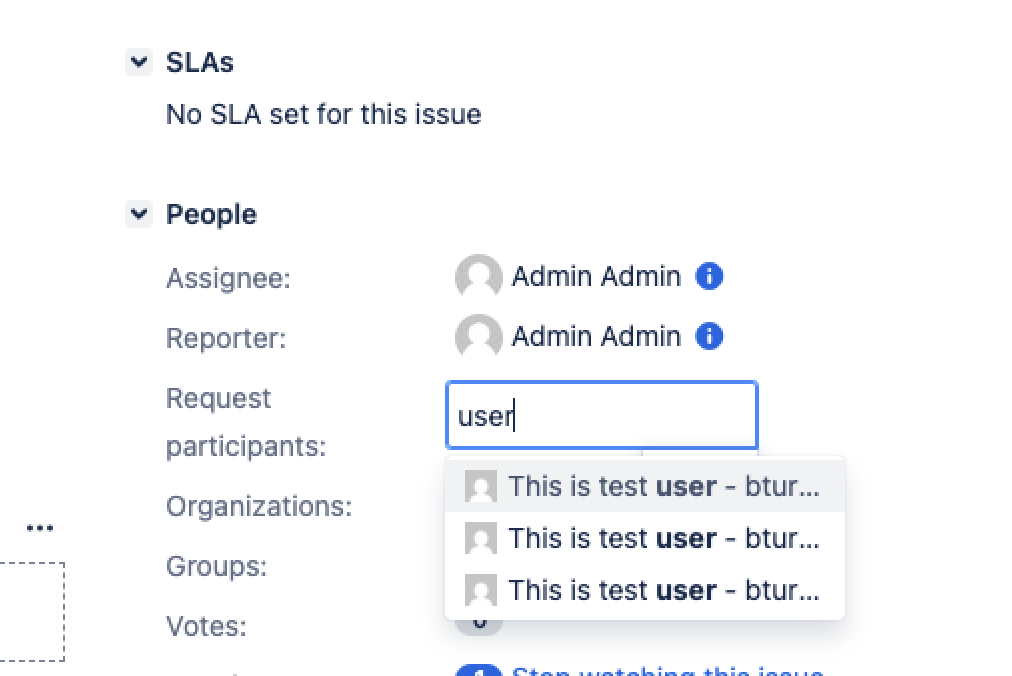
The purpose of this article is to provide a way to increase the size of the Request Participant field list.
Environment
Jira Service Management Data Center on any version from 10.3.0.
Solution
Right-click on the Issue View screen and select "View Page Source."
Search for the keyword "Request participants:" and locate the relevant sections
<label for="customfield_XXXXX">Request participants:</label>
...
<span id="<customfield_span_id>" data-name="Request participants:" data-fieldtype="sd-request-participants" ...
Extract the customfield span id from the span id section.
Add the announcement banner below with the correct span id, by going to ⚙ > System > Announcement Banner:
<style>
  #<customfield_span_id> {
      width: 400px !important;
      max-width: 100% !important;
  }
</style>
Was this helpful?