How to Enable Notifications for Agents Acting as Customers in Jira
Platform Notice: Data Center Only - This article only applies to Atlassian apps on the Data Center platform.
Note that this KB was created for the Data Center version of the product. Data Center KBs for non-Data-Center-specific features may also work for Server versions of the product, however they have not been tested. Support for Server* products ended on February 15th 2024. If you are running a Server product, you can visit the Atlassian Server end of support announcement to review your migration options.
*Except Fisheye and Crucible
Summary
By default, JSM treats agents as customers when they're the Reporter, Request Participant, Approver, or part of a shared customer organization — so they may not receive Jira notifications for internal comments or changes.
This configuration sends internal activity notifications to agents who are Request Participants, Approvers, or organization members, while Reporters continue receiving JSM customer notifications to avoid duplicates.
Solution
Definitions
For the configuration below, Jira notifications are governed by the project’s notification scheme, while Jira Service Management customer notifications are governed by the customer notification settings.
Jira notifications: General notifications shared between all Jira applications. These notifications are designed to keep team members informed about progress on particular tickets. They usually include notifications about issue updates (new information, comments, etc.) or work progress (started, stopped, etc.)
Jira Service Management / Customer notifications: Notifications specific to Jira Service Management. These notifications are designed to keep customers informed about the progress of particular tickets without disclosing information about internal processes. They usually include responses to customers, customer-visible changes, approvals, or requests being shared with individuals or organizations.
Context
If you need more details about how Jira Service Management and Jira notifications work together, see Managing Service Management notifications. For the purpose of this article, let’s just focus on this section:
Agents and admins
When agents and admins work on a request, they receive notifications as part of the project's notification scheme.
Agents don't receive notifications on their own changes when they act as a customer on issues with a set request type. Jira Service Management treats agents acting as a reporter, participant, or approver on these issues as a customer. This occurs regardless of the notification scheme. Additionally, agents acting as customers (e.g., reporters, request participants) will not receive @mention notifications for internal comments as this is by design to maintain the privacy of internal discussions.
Agents who are part of an organization will only receive a customer notification when a request is shared with that organization. If the agent is the assignee of the issue, they won't receive any notifications from the project's Jira notification scheme.
In other words, Jira Service Management blocks Jira notifications for agents who meet the Jira Service Management customer criteria on a ticket, that is, act as:
Reporter
Request Participant
Approver
Part of the customer organization, the ticket is shared with
This means that agents won’t receive any notifications about internal comments or changes to the ticket unless these changes are visible to customers as well. Some admins see this behavior as counterintuitive or incorrect.
Enabling notifications for agents acting as customers
Let’s configure Jira to send Jira notifications about all internal activity on a ticket to agents who are Request Participants, Approvers, or part of a customer organization the ticket is shared with, but not to the Reporter. For Reporters, we’ll just send Jira Service Management’s customer notifications to avoid duplicate notifications.
Step 1. Choose to send all notifications to customers
In this step, we’ll configure Jira to send both Jira Service Management and Jira notifications to customers.
Go to Administration > Applications > Configuration (under Jira Service Management).
In the Notifications section, select the option to send both Jira Service Management and Jira notifications to customers (called Yes, send customers both Jira Service Management and Jira notifications)
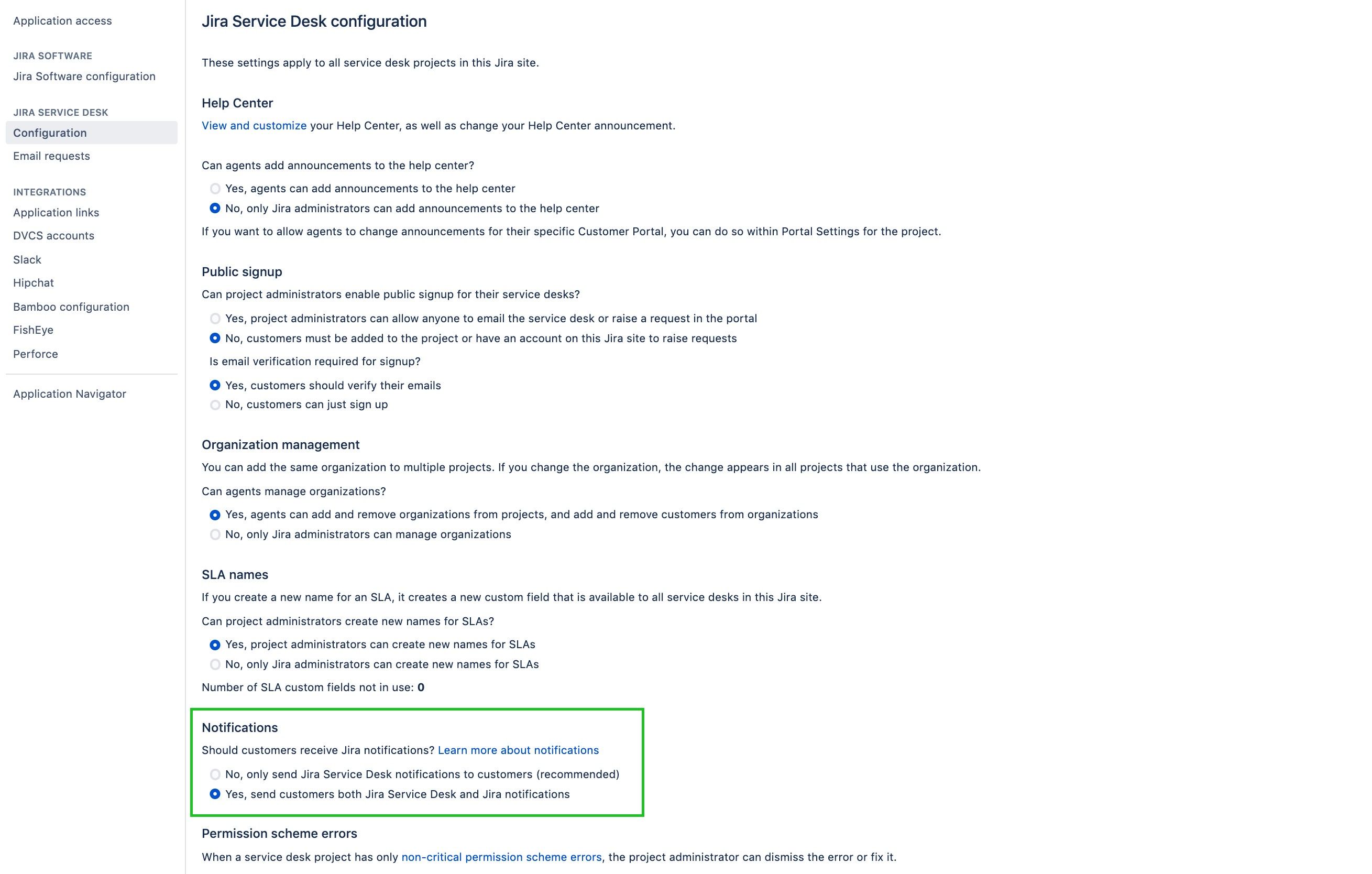
Things you should know about this setting:
This is a global setting that affects all Service Management projects.
Some notifications may be duplicated because Jira notifications and Jira Service Management customer notifications operate independently after this setting is enabled.
Customers will continue to receive customer notifications as before, and Jira notifications will also be sent according to the project’s notification scheme.
Existing Bugs related to the Notification Configuration:
When selecting the option No, only send Jira Service Management notifications to customers (recommended). When a user is acting as both a customer and an agent in a request, this user will receive both a customer notification and a Jira notification if mentioned in a public comment.
When selecting the option Yes, send customers both Jira Service Management and Jira notifications, the only way to be able to send a customer (without any license / application access) both notifications is by adding the "Service Desk Team" role to this customer. This behavior seems to be contradictory to the name of the setting itself.
Step 2. Create a new notification scheme
Assuming you’re using the default notification scheme, some notifications will be duplicated because both Jira and Jira Service Management will try to notify the Reporter of a ticket (a role shared by these two applications) about updates. We can avoid that by limiting the Reporter’s notifications to Jira Service Management customer notifications only. To do that, we’ll create a new notification scheme.
Go to Administration > Issues > Notification schemes.
Click Add notification scheme.
Give it a name and description, and click Add.
In this configuration, select all events and notify All Watchers and Current Assignee. Don't add Reporter, because Reporters should continue to receive Jira Service Management customer notifications rather than an additional Jira notification.
Step 3. Assign the scheme to all Service Management projects
Open a project, and go to Project settings > Notifications.
Click Actions > Use a different scheme.
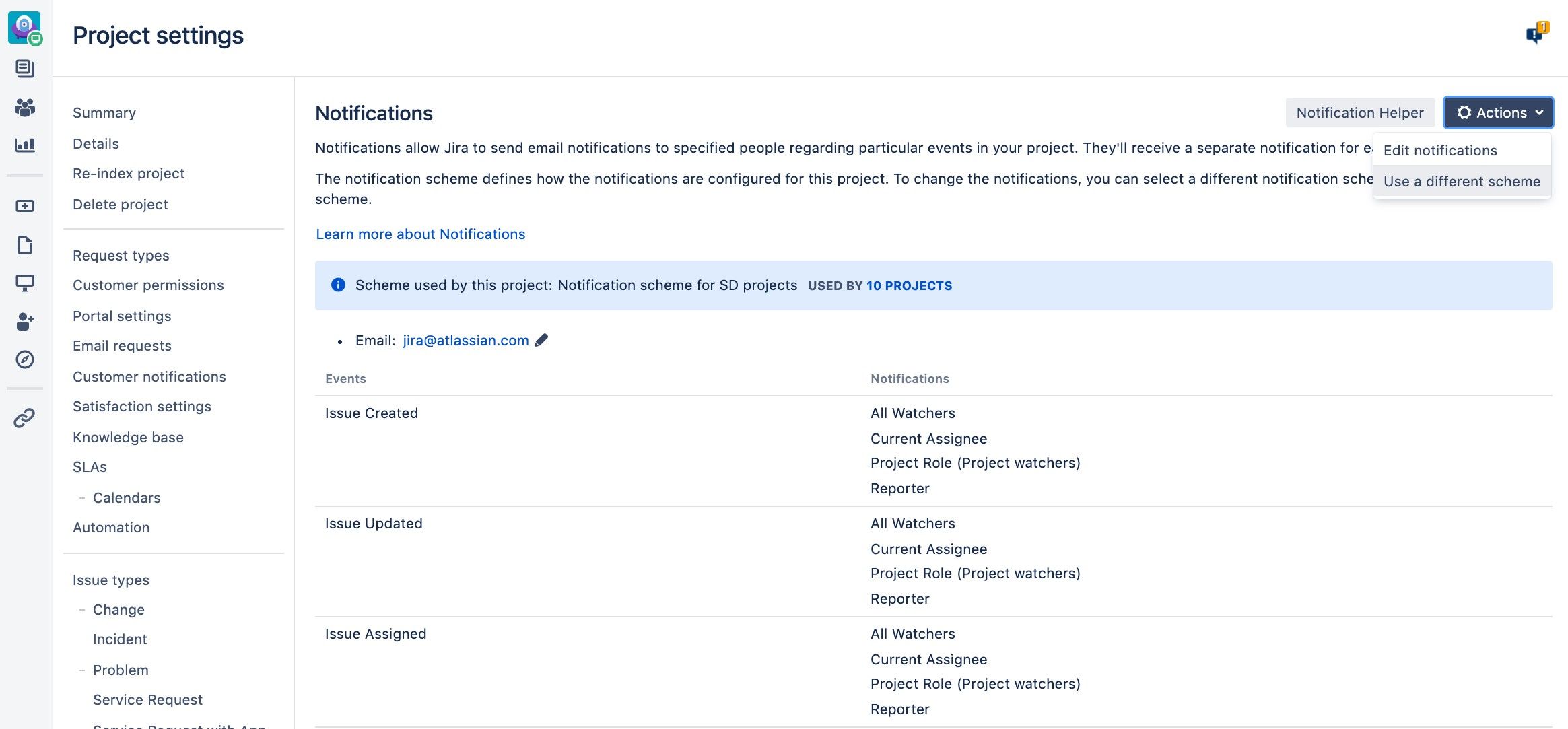
Select the new scheme and click Associate.
Repeat the association steps for every Service Management project that should use this notification configuration. The notification scheme must be associated with each project individually.
Resulting changes in notifications
Let’s have a look at how the notifications changed for different roles.
Event | Role | Before | After |
|---|---|---|---|
Public issue event (e.g. public comment added, public transition) | Agent Watcher Agent Assignee (but not Participant, Approver, Organization Member or Reporter) | Jira notification | Jira notification |
Public issue event | Agent Participant Agent Approver Agent part of Customer Organization | Customer notification (if subscribed) | Customer notification (if subscribed) Jira notification (only if Watcher or Assignee) |
Public issue event | Agent Reporter | Customer notification | Customer notification Jira notification (only if Watcher or Assignee) |
Internal issue event (e.g. internal comment added, internal transition) | Agent Watcher Agent Assignee | Jira notification | Jira notification |
Internal issue event | Agent Participant Agent Approver Agent part of Customer organization | No notification | Jira notification (only if Watcher or Assignee) |
Internal issue event | Agent Reporter | No notification | No notification
(unless Watcher or Assignee) |
Duplicate notifications for agents who are watchers or assignees
Agents receive duplicate notifications for the same public action only when all three conditions apply:
The agent is a watcher or assignee of the ticket.
The agent is subscribed to customer notifications.
The event is public, such as a public comment.
Customers and agents can unsubscribe from notifications using the link available on the Customer Portal and in the customer notifications they receive. This does not apply to Reporters, who always receive customer notifications regardless of subscription status.
What if I add customers as watchers or assignees?
Jira Service Management permission settings will prevent you from doing that (unless you’ve changed them), so no sensitive data will be sent to your customers through notifications.
Was this helpful?