Automatically close Jira work item when all other linked work is closed
Platform Notice: Cloud Only - This article only applies to Atlassian apps on the cloud platform.
Summary
Jira automation can help reduce tedious work to mitigate risk and improve efficiencies in your projects.
Let's say we have a work item, ITSM-100, with linked work items ITSM-101 and ITSM-102. We want ITSM-100 to close automatically only when both ITSM-101 and ITSM-102 are closed.
Solution
Step 1: Set up the Automation rule with a trigger
Navigate to your project, select Project Settings > Automation > Create rule
Select the Issue transitioned trigger and set the destination status that matches your workflow
In our example, we choose the Resolved status
This trigger ensures that the rule activates whenever a linked work item transitions to the "Resolved" status.
The following steps will evaluate if all linked issues are Resolved.
Step 2: Create a branch rule for linked issues
In the automation rule editor, select Branch rule / related work items and choose Linked work items
Specify the link types if required .
If you don't specify a link type, the flow checks every linked work item. To let only certain links decide when the main work item closes, select those link types here. Then add the same link type to the Step 3 query, for example:
issue IN linkedIssues("{{issue.key}}", "relates to") and status != ResolvedLink type names are case-sensitive and depend on direction (for example, blocks and is blocked by). Enter them exactly as they appear on your site.
This step will allow actions to be performed on the main work item (e.g., ITSM-100) that is linked to the work items transitioning to Resolved (e.g., ITSM-101 or ITSM-102)
Step 3: Use a Lookup work items action
Add a Lookup work items action using the following JQL query:
issue IN linkedIssues("{{issue.key}}") and status != Resolved

Note: Replace Resolved in this query with the status you selected in Step 1. For example, if your workflow closes work items to Done, use:
issue IN linkedIssues("{{issue.key}}") and status != Done
If the status name has spaces, put it in quotes, for example status != "Won't Do". If your workflow has more than one closed status, use statusCategory != Done instead.
Step 4: Add a Conditional check
Check the results from the 'Lookup work items' action:
Use a condition to verify if
{{lookupIssues.size}}equals 0.
If all linked work items are resolved, the JQL query will not return any results, making {{lookupIssues.size}} equal to 0. This condition allows the rule to proceed to the next step to close the main work item.
Step 5: Transition the main work item
Transition the main work item (e.g., ITSM-100) to "Resolved":
This action is executed only if the condition from Step 4 is met (i.e., all linked work items are resolved)
Please refer to the below screenshot for an example of our automation rule thus far.
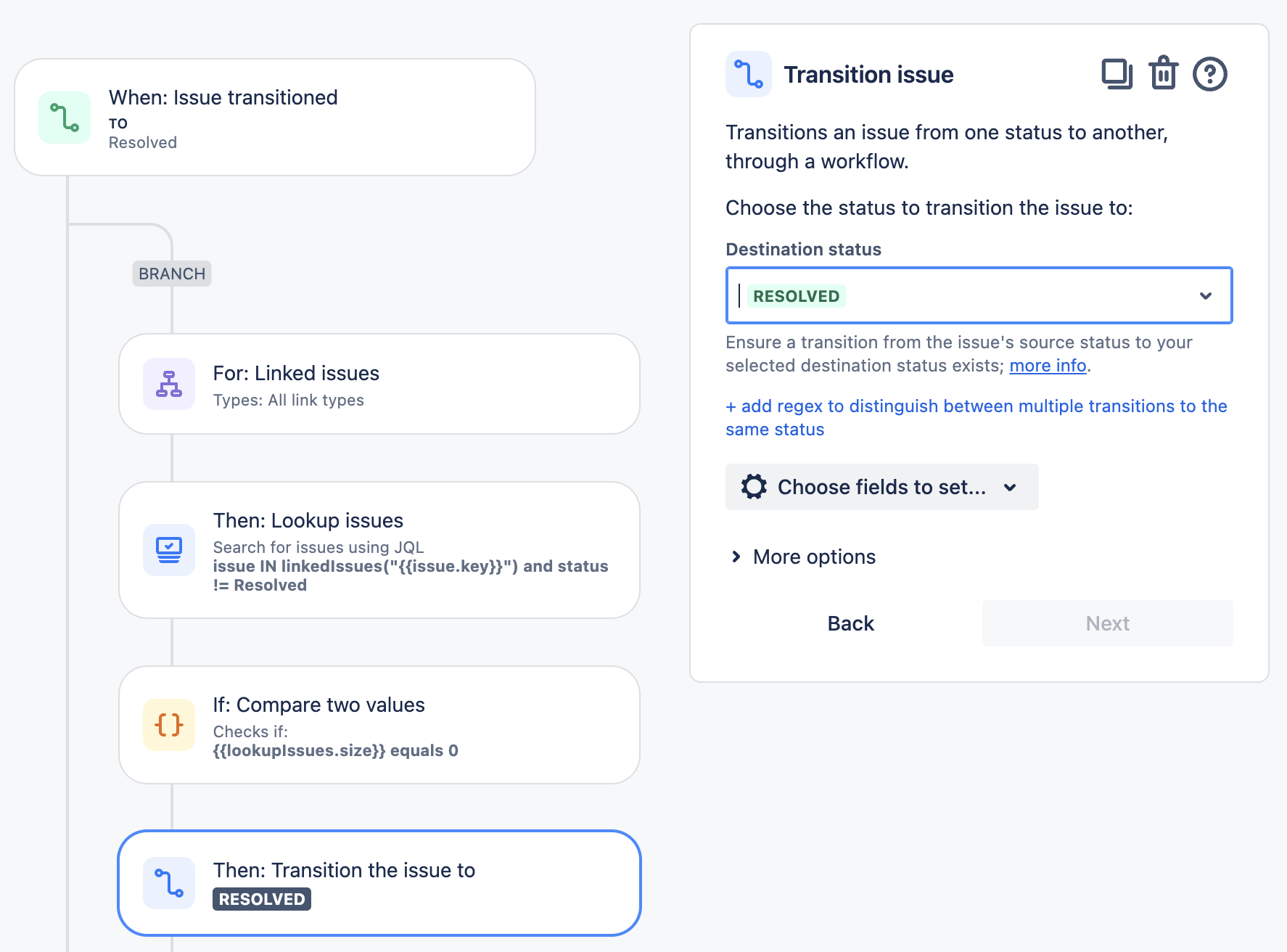
If the JQL query does return any unresolved work, {{lookupIssues.size}} will not be 0, and the condition will fail. This stops the transition of the main work item to "Resolved."
Additional Options
Add more conditions or actions: You can include additional checks, such as verifying the Request type or setting the Resolution field, to tailor the rule to your specific requirements.
By following these steps, you can automate the process of closing a primary issue when all its linked issues are resolved, improving efficiency and ensuring consistency in your issue management process.
Was this helpful?