Health Check: OpenSearch Cluster
Platform Notice: Data Center Only - This article only applies to Atlassian apps on the Data Center platform.
Note that this KB was created for the Data Center version of the product. Data Center KBs for non-Data-Center-specific features may also work for Server versions of the product, however they have not been tested. Support for Server* products ended on February 15th 2024. If you are running a Server product, you can visit the Atlassian Server end of support announcement to review your migration options.
*Except Fisheye and Crucible
Summary
The OpenSearch cluster health check monitors the health status of an OpenSearch cluster in Jira Data Center environments. When OpenSearch is configured, this health check runs and helps identify cluster issues that could impact Jira's search functionality.
Solution
Understand the health check results
icon | status | Result | What this means |
✅ | GOOD | The OpenSearch cluster "[cluster-name]" is healthy. All primary shards and their replicas are allocated to nodes. | All shards are properly allocated and the cluster is operating optimally |
⚠️ | WARNING | The OpenSearch cluster " [cluster-name]" is experiencing degraded performance. Currently, X primary shards are allocated. Y of Z total shards active, and N shards remain unassigned. | All primary shards are allocated, but some replica shards are missing. This may indicate that while the search functionality works, the resilience is reduced. |
❗️ | CRITICAL | The OpenSearch cluster "[cluster-name]" is experiencing critical issues. Currently, X primary shards are allocated. Y of Z total shards are active, and N shards remain unassigned. At least one primary shard isn't allocated to any node. | One or more primary shards are not allocated, causing data loss. This may indicate that the search functionality is severely impacted or partially unavailable. |
❗️ | CRITICAL | The health check was unable to complete within the timeout of 60000ms. Unable to check the OpenSearch cluster health. Make sure the cluster is connected and try again. An unexpected error occurred while checking the OpenSearch cluster health. | Jira can’t get an OpenSearch health check response. This may indicate an issue with connecting to the OpenSearch cluster. |
Diagnose cluster health issues
When the OpenSearch cluster health check reports WARNING or CRITICAL status, use these diagnostic commands to understand the root cause
Check OpenSearch connectivity If Jira is unable to provide the health check status, there might be an issue with connecting to the OpenSearch cluster. Review the
<jira-home>/log/atlassian-jira.logfor errors and ensure that the OpenSearch properties in<jira-home>/jira-config.propertiesare correctly configured.Check shard status OpenSearch provides the Cat Shards API, which is useful for understanding the current state of each shard in an OpenSearch cluster. The following command can be run to identify which shards are affecting the OpenSearch cluster health:
GET /_cat/shards?v&h=index,shard,prirep,state,unassigned.reasonExample Output:
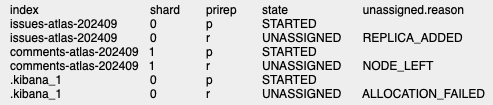
Key Columns
index: Name of the affected index
shard: Name of the shard
prirep: Shard type(primary or replica)
state:
INITIALIZING: The shard is recovering from a peer shard or gateway
RELOCATING: The shard is relocating
STARTED: The shard has started
UNASSIGNED: The shard is not assigned to any node
unassigned.reason: Reason shard is unassigned
List of unassigned reasons
INDEX_CREATED: Unassigned as a result of an API creation of an index
CLUSTER_RECOVERED: Unassigned as a result of a full cluster recovery
INDEX_REOPENED: Unassigned as a result of opening a closed index
DANGLING_INDEX_IMPORTED: Unassigned as a result of importing a dangling index
NEW_INDEX_RESTORED: Unassigned as a result of restoring into a new index
EXISTING_INDEX_RESTORED: Unassigned as a result of restoring into a closed index
REPLICA_ADDED: Unassigned as a result of explicit addition of a replica
ALLOCATION_FAILED: Unassigned as a result of a failed allocation of the shard
NODE_LEFT: Unassigned as a result of the node hosting it leaving the cluster
REROUTE_CANCELLED: Unassigned as a result of explicit cancel reroute command
REINITIALIZED: When a shard moves from started back to initializing
REALLOCATED_REPLICA: A better replica location is identified and causes the existing replica allocation to be cancelled
PRIMARY_FAILED: Unassigned as a result of a failed primary while the replica was initializing
FORCED_EMPTY_PRIMARY: Unassigned after forcing an empty primary
MANUAL_ALLOCATION: Forced manually to allocate
INDEX_CLOSED: Unassigned as a result of closing an index
Get detailed allocation explanation Unassigned shards can be further investigated using the Cluster Allocation Explain API, which provides a detailed explanation of why they cannot be allocated to a node.
GET /_cluster/allocation/explain

{
  "index": "issues-atlas-202409",
  "shard": 0,
  "primary": false
}
Example Output:
{
    "index": "issues-atlas-202409",
    "shard": 0,
    "primary": false,
    "current_state": "unassigned",
    "unassigned_info": {
        "reason": "NODE_LEFT",
        "at": "2025-09-17T07:57:39.402Z",
        "details": "node_left [TK848AjkRpyej-eQvJ7wsw]",
        "last_allocation_status": "no_valid_shard_copy"
    },
    "can_allocate": "no_valid_shard_copy",
    "allocate_explanation": "cannot allocate because a previous copy of the primary shard existed but can no longer be found on the nodes in the cluster",
    "node_allocation_decisions": [
        {
            "node_id": "8j9QlgKySnWO0cRfW0ZSnw",
            "node_name": "opensearch-node2",
            "transport_address": "172.18.0.4:9300",
            "node_attributes": {
                "shard_indexing_pressure_enabled": "true"
            },
            "node_decision": "no",
            "store": {
                "found": false
            }
        }
    ]
}
Common shards allocation issues and solutions
Disk space issues
An OpenSearch cluster may prevent the allocation of shards when disk usage exceeds the configured watermarks.
Solution 1
Archiving Jira projects that are not actively used can help reduce OpenSearch disk usage.
Solution 2
Only use this solution after confirming that no Jira Full Reindexing is in progress.
Delete unused indexes generated by a failed full reindexing.
Go to OpenSearch Dashboards > Index Management > Indexes.
In the search box, type
issues-.For each index, select the name to view details:
Select
Aliasto see if it has the aliasissues. If it does not, you can safely delete the index.
For more information about OpenSearch disk usage and configuration, refer to the OpenSearch Cluster settings documentation.
Insufficient nodes for shards
When there are not enough data nodes to accommodate the shards, they may not be allocated to the OpenSearch cluster. Refer to our OpenSearch Hardware recommendations in Jira Data Center to understand the required number of data nodes and consider scaling up accordingly.
Other shards allocation issues
For more information about OpenSearch cluster health and shards allocation issues, refer to the OpenSearch Cluster Health API documentation.
Was this helpful?