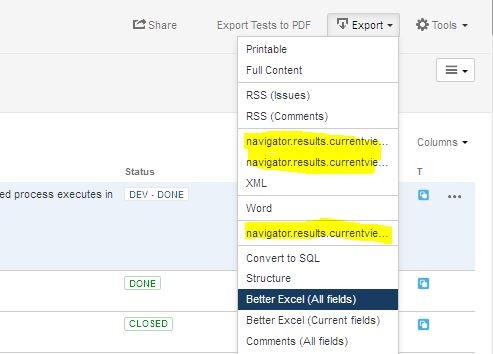
Export menu of issue navigator displays navigator.results.currentview.*
Platform Notice: Data Center Only - This article only applies to Atlassian apps on the Data Center platform.
Note that this KB was created for the Data Center version of the product. Data Center KBs for non-Data-Center-specific features may also work for Server versions of the product, however they have not been tested. Support for Server* products ended on February 15th 2024. If you are running a Server product, you can visit the Atlassian Server end of support announcement to review your migration options.
*Except Fisheye and Crucible
Summary
Problem
When using the Export feature from the issue navigator, some menu items are not displayed correctly.
In the export menu, navigator.results.currentview.* is displayed instead of the name of the export option (e.g. CSV (All fields) ), see example below :
Diagnosis
Diagnostic Steps
Verify if the
JiraWebActionSupport.propertiesfile in$JIRA_install/atlassian-jira/WEB-INF/classes/com/atlassian/jira/web/actionhas been modified.
Cause
Each name of the export option (menu item) is associated with a unique key and stored in JiraWebActionSupport.properties file under $JIRA_install/atlassian-jira/WEB-INF/classes/com/atlassian/jira/web/action.
For example,
navigator.results.currentview.excel.csv.current = CSV (Current fields)
navigator.results.currentview.excel.csv.all = CSV (All fields)
It's a standard key-value pair file, if an entry is missing then the key will be displayed on the UI.
Solution
Resolution
Revert the modification made to the JiraWebActionSupport.properties file by adding the missing key-value pair back.
Was this helpful?