Error "Failed to send request to the knowledge base server."
Platform Notice: Data Center Only - This article only applies to Atlassian apps on the Data Center platform.
Note that this KB was created for the Data Center version of the product. Data Center KBs for non-Data-Center-specific features may also work for Server versions of the product, however they have not been tested. Support for Server* products ended on February 15th 2024. If you are running a Server product, you can visit the Atlassian Server end of support announcement to review your migration options.
*Except Fisheye and Crucible
Summary
Problem
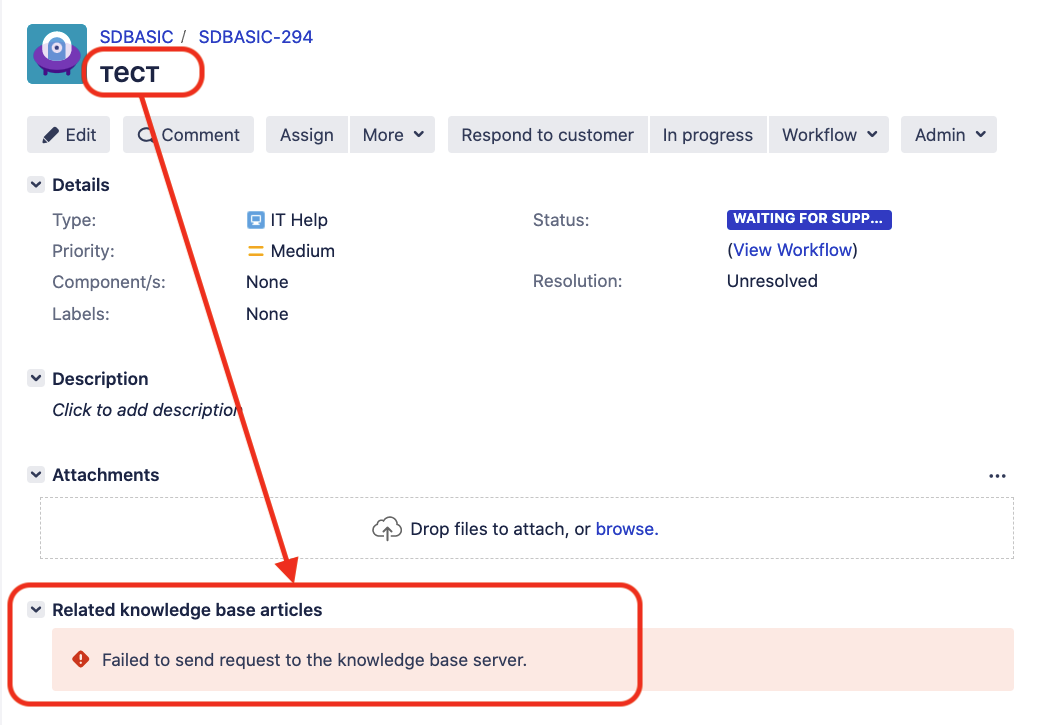
When accessing a Jira Service Management ticket in Agent View (Jira Issue View) an error "Failed to send request to the knowledge base server." is showing:
The following appears in the atlassian-confluence.log
2017-11-23 18:33:39,000 WARN [http-nio-9443-exec-3] [oauth.serviceprovider.internal.AuthenticatorImpl] logOAuthProblem Problem encountered authenticating OAuth client for url "https://<Conf Base URL>/rest/knowledge-base/1.0/search/DES", error was "signature_invalid", with parameters "{oauth_problem=signature_invalid, oauth_signature=dJ3ISkCwaZAYVTbznFMTN7y5hOjQhYo4FacKXbXx/GjstunywjozphS28lg+mib8K07nUZ03ltHz/sRskmLYBDRdJb2uNeZ174vgCm4QTYTpw/3HzL/y/2Zb7GZodSXYhjouS2438=, oauth_signature_base_string=GET&https%3A%2F%2F<Conf Base URL>%3A<port>%2Frest%2Fknowledge-base%2F1.0%2Fsearch%2FDES&highlight%3Dfalse%26oauth_consumer_key%3Djira%22c-7061-4a85-a813-be2cc9b66748%26oauth_nonce%3D2311910188949047%26oauth_signature_method%3DRSA-SHA1%26oauth_timestamp%3D1511458418%26oauth_token%3D%26oauth_version%3D1.0%26permissionCheckedUser%3Dmagda%2540jira.something.com%26queryString%3Dwyr%25C3%2583%25C2%25B3wnanie%2520zasi%25C3%2585%25C2%2582ku%2520macierzy%25C3%2585%25C2%2584skiego%2520z%2520bud%25C3%2585%25C2%25BCetu%2520pa%25C3%2585%25C2%2584stwa%26type%3Dpage%26xoauth_requestor_id%3Dadmin, oauth_signature_method=RSA-SHA1}"
 -- url: /rest/knowledge-base/1.0/search/DES | traceId: 94fcb14e434
Diagnosis
Jira and Confluence Application Link is using SSL/HTTPS
The ERROR appears in Jira Tickets that have special characters in its Summary
Check if Jira and Confluence has the following parameter set in the respective instance
server.xml
useBodyEncodingForURI="true"Cause
The cause of the issue is the mentioned parameter above where it needs to be "false"
Solution
Resolution
As mentioned before, we would need to set the value to "false" in order to solve the issue. The steps are:
Find the and edit the instance
server.xmlhas the parameter set.Jira Installation Directory > conf > server.xml
Confluence Installation Directory > conf > server.xml
Find the parameter:
useBodyEncodingForURI="true"Change the value to
"false"useBodyEncodingForURI="false"Save the file and restart the instance to take effect.
Related Article
Was this helpful?