Jira Cloud automation triggers are significantly delayed
Platform Notice: Cloud Only - This article only applies to Atlassian apps on the cloud platform.
Summary
On some occasions, automation will take an hour or more to execute a trigger. This results in any rule actions firing on a huge delay, potentially causing inaccurate or unwanted actions to fire on work matching the automation conditional blocks. This may also appear as if the rule was triggered without any apparent reason.
Diagnosis
Some Jira instances have large lists of automations that run multiple times within short periods of time. In normal circumstances, automation can keep up with a large number of automation executions in parallel without having a performance impact. However, there may be certain scenarios where multiple automations are running with thousands of parallel processes. This can result in degraded performance due to the high load. Automation uses a rule processing queue to manage the execution of rules in your instance. To maintain performance, rule executions are queued, and the number of items processed in parallel is limited.
Cause
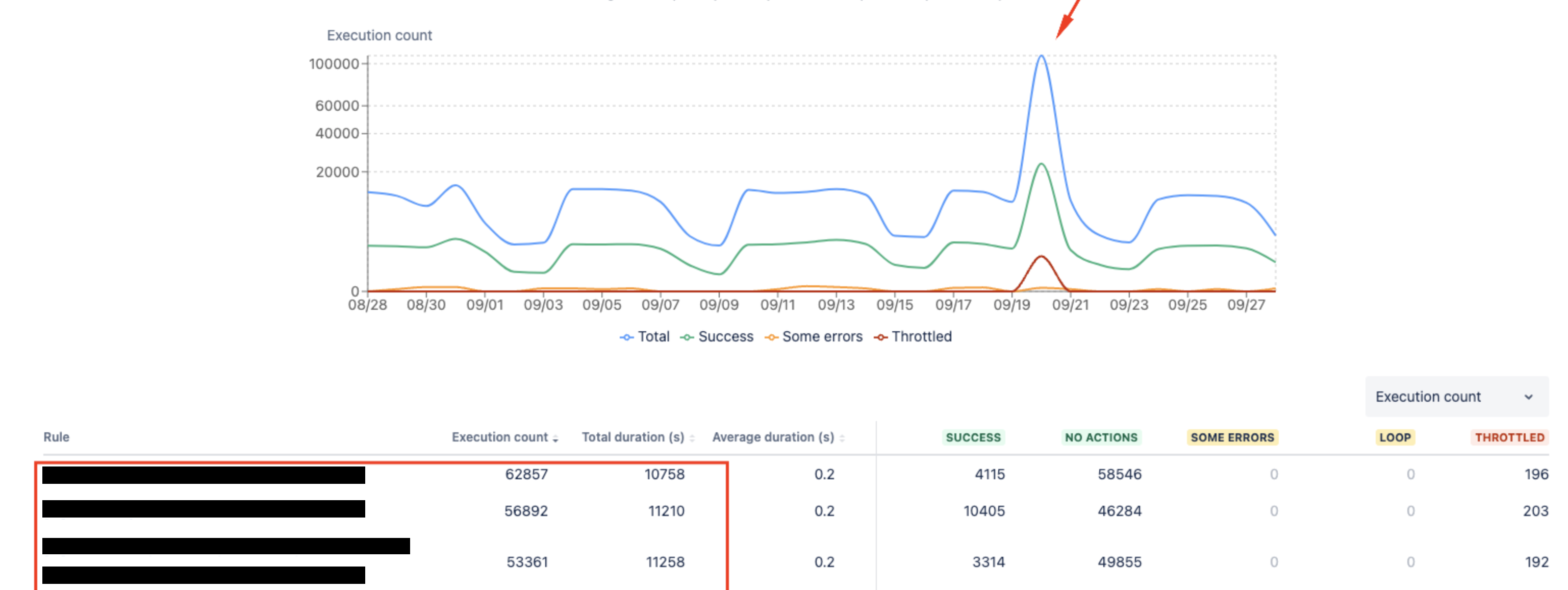
A large spike of automation executions can be seen under the Global automation performance insights page:
https://<instanceName>.atlassian.net/jira/settings/automation#/performance-insights
Large automation spikes can be caused by:
Enabling a rule that runs on many work items (scheduled rules are the most common).
Restoring an archived project with many work items + rules triggering against them.
Rules with looped "send web request" actions.
Bulk imports (especially with create/update-triggered rules).
The spike will be shown in the performance-insights graph. Try filtering by the day the delay was seen, and you'll see the spike in activity along with the rules executed during that timeframe. Here's an example graph:
Solution
Open Global automation performance insights at https://<instanceName>.atlassian.net/jira/settings/automation#/performance-insights and filter to the day the delay occurred. A spike in the graph (with the rules that ran) confirms the queue was saturated — that's the cause of the delay.
Optimize Jira automation rules for performance
This behavior is considered very uncommon and should be attributed to isolated cases where a large volume of rules is executed in parallel, resulting in delays for certain issues that automation is addressing.
If you regularly experience behavior like this, consider auditing your automation rules and optimizing them for performance.
If you need to perform bulk updates through automation, consider running them outside of peak Jira usage hours. This will lessen any impact on real users if usage spikes do occur.
Next steps
After optimizing rules and moving bulk updates outside peak hours, re-check performance insights on the next run to confirm the spike (and delay) is gone.
If delays recur or don't match this pattern, contact Atlassian Support.
Additional documentation
Was this helpful?