Automatically add Slack channel information to custom fields in Jira when using JSM Chat
Platform Notice: Cloud Only - This article only applies to Atlassian apps on the cloud platform.
It’s possible to store information related to Slack messages that generated issues using JSM Chat directly into your Jira issues.
To do so, you must create "Short text” type (Text Field single line) custom fields with the following names:
triageChannelLink
requesterChannelLink
ticketCreationMethod
originalMessageTime
slackCreationChannel
Please note that the custom field names must be filled exactly as displayed above.

When you create the fields, add them to the screens associated with the create and view operations of the work types associated with the Request Types you are using in Chat.
It’s not required to use all of them, you can pick only the ones that you want.
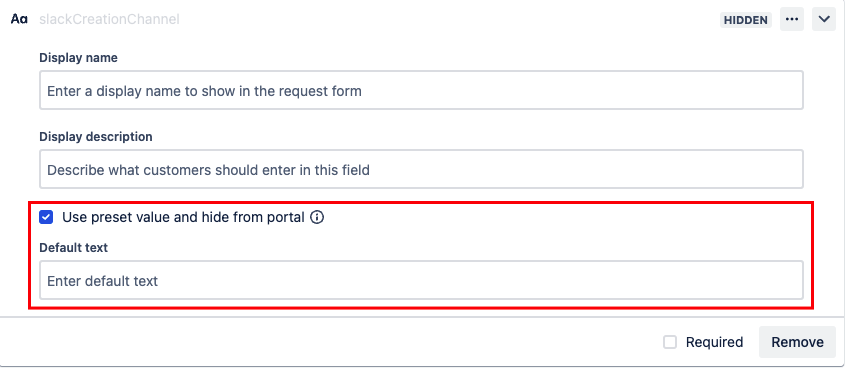
In case you would not like that this information is displayed for customers in the customer portal, you will need to set those fields as hidden in the request form and leave “Default text” as empty.
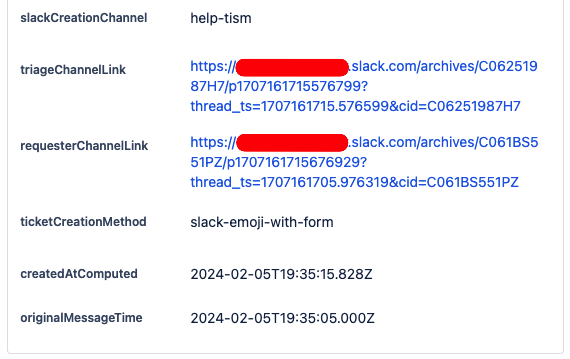
Below you can find how the information is populated on those fields whenever a new issue is created using JSM Chat in a Slack channel.
Was this helpful?