An exception occurred while rendering the web panel
Platform Notice: Data Center Only - This article only applies to Atlassian apps on the Data Center platform.
Note that this KB was created for the Data Center version of the product. Data Center KBs for non-Data-Center-specific features may also work for Server versions of the product, however they have not been tested. Support for Server* products ended on February 15th 2024. If you are running a Server product, you can visit the Atlassian Server end of support announcement to review your migration options.
*Except Fisheye and Crucible
Symptoms
An exception occurred while rendering the web panel:
com.atlassian.jira.jira-view-issue-plugin:attachmentmodule (null)
java.lang.IllegalArgumentException: invalid extra field length
at java.util.zip.ZipEntry.setExtra(ZipEntry.java:243)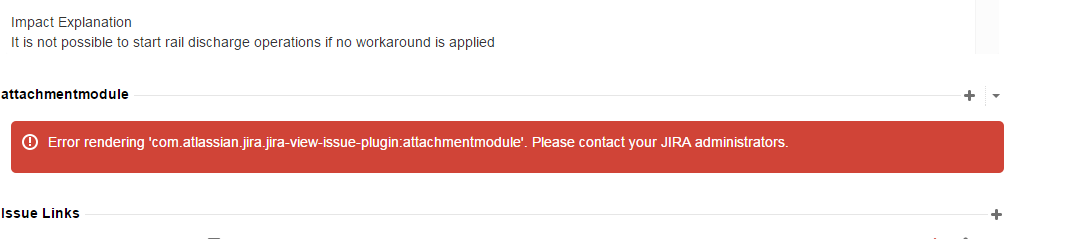
Environment
Jira Data Center
Cause
From the logs, we found this following stack trace error :
2015-03-12 01:48:21,335 http-bio-8180-exec-6741 ERROR gannasr 108x4302739x1 ywyb22 134.37.74.122,10.47.102.245 /browse/ARGO-69595 [jira.web.component.ModuleWebComponentImpl] An exception occured while rendering the web panel: com.atlassian.jira.jira-view-issue-plugin:attachmentmodule (null)
java.lang.IllegalArgumentException: invalid extra field length
	at java.util.zip.ZipEntry.setExtra(ZipEntry.java:243)
Troubleshooting Steps
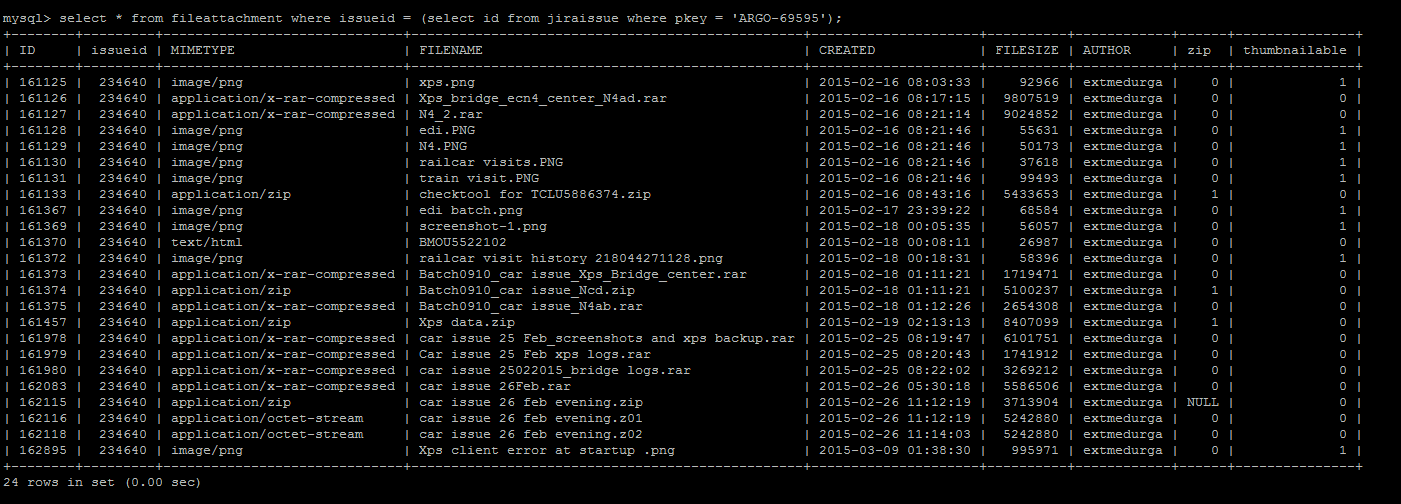
Ask the user to provide the following SQL result
select * from fileattachment where issueid = (select id from jiraissue where pkey = 'ARGO-69595');ℹ️ Replace "ARGO-69595" with the issue key which is stated in the error from the stack trace.
After looking at the sql result, we noticed that the fileattachment table contained NULL variable in ZIP column.

Resolution
Backup JIRA
Stop JIRA
Run the following SQL command on the database
update fileattachment set zip = '1' where ID in ('162115');or
update fileattachment set zip = '1' where ID in ('162,115');Start JIRA
Was this helpful?