Add more workflow transition buttons to Jira issue page
Platform Notice: Data Center Only - This article only applies to Atlassian apps on the Data Center platform.
Note that this KB was created for the Data Center version of the product. Data Center KBs for non-Data-Center-specific features may also work for Server versions of the product, however they have not been tested. Support for Server* products ended on February 15th 2024. If you are running a Server product, you can visit the Atlassian Server end of support announcement to review your migration options.
*Except Fisheye and Crucible
Summary
Moving transition buttons outside of the Issue status menu is only available in Jira 8.x. Starting with Jira 9.0, all buttons are only available from the menu and can't be displayed on the issue page. The following Feature Request ticket was created to allow setting the old interface back for workflow transitions: JRASERVER-74434
Solution
Problem
When viewing an issue page, most of the workflow transition buttons are contained within the Workflow dropdown menu. Some Jira admins may want to have more of the transition buttons visible on the issue page.
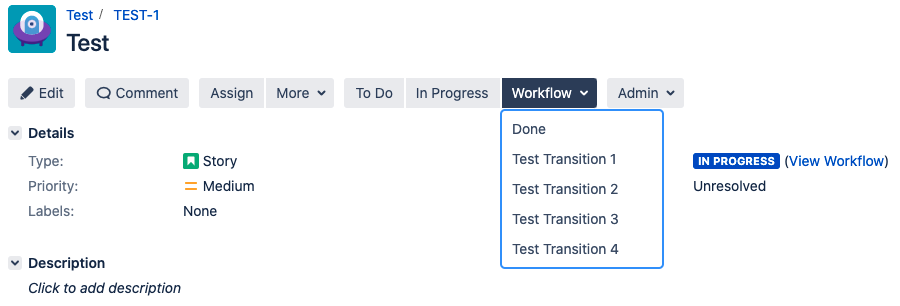
Resolution
💡 The ops.bar.group.size.opsbar-transitions property in the jira-config.properties file is responsible for defining how many workflow transition buttons are shown on the issue page.
⚠️ Keep in mind that this setting is universal across Jira and will require shutting down the instance. As always, we recommend testing changes in a lower environment before attempting them in production.
Shutdown Jira. Even on Jira Data Center, it is necessary to shutdown all nodes. A rolling restart of the nodes won't suffice.
Edit the jira-config.properties file in your JIRA application home directory.
ℹ️In new Jira installations, this file may not initially exist and if so, needs to be created manually)
ℹ️ See Making changes to the jira-config.properties file for more information.
Change the value of the ops.bar.group.size.opsbar-transitions property within this file to be the number of transition buttons required before the Workflow menu.
ℹ️ If this property does not appear in the jira-config.properties file, add it; otherwise a default value of 2 will be used. To hide and move the default buttons to the Workflow dropdown menu, set the value to 0.
For example, the following could be added to the file to allow for 5 transition buttons to be visible on the page before the Workflow dropdown.
ops.bar.group.size.opsbar-transitions = 5
Save the updated jira-config.properties file.
Restart JIRA.
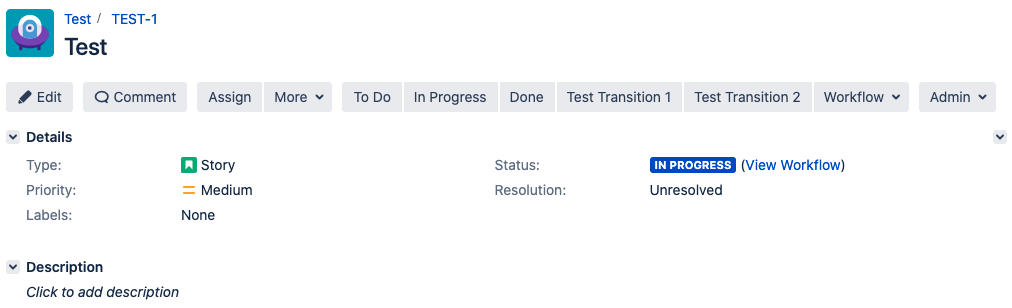
Your workflow transition buttons should now be visible on the page.
Was this helpful?