How to Reset App Access Settings Before a Product Transfer
Platform Notice: Cloud Only - This article only applies to Atlassian apps on the cloud platform.
Summary
When transferring products between Atlassian organizations, certain security and access configurations can act as blockers. One common requirement is to reset your app access settings (formerly known as User Access Settings).
This article guides you through the process of resetting these settings to clear blockers for a smooth organization transfer.
Solution
Before you begin
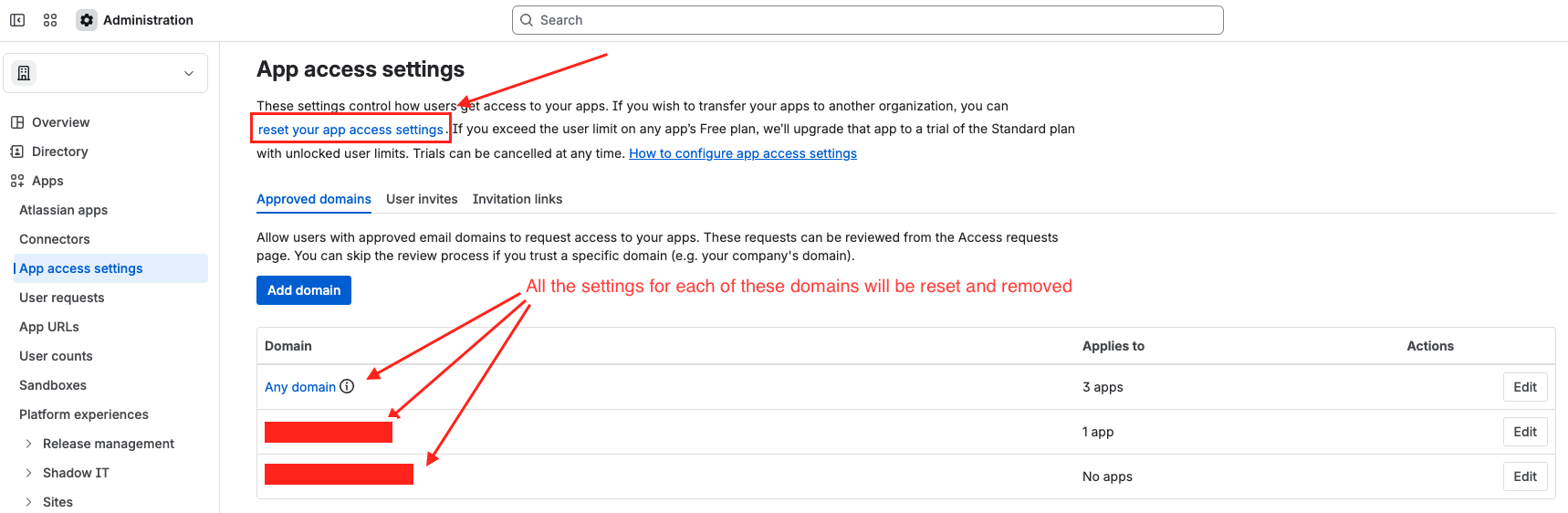
Capture your current setup: We strongly recommend taking a screenshot of your current Approved domains, User invites, and Invitation links. You will need to manually re-configure these settings in the destination organization after the transfer is complete.
Verify Domains: Ensure your domains are successfully verified in the target organization and that user email addresses are updated to align with the new organization’s domain.
Step-by-Step: Reset App Access Settings
Go to admin.atlassian.com.
Select your Organization from the list.
In the left-hand sidebar, select Apps.
Under the Apps menu, click on App access settings.
Locate the reset option:
Depending on your interface version, this will appear as a linked text within the descriptive paragraph or as an option under the More options (...) menu at the top right of the page.
Click on "Reset your app access settings."
A confirmation pop-up will appear. Review the impact and click Reset.
What happens next? This action will immediately clear all approved domains, user invite permissions, and active invitation links. Once the product transfer to the new organization is finished, you can navigate back to this page in the destination org to re-enable these settings.
Troubleshooting other blockers
If the "Transfer products" option remains unavailable after following these steps, please refer to our comprehensive guide on identifying other potential blockers:
Was this helpful?