Unlock a locked Jira Software Server or Data Center custom field
プラットフォームについて: Data Center のみ。 - This article only applies to Atlassian apps on the Data Center プラットフォーム。
この KB は Data Center バージョンの製品用に作成されています。Data Center 固有ではない機能の Data Center KB は、製品のサーバー バージョンでも動作する可能性はありますが、テストは行われていません。 Server* 製品のサポートは 2024 年 2 月 15 日に終了しました。Server 製品を実行している場合は、 アトラシアン Server サポート終了 のお知らせにアクセスして、移行オプションを確認してください。
*Fisheye および Crucible は除く
This KB article provides changes that are out of the scope of Atlassian Support and, therefore, is provided as-is. The steps are only meant to fix problems within Jira, and not necessarily to be used for any locked fields. Consult with Atlassian support before following the steps listed here. Altering locked system fields can introduce unintended side effects in Jira (such as the inability to pre-populate fields during Issue creation) if unexpected changes are made to default fields, such as adding Translation Text to fields that do not permit this by default.
症状
Jira Software のロックされたフィールドのロックを解除する必要がある場合があります。
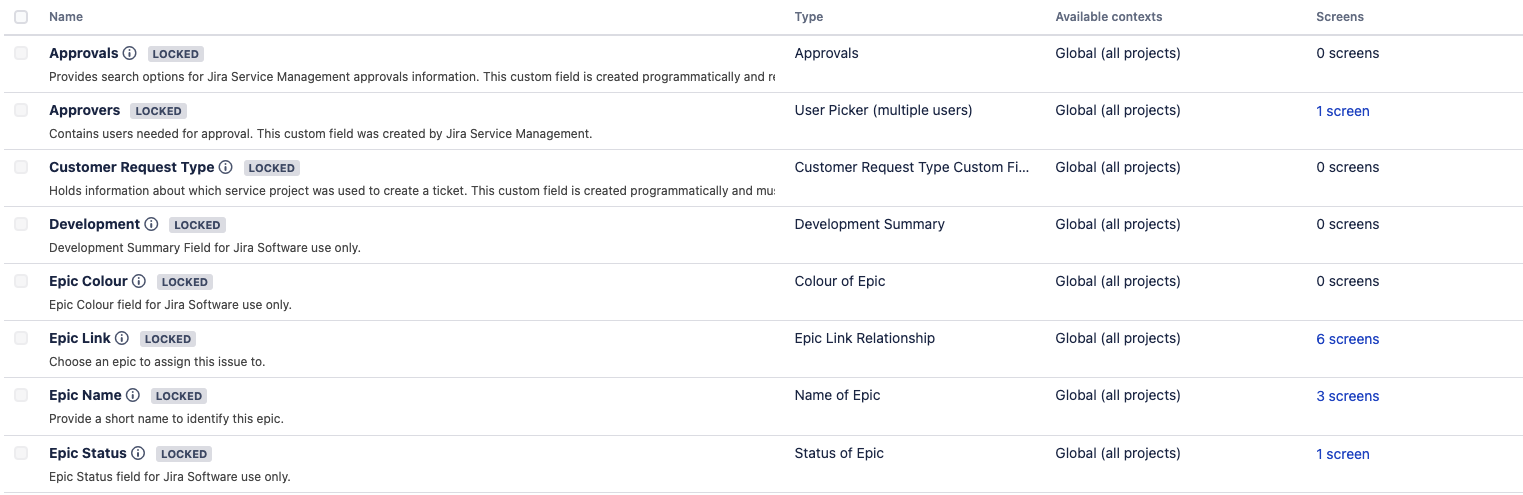
原因
These fields are locked to prevent accidental changes which can subsequently break the operation of JIRA ソフトウェア. Due to certain problems within JIRA ソフトウェア, sometimes the fields need to be manually unlocked so they can be altered.
ソリューション
If you have ScriptRunner installed, it is possible to unlock fields without a restart using the Groovy Scripts described in: Unlock a locked Jira custom field using ScriptRunner
Warning: Backup your database before proceeding.
Before running any SQL in this article, create a full backup of your Jira database. This is a database-level operation with no undo other than restoring from backup. Only proceed if you're comfortable running SQL directly against the Jira database, and test on a staging or cloned environment first, wherever possible.
データベースに対して次のクエリを実行し、Jira Software のカスタム フィールド ID を確認します。
SELECT id,customfieldtypekey,cfname from customfield where customfieldtypekey like 'com.pyxis.greenhopper.jira%';次のような結果が返されます。
id | customfieldtypekey | cfname -------+--------------------------------------------------------------------+------------------------- 10204 | com.pyxis.greenhopper.jira:gh-global-rank | Rank 10205 | com.pyxis.greenhopper.jira:gh-sprint | Sprint 10206 | com.pyxis.greenhopper.jira:gh-epic-link | Epic Link 10207 | com.pyxis.greenhopper.jira:gh-epic-label | Epic Name 10208 | com.pyxis.greenhopper.jira:gh-epic-status | Epic Status 10209 | com.pyxis.greenhopper.jira:gh-epic-color | Epic Colour 10211 | com.pyxis.greenhopper.jira:greenhopper-releasedmultiversionhistory | Release Version Historymanagedconfigurationitemテーブルの item_id コラムの該当するエントリを参照し、ロックを解除したいフィールドの id を一致させる必要があります。SELECT * from managedconfigurationitem;id | item_id | item_type | managed | access_level | source | description_key -------+-------------------+--------------+---------+--------------+----------------------------------------------------+---------------------------- 10000 | customfield_10204 | CUSTOM_FIELD | true | LOCKED | com.pyxis.greenhopper.jira:reference-select-locked | gh.customfield.locked.desc 10001 | customfield_10205 | CUSTOM_FIELD | true | LOCKED | com.pyxis.greenhopper.jira:reference-select-locked | gh.customfield.locked.desc 10002 | customfield_10206 | CUSTOM_FIELD | true | LOCKED | com.pyxis.greenhopper.jira:reference-select-locked | gh.customfield.locked.desc 10003 | customfield_10207 | CUSTOM_FIELD | true | LOCKED | com.pyxis.greenhopper.jira:reference-select-locked | gh.customfield.locked.desc 10004 | customfield_10208 | CUSTOM_FIELD | true | LOCKED | com.pyxis.greenhopper.jira:reference-select-locked | gh.customfield.locked.desc 10005 | customfield_10209 | CUSTOM_FIELD | true | LOCKED | com.pyxis.greenhopper.jira:reference-select-locked | gh.customfield.locked.descロックを解除したいすべてのフィールドの managed 列を
falseに設定する必要があります。たとえば、次の例は Epic Status と Epic Colour をアンロックします。UPDATE managedconfigurationitem set managed='false' where item_id in ('customfield_10208','customfield_10209');注: 上述の変更のあと、"access_level" 列は "LOCKED" 値のままになりますが、カスタム フィールドは UI でロック解除されます。
Oracle データベースを使用している場合、変更をコミットするのを忘れないようにします。
フィールドに必要な変更を加えます。
managed 列を true に設定して、ロックを解除したフィールドをロックします。たとえば、次の例は Epic Status と Epic Colour をロックします。
UPDATE managedconfigurationitem set managed='true' where item_id in ('customfield_10208','customfield_10209');Oracle データベースを使用している場合、変更をコミットするのを忘れないようにします。
これらのフィールドは起動時に、プラグイン内の自動タスクによって再びロックされます。
この内容はお役に立ちましたか?