Unable to archive components
プラットフォームについて: Data Center のみ。 - This article only applies to Atlassian apps on the Data Center プラットフォーム。
この KB は Data Center バージョンの製品用に作成されています。Data Center 固有ではない機能の Data Center KB は、製品のサーバー バージョンでも動作する可能性はありますが、テストは行われていません。 Server* 製品のサポートは 2024 年 2 月 15 日に終了しました。Server 製品を実行している場合は、 アトラシアン Server サポート終了 のお知らせにアクセスして、移行オプションを確認してください。
*Fisheye および Crucible は除く
問題
Sometimes you're unable to archive components. This problem happens because the Component Lead doesn't exist or is unreachable. Normally, when we delete a user in Jira, the bond between the user and the component leadership is unmade. However, if the user was deleted directly from the database (or is unreachable due to other reasons), several checks (including the unmaking of the component bond) aren't done.
診断
When you try to archive a component, you get a red exclamation mark followed by a retry button (like below):

ソリューション
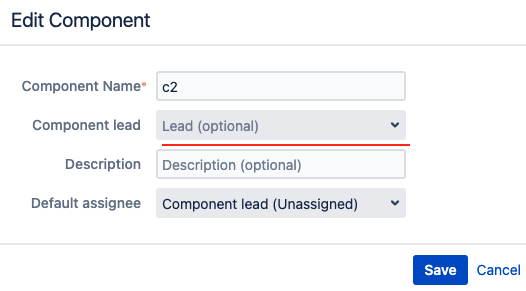
Edit the component (Actions > three dots > Edit) and change (or remove) the component lead, after this, you should be able to archive the component.

この内容はお役に立ちましたか?