Sort Fix/Affected Versions into a correct order in the Issue Screen
プラットフォームについて: Data Center のみ。 - This article only applies to Atlassian apps on the Data Center プラットフォーム。
この KB は Data Center バージョンの製品用に作成されています。Data Center 固有ではない機能の Data Center KB は、製品のサーバー バージョンでも動作する可能性はありますが、テストは行われていません。 Server* 製品のサポートは 2024 年 2 月 15 日に終了しました。Server 製品を実行している場合は、 アトラシアン Server サポート終了 のお知らせにアクセスして、移行オプションを確認してください。
*Fisheye および Crucible は除く
症状
The Fix/Affected Versions is not sorted accordingly as it can be seen in this screenshot:

原因
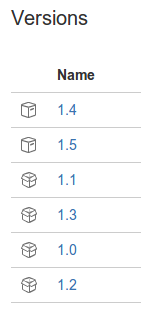
In the Project Overview - Versions page, the version is not sorted as well:
ソリューション
(For JIRA 5.x and above) Rearrange the versions accordingly by drag and drop it into the correct order:
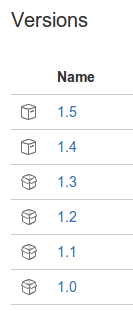
Fix/Affected Version should be sorted accordingly:

更新日時: September 25, 2025
この内容はお役に立ちましたか?
さらにヘルプが必要ですか?
アトラシアン コミュニティをご利用ください。