Putty X11 Error Starting JIRA
プラットフォームについて: Data Center のみ。 - This article only applies to Atlassian apps on the Data Center プラットフォーム。
この KB は Data Center バージョンの製品用に作成されています。Data Center 固有ではない機能の Data Center KB は、製品のサーバー バージョンでも動作する可能性はありますが、テストは行われていません。 Server* 製品のサポートは 2024 年 2 月 15 日に終了しました。Server 製品を実行している場合は、 アトラシアン Server サポート終了 のお知らせにアクセスして、移行オプションを確認してください。
*Fisheye および Crucible は除く
症状
atlassian-jira.log に次のエラーが返される。
Xlib: connection to "localhost:10.0" refused by server
Xlib: PuTTY X11 proxy: wrong authentication protocol attempted
2012-09-23 20:37:42,167 main ERROR      [atlassian.event.internal.EventPublisherImpl] There was an exception thrown trying to dispatch event 'com.atlassian.plugin.event.events.PluginFrameworkStartingEvent@3bb6a350' from the invoker 'com.atlassian.event.internal.SingleParameterMethodListenerInvoker@4e64f6fe'.
java.lang.RuntimeException: Can't connect to X11 window server using 'localhost:10.0' as the value of the DISPLAY variable.
原因
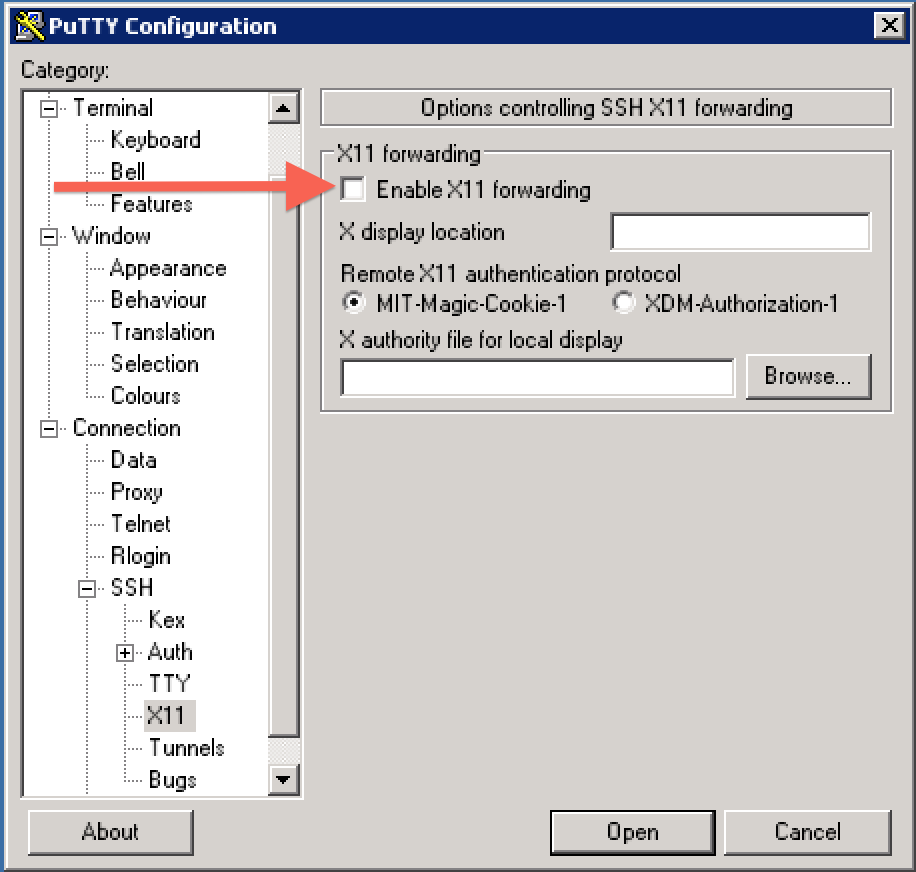
This seems to be a authenication issue when using the X11 forwarding option in Putty's settings and switching users before starting JIRA.
回避策
Current workaround is to disable X11 forwarding in Putty.
関連コンテンツ
更新日時: September 25, 2025
この内容はお役に立ちましたか?
さらにヘルプが必要ですか?
アトラシアン コミュニティをご利用ください。