Missing option to Create Branch in Bitbucket server from Jira ticket
プラットフォームについて: Cloud と Data Center - この記事は クラウド プラットフォームとデータセンター プラットフォームの両方に等しく当てはまります。
Server* 製品のサポートは 2024 年 2 月 15 日に終了しました。Server 製品を実行している場合は、 アトラシアン Server サポート終了 のお知らせにアクセスして、移行オプションを確認してください。
*Fisheye および Crucible は除く
要約
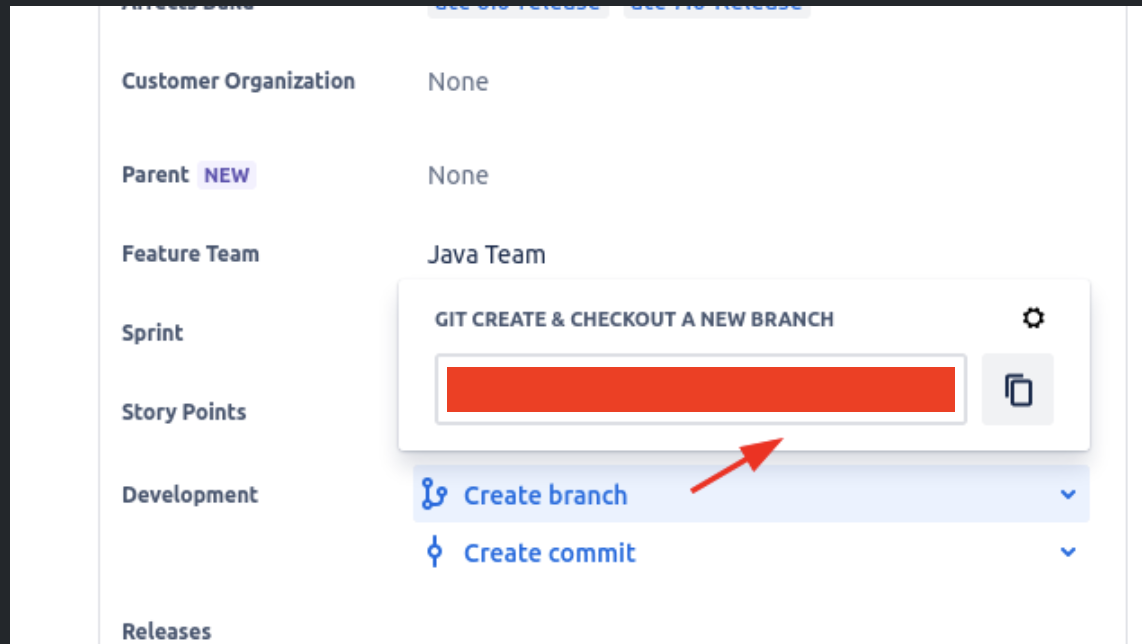
When clicking on '+' icon, no option shows up to create branch in connected dev tool i.e Bitbucket Server. Only Git command shows in the field:
環境
Jira Cloud
Bitbucket Server
診断
The dev information on the ticket might also be missing, hitting issue with connection
Navigate to project settings > Development Tools, verify if any warning sign showing up there.
原因
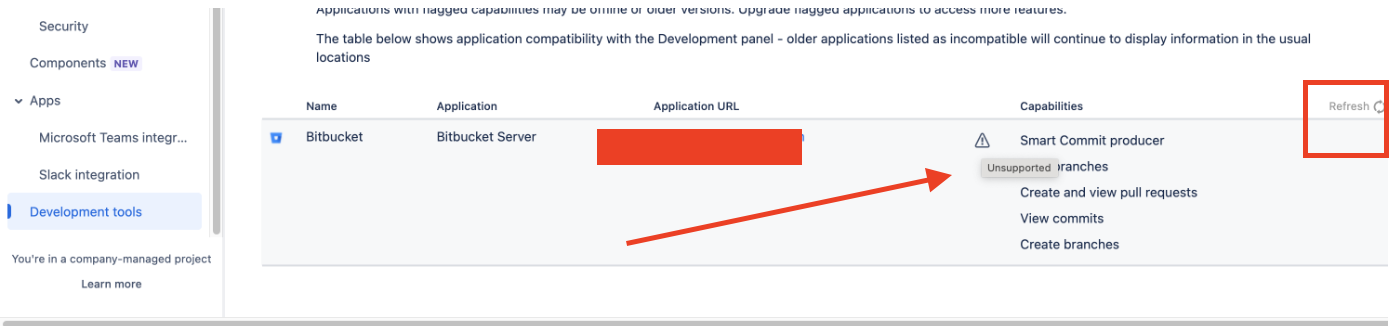
The connection was not working properly. In development tools node, we could see a warning sign and "unsupported" message.
ソリューション
Hit "Refresh" option, available in development tools node (as shown in above screenshot in top right corner). Wait for some time and slowly missing data will start showing up on tickets along with option to create branch in Bitbucket server.
この内容はお役に立ちましたか?