Mantis Attachments are corrupted upon Importing to JIRA
プラットフォームについて: Data Center のみ。 - This article only applies to Atlassian apps on the Data Center プラットフォーム。
この KB は Data Center バージョンの製品用に作成されています。Data Center 固有ではない機能の Data Center KB は、製品のサーバー バージョンでも動作する可能性はありますが、テストは行われていません。 Server* 製品のサポートは 2024 年 2 月 15 日に終了しました。Server 製品を実行している場合は、 アトラシアン Server サポート終了 のお知らせにアクセスして、移行オプションを確認してください。
*Fisheye および Crucible は除く
要約
症状
Using the JIRA Importer Plugin to import Mantis projects to JIRA, the attachment are corrupted. By corrupted, all the attachment files are converted into a Mantis login page and this can be verified by opening the attachment on a notepad (even though the attachment is a non txt file, such as jpg, pdf, and etc).
診断
The problem generally occurs when the Mantis and its database are located on a different server than JIRA.
原因
JIRA cannot authenticate to Mantis to retrieve its attachment.
ソリューション
ソリューション
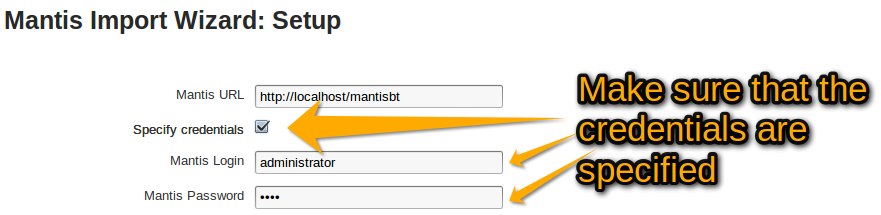
In order for the Mantis attachment to be imported properly, you will need to re-import Mantis again and specify the Mantis Credentials by clicking on the check-box for Mantis authentication.
この内容はお役に立ちましたか?