Manage dark features in Jira Data Center
プラットフォームについて: Data Center のみ。 - This article only applies to Atlassian apps on the Data Center プラットフォーム。
この KB は Data Center バージョンの製品用に作成されています。Data Center 固有ではない機能の Data Center KB は、製品のサーバー バージョンでも動作する可能性はありますが、テストは行われていません。 Server* 製品のサポートは 2024 年 2 月 15 日に終了しました。Server 製品を実行している場合は、 アトラシアン Server サポート終了 のお知らせにアクセスして、移行オプションを確認してください。
*Fisheye および Crucible は除く
要約
Some of the features in Jira are not enabled by default and it is implemented as a dark feature (also known as feature flags).
Only enable dark features when instructed by Atlassian Support. Dark features are internal feature flags that can change without notice between Jira versions and may cause data corruption, performance issues, or unexpected behaviour if misused. Never enable a dark feature in production based solely on community advice — confirm with Atlassian Support first, and test in a non-production instance.
ソリューション
ダーク機能を管理するには、Jira 管理者のアカウントとして次の URL にアクセスします。
<BASE_URL>/secure/admin/SiteDarkFeatures!default.jspa
ダーク機能の有効化
In order to enable a feature flag, type <feature_flag_name>.enabled in the Enable dark feature text area and click the Add button.
Make sure to not have double ".enabled" suffix at the end of feature flag name.
Dark Features related to migration (e.g all the dark features of format com.atlassian.jira.migration.*) may not support above notation. DON't add ".enabled" or ".disabled" suffix for these migration related Dark features.
Please work with your Migrations Support team for the correct directions in implementing such dark features.
ダーク機能の無効化
To disable a feature flag:
Click disable link next to the specific feature flag in the left section (as on a screenshot below)
または
Type <feature_flag_name>.disabled feature flag in the Enable dark feature text area and click the Add button.
Make sure to not have the combination of suffixes ".enabled.disabled" at the end of the feature flag name.
管理ページに存在しないダーク機能がある場合、そのダーク機能は既定値を持ち、それが個々のダーク機能に応じて有効化または無効化されている可能性があります。
ダーク機能の管理画面の例
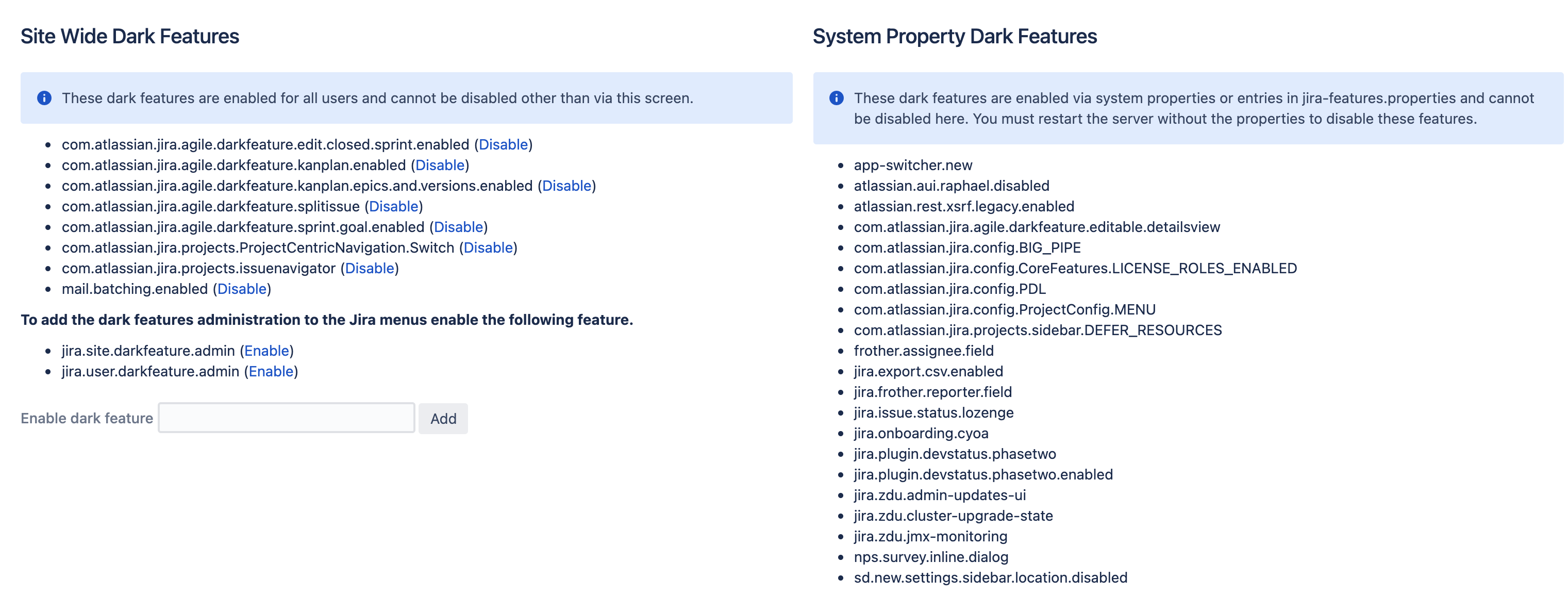
Verifying that a dark feature took effect
Return to
/secure/admin/SiteDarkFeatures!default.jspaand confirm the flag appears in the correct section.Check
atlassian-jira.logfor errors immediately after toggle.Test the specific behavior the dark feature controls in a low-risk action.
For DC clusters, confirm propagation to all nodes by checking each node's admin page.
REST API を利用したダーク機能の管理
It is possible to manage dark features in Jira using the following private endpoint: /rest/internal/1.0/darkFeatures/{key}
これは、アトラシアンが製品内で利用する非公開の API です。この API は予告なしで変更される可能性があります。
手順説明
Perform a PUT method on the endpoint above with the following JSON body (true or false depending if you want to add or remove the feature flag):
{ "enabled": "true" }
Where {key} is the dark feature key. Example:
<BASE_URL>/rest/internal/1.0/darkFeatures/sd.sla.improved.rendering.enabled
cURL シンタックスの例です。
curl -u user:password -X PUT <BASE_URL>/rest/internal/1.0/darkFeatures/{key} -H 'Content-Type: application/json' -d '{ "enabled": "true" }'
構成の保持について
Jira stores the current configured dark features in the database table feature.
Dark Features will persist service restarts and node replacements on a Jira Data Center environment.
追加情報
Dark Features in Jira is different from Dark Theme/Mode (change visualization on a browser window). If you're looking for Dark Theme/Mode for Jira Data Center or Cloud, please check out the following:
For Jira Data Center: Feature request JRASERVER-63150 - A dark theme for Jira Server - dark background, contrasting text, etc available in Jira 10.3.0 and later, for further details, please refer to the release notes.
For Jira Cloud: The story of the dark theme.
この内容はお役に立ちましたか?