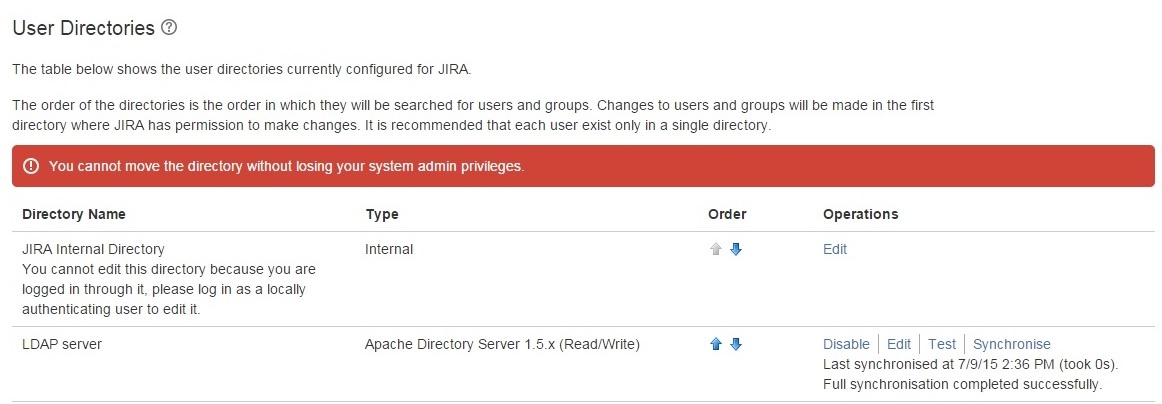
LDAP - Jira - You cannot move the directory without losing your system admin privileges.
プラットフォームについて: Cloud と Data Center - この記事は クラウド プラットフォームとデータセンター プラットフォームの両方に等しく当てはまります。
Server* 製品のサポートは 2024 年 2 月 15 日に終了しました。Server 製品を実行している場合は、 アトラシアン Server サポート終了 のお知らせにアクセスして、移行オプションを確認してください。
*Fisheye および Crucible は除く
問題
After setting up the external directory-LDAP, user is unable to re-order the Directories with below error:
環境
Jira Data Center
原因
Current user has it's own username both on internal and LDAP, but current user is an administrator on Jira internal directory, but it does not have administrator permission on LDAP.
Note that if the user name is only available on Jira internal directory and not available in LDAP there won't be any issue as it checks the first Order(LDAP) and can't find the user name so it checks the second order(Internal Directory) and matches the credentials.
ソリューション
One way to address this issue is to login as an admin user in the Jira Internal Directory to make this change. Otherwise, you can perform one of the following:
Create an Administrator group on LDAP and give this group Administrator permission on the Jira Global Permissions
または
If user belongs to a group on LDAP you can grant that group administrator permission on Jira
この内容はお役に立ちましたか?