Jira Service Management Fails to Start with a Timeout error after its Installation
プラットフォームについて: Data Center のみ。 - This article only applies to Atlassian apps on the Data Center プラットフォーム。
この KB は Data Center バージョンの製品用に作成されています。Data Center 固有ではない機能の Data Center KB は、製品のサーバー バージョンでも動作する可能性はありますが、テストは行われていません。 Server* 製品のサポートは 2024 年 2 月 15 日に終了しました。Server 製品を実行している場合は、 アトラシアン Server サポート終了 のお知らせにアクセスして、移行オプションを確認してください。
*Fisheye および Crucible は除く
症状
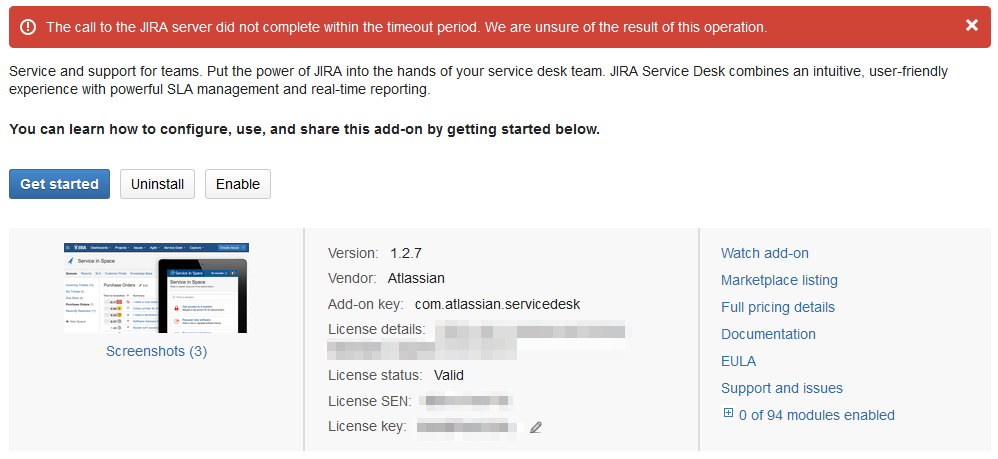
After installing Jira Service Management, it does not start with a timeout error:
atlassian-jira.log に次のエラーが返される。
2015-01-07 16:32:25,206 TP-Processor19 INFO jirauser 992x302039x1 1vz9bny 192.168.1.1 /rest/plugins/1.0/com.atlassian.servicedesk-key [atlassian.plugin.util.WaitUntil] Plugins that have yet to be enabled: [com.atlassian.servicedesk, com.atlassian.plugins.atlassian-client-resource, com.atlassian.jira.plugins.workinghours], 60 seconds remaining
2015-01-07 16:33:24,459 TP-Processor19 INFO jirauser 992x302039x1 1vz9bny 192.168.1.1 /rest/plugins/1.0/com.atlassian.servicedesk-key [atlassian.plugin.util.WaitUntil] Plugins that have yet to be enabled: [com.atlassian.servicedesk], 0 seconds remaining
2015-01-07 16:33:25,459 TP-Processor19 INFO jirauser 992x302039x1 1vz9bny 192.168.1.1 /rest/plugins/1.0/com.atlassian.servicedesk-key [atlassian.plugin.manager.DefaultPluginManager] Disabling com.atlassian.servicedesk
2015-01-07 16:33:27,497 TP-Processor19 ERROR jirauser 992x302039x1 1vz9bny 192.168.1.1 /rest/plugins/1.0/com.atlassian.servicedesk-key [atlassian.plugin.manager.PluginEnabler] Unable to start the following plugins due to timeout while waiting for plugin to enable: com.atlassian.servicedesk
2015-01-07 16:33:27,746 ThreadPoolAsyncTaskExecutor::Thread 61 ERROR jirauser 992x302039x1 1vz9bny 192.168.1.1 /rest/plugins/1.0/com.atlassian.servicedesk-key [internal.dependencies.startup.DependencyWaiterApplicationContextExecutor] Unable to create application context for [com.atlassian.servicedesk], unsatisfied dependencies: none
java.lang.IllegalStateException: Invalid BundleContext.
    at org.apache.felix.framework.BundleContextImpl.checkValidity(BundleContextImpl.java:365)
    at org.apache.felix.framework.BundleContextImpl.getServiceReferences(BundleContextImpl.java:307)
原因
Jira Service Management was not successfully installed or the downloaded file is corrupted.
ソリューション
Jira を停止します
Remove the jira-servicedesk-X.X.X.jar inside the $Jira-Home/plugins/installed-plugins directory;
Restart Jira;
Install Jira Service Management again through the Find New Add-ons page in the Jira Administration.
この内容はお役に立ちましたか?