JIRA default workflow changed
プラットフォームについて: Data Center のみ。 - This article only applies to Atlassian apps on the Data Center プラットフォーム。
この KB は Data Center バージョンの製品用に作成されています。Data Center 固有ではない機能の Data Center KB は、製品のサーバー バージョンでも動作する可能性はありますが、テストは行われていません。 Server* 製品のサポートは 2024 年 2 月 15 日に終了しました。Server 製品を実行している場合は、 アトラシアン Server サポート終了 のお知らせにアクセスして、移行オプションを確認してください。
*Fisheye および Crucible は除く
要約
問題
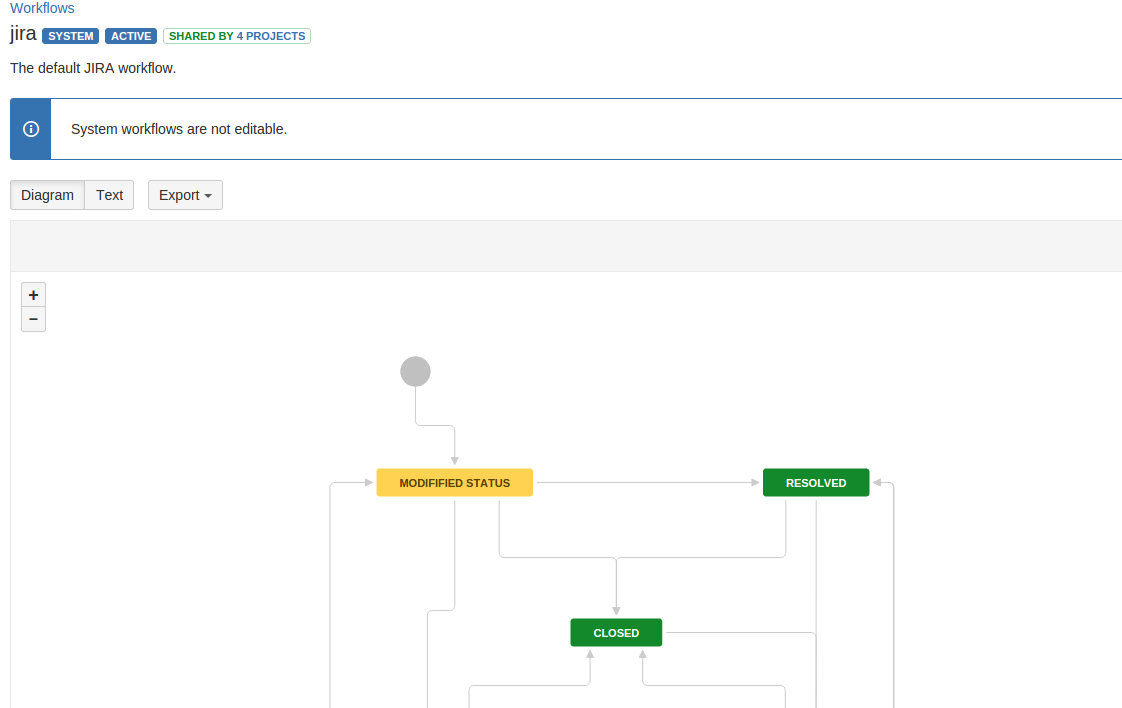
JIRA default system workflow seems to have some changes in the status, even though this workflow should not be editable. There is even a information box to indicate this.
診断
環境
Disable all plugin and the default system JIRA workflow still showing changes in the status.
原因
This is caused by changing the original status of JIRA at JIRA Administration > Issues > Status
JIRA comes with these 5 default statuses and modifying these statuses will reflect in the JIRA default workflow:
オープン
進行中
解決済
Closed
再オープン
From the example screenshot above, the Open status has been changed to 'Modified status' with 'In Progress' category at JIRA Administration > Issues > Status.
ソリューション
ソリューション
Change back the status to above standard status, and the default workflow will display the correct statuses. When configuring statuses, try to avoid changing the default statuses and create a new status instead.
この内容はお役に立ちましたか?