How to remove Source or Reviews tab
プラットフォームについて: Data Center のみ。 - This article only applies to Atlassian apps on the Data Center プラットフォーム。
この KB は Data Center バージョンの製品用に作成されています。Data Center 固有ではない機能の Data Center KB は、製品のサーバー バージョンでも動作する可能性はありますが、テストは行われていません。 Server* 製品のサポートは 2024 年 2 月 15 日に終了しました。Server 製品を実行している場合は、 アトラシアン Server サポート終了 のお知らせにアクセスして、移行オプションを確認してください。
*Fisheye および Crucible は除く
症状
In some specific situations, even though there's an active link between JIRA and Fisheye/Crucible customers don't want to see the Source or Reviews tab in the issue view screen. This knowledge base article is a guideline on how to remove those tabs individually from the issue view.
ソリューション
There are two possibly ways to remove Source or Reviews tab as follow:
Starting from JIRA version 6.x, you can remove Source or Reviews tab by navigating to the Fisheye Configuration Screen and at "Fisheye/Crucible entity mappings" click on the "Edit" button and select one of the options available as in the following screenshot:
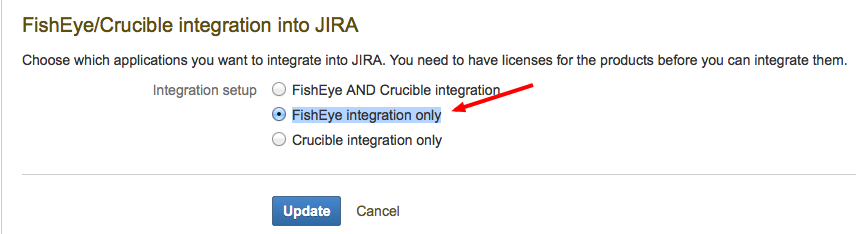
Another away to remove the Source or Reviews tab is by disabling the modules Crucible Issue Tab Panel or Fisheye Issue Tab Panel inside Fisheye plugin configuration as shown in the following screenshots:



この内容はお役に立ちましたか?