Bulk archive work items in Jira Cloud with Automation
プラットフォームの注記: Cloud のみ - This article only applies to Atlassian apps on the クラウド プラットフォーム上のアトラシアン製品にのみ適用されます。
要約
Archiving issues is only available for Premium and Enterprise customers.
In Jira Cloud, it's possible to archive single work items, but bulk archiving them is not available. Please refer to the feature request ticket: JRACLOUD-85101
Jira Automation allows us to work around this limitation and archive multiple Jira work items at once.
ソリューション
Automation execution limits
For Premium plans, there is a limit of 1000 automation executions per licensed user.
Before proceeding with this workaround, make sure the automation won't exceed the monthly execution limit. Please refer to How is my usage calculated for more details.
Bulk archive issues using Automation
It's possible to archive up to 1000 work items at a time by sending a PUT request to the Archive issue(s) by issue ID/key API endpoint. This requires a user token to authorize the request. However, if we want to use the Lookup work items automation action, we will be limited to 100 work items at a time.
Navigate to Global automation in Jira and create a new rule
Use a trigger that matches your requirements
The Manual or Scheduled triggers are likely the best choices
Use the Lookup work items action to fetch a list of work items via JQL
Please note: This action will only fetch 100 issues at a time
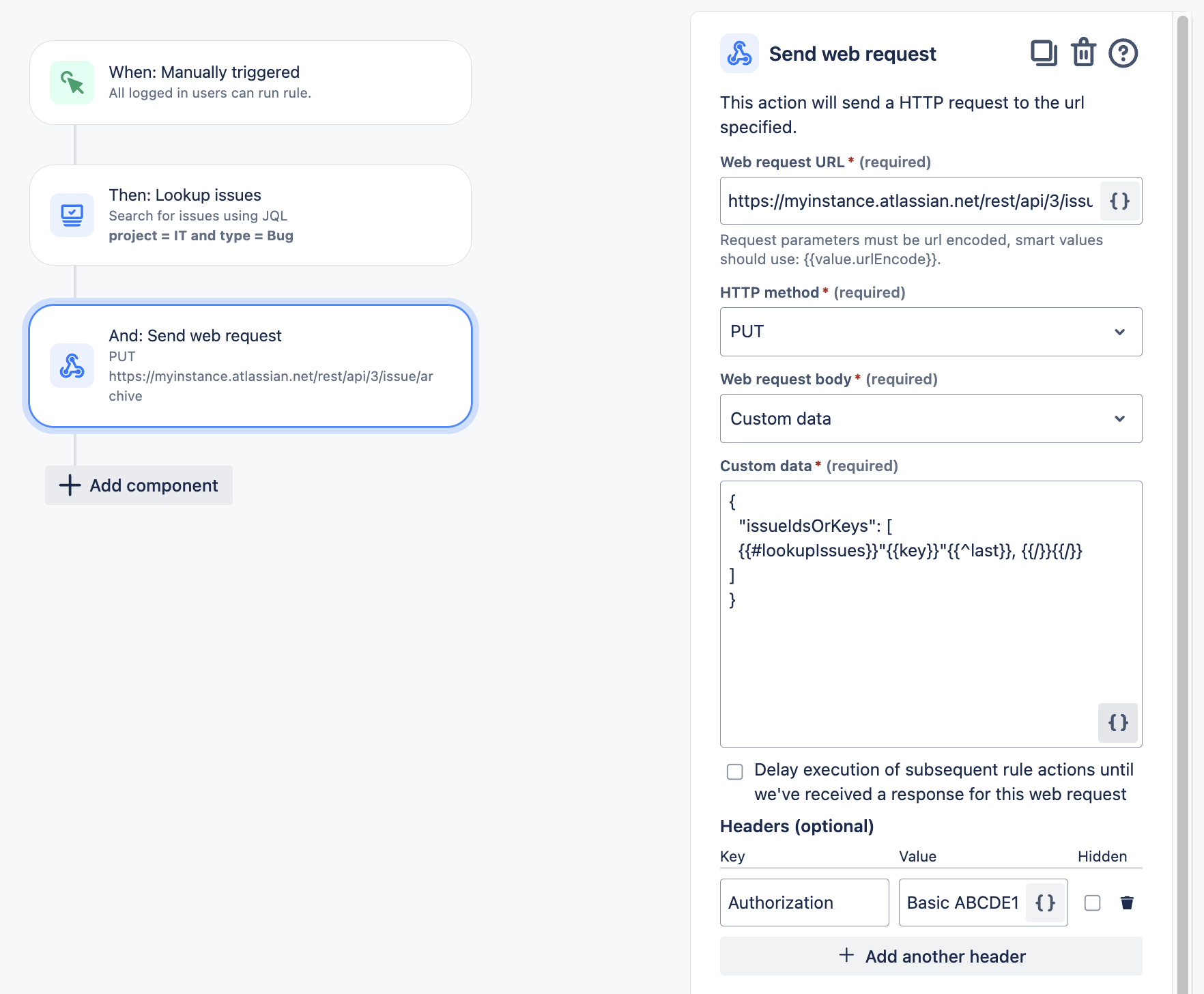
Add a Send web request action
Web リクエスト URL:
https://<YOUR-URL>.atlassian.net/rest/api/3/issue/archiveHTTP メソッド: PUT
Web リクエスト本文: カスタム データ
カスタム データ:
{
  "issueIdsOrKeys": [
  {{#lookupIssues}}"{{key}}"{{^last}}, {{/}}{{/}}
]
}
Ensure the work item keys are passed in double quotes and comma-separated in the JSON request body.
[Web リクエストを送信] アクションを承認するには、ユーザー トークンを Base64 でエンコードする必要があります。こちらで手順をご確認ください。
Please refer to the screenshot below for an example automation rule:
この内容はお役に立ちましたか?