Automation Rule to add additional approvers (A4J)
プラットフォームについて: Data Center のみ。 - This article only applies to Atlassian apps on the Data Center プラットフォーム。
この KB は Data Center バージョンの製品用に作成されています。Data Center 固有ではない機能の Data Center KB は、製品のサーバー バージョンでも動作する可能性はありますが、テストは行われていません。 Server* 製品のサポートは 2024 年 2 月 15 日に終了しました。Server 製品を実行している場合は、 アトラシアン Server サポート終了 のお知らせにアクセスして、移行オプションを確認してください。
*Fisheye および Crucible は除く
要約
The following automation rule will help to add users to the Approvers field without replacing the current values.
環境
Jira Software
Jira Service Management
Automation for Jira
診断
When creating a Rule with the Edit Issue action and selecting the Approvers field, if you define a user name in the Dropdown it will overwrite the values when the rule is executed.
ソリューション
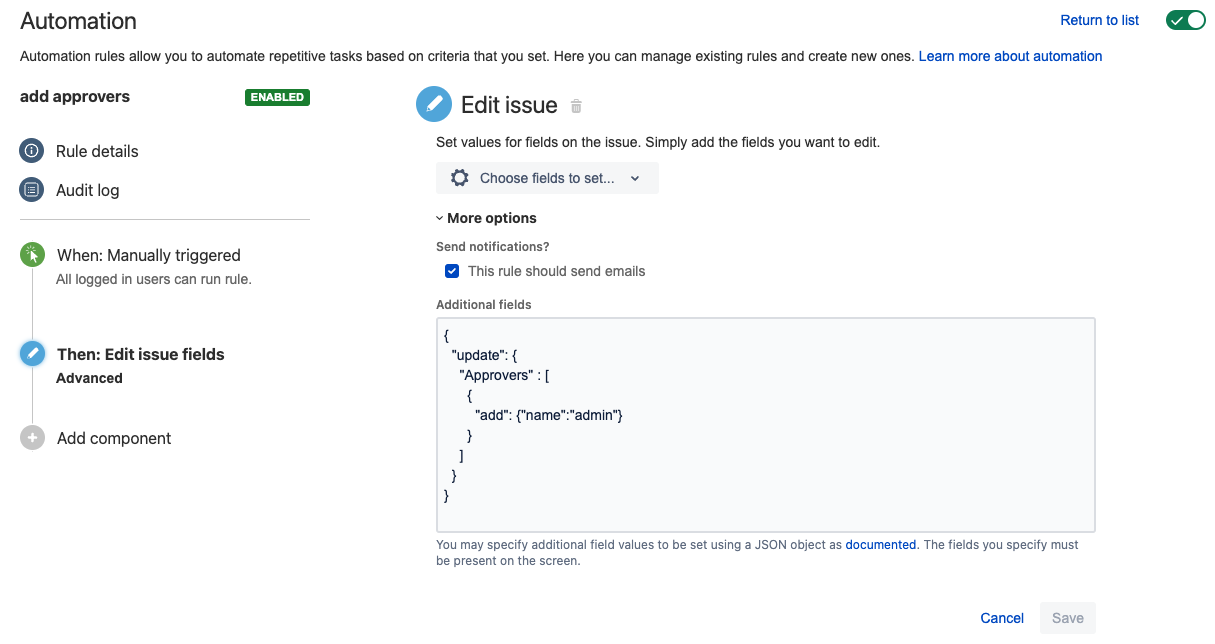
To add new users to the field we could expand the More Options available in the Edit Issue action and add a JSON to add users instead of replacing, based on the details contained in Advanced field editing using JSON.
On the Edit Issue action expand the More options and add the following JSON, replacing <username> with the actual user name:
{
  "update": {
    "Approvers" : [
      {
        "add": {"name":"<username>"}
      }
    ]
  }
}
この内容はお役に立ちましたか?