XML import for a space got stuck on "Applying special processing" phase
プラットフォームについて: Data Center のみ。 - This article only applies to Atlassian apps on the Data Center プラットフォーム。
この KB は Data Center バージョンの製品用に作成されています。Data Center 固有ではない機能の Data Center KB は、製品のサーバー バージョンでも動作する可能性はありますが、テストは行われていません。 Server* 製品のサポートは 2024 年 2 月 15 日に終了しました。Server 製品を実行している場合は、 アトラシアン Server サポート終了 のお知らせにアクセスして、移行オプションを確認してください。
*Fisheye および Crucible は除く
要約
During an XML space import, the UI could get stuck on the "Applying special processing" phase for a long time with a 100% completion ratio.
診断
The below screen could be visible on the import space page:
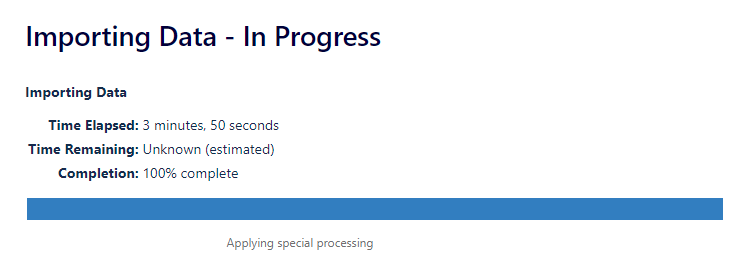
原因
After some time if the screen doesn't change the import could be completed but somehow doesn't change the import screen. It can be verified by opening a new window and checking the Confluence for the recently imported space. If it's imported successfully and there is no issue you may ignore the import screen. If errors or missing contents are noticed there might be some other problems please generate a Support Zip and raise a ticket to the support team for further investigation.
この内容はお役に立ちましたか?